——本文档创建于20191027,最后更新于20210410,基于EZDML x64 3.08版
本文混杂着JS和PAS脚本。PASCAL脚本不区分大小写,但在使用JavaScript时要注意大小写敏感:
PASCAL一般习惯首字母大写: CurOut.Add(‘当前表名:’+CurTable.Name);
JAVASCRIPT是首字母小写:curOut.add(“当前表名:”+curTable.name);
快速上手 EZDML同时支持Javascript和Pascal脚本(以下简称JS和PAS),你可以根据需要选择一种。
JAVASCRIPT脚本 接下来举例说如何用JS实现一些目的,不讲解javascript的基础知识。
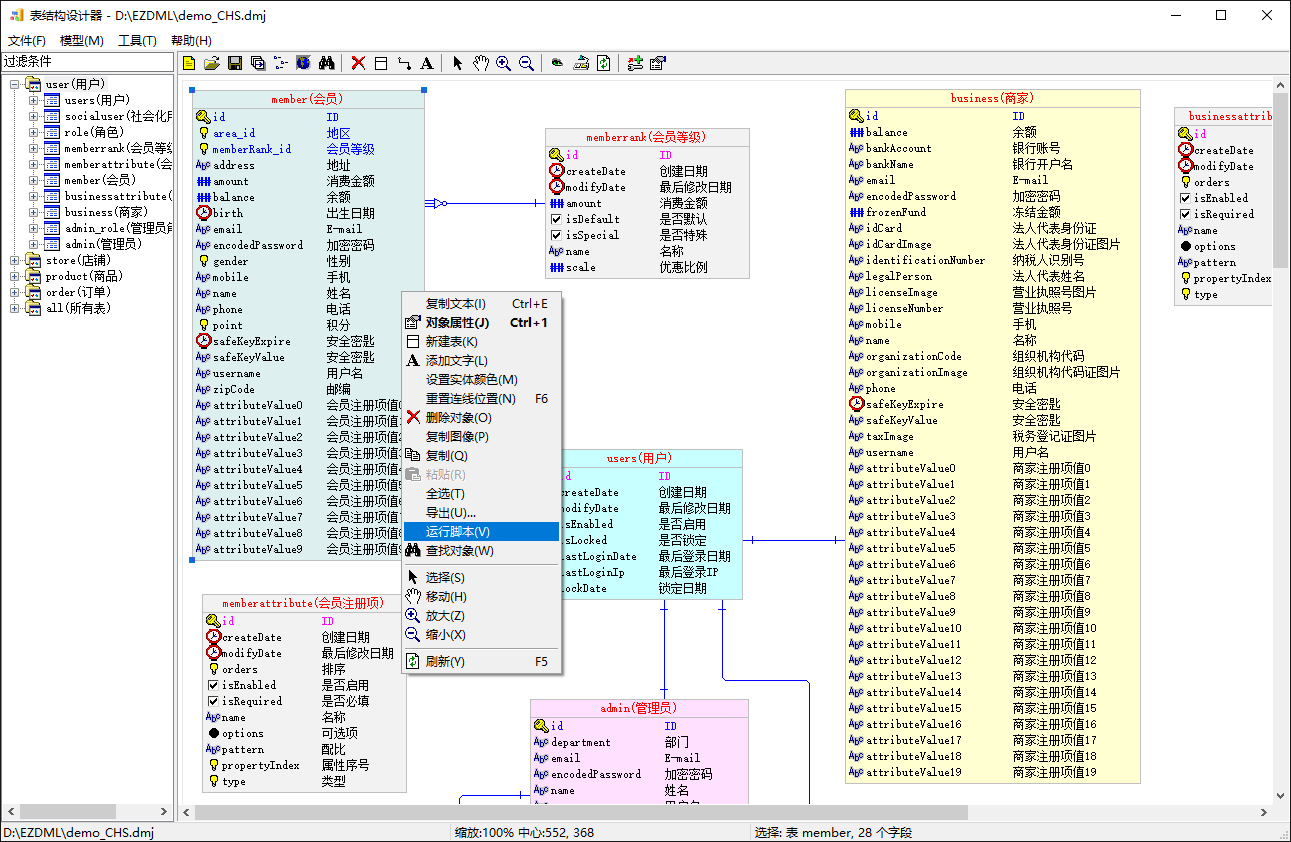
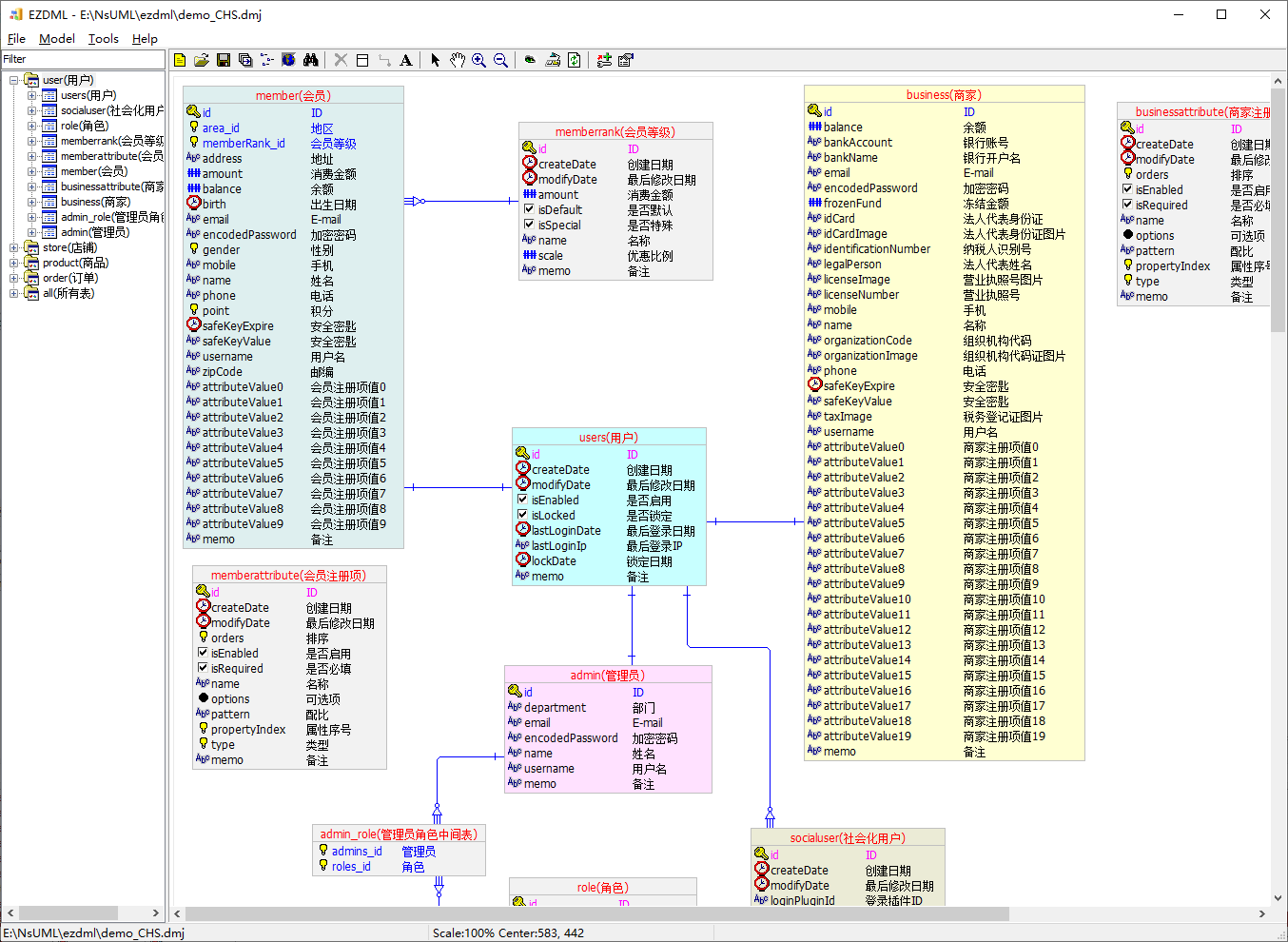
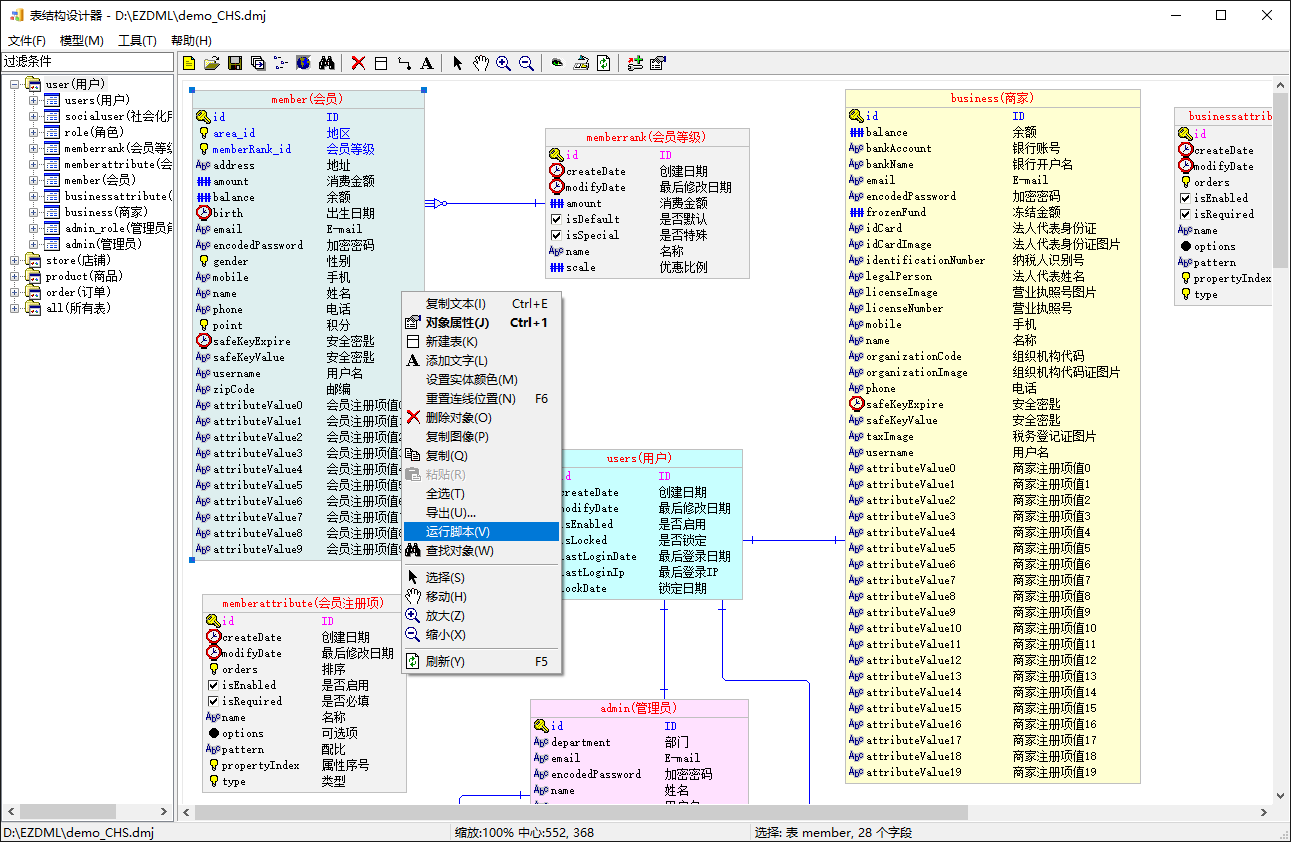
打开示例文件,选中会员表,右键弹出菜单,选择“运行脚本”:
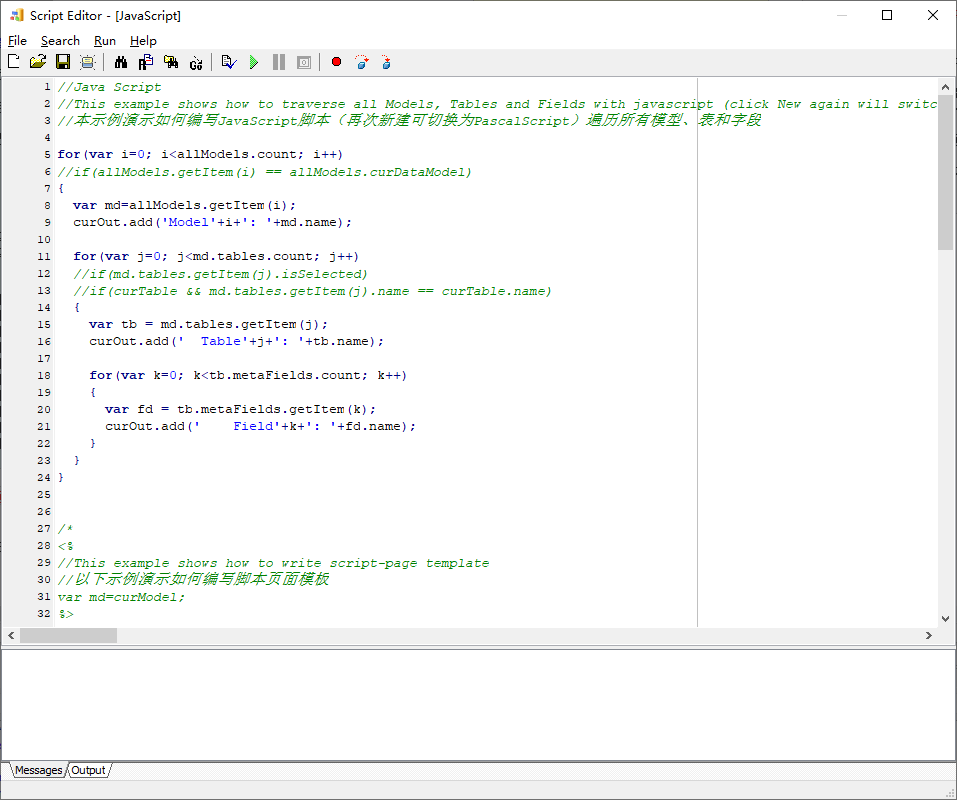
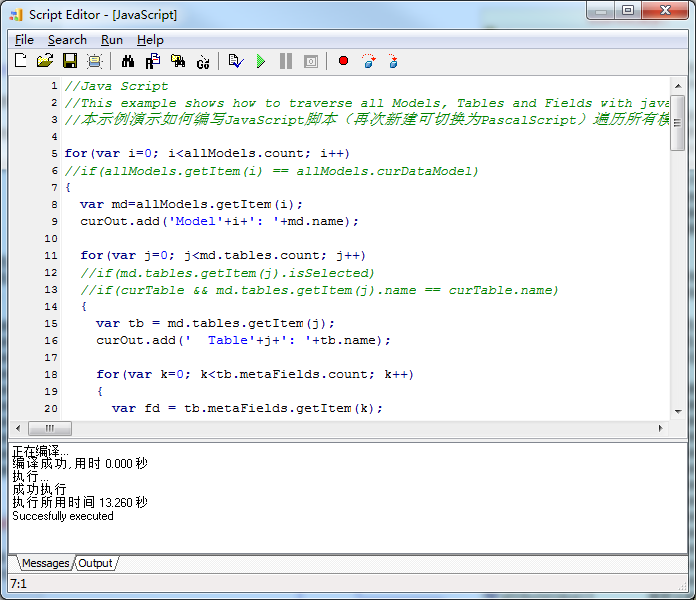
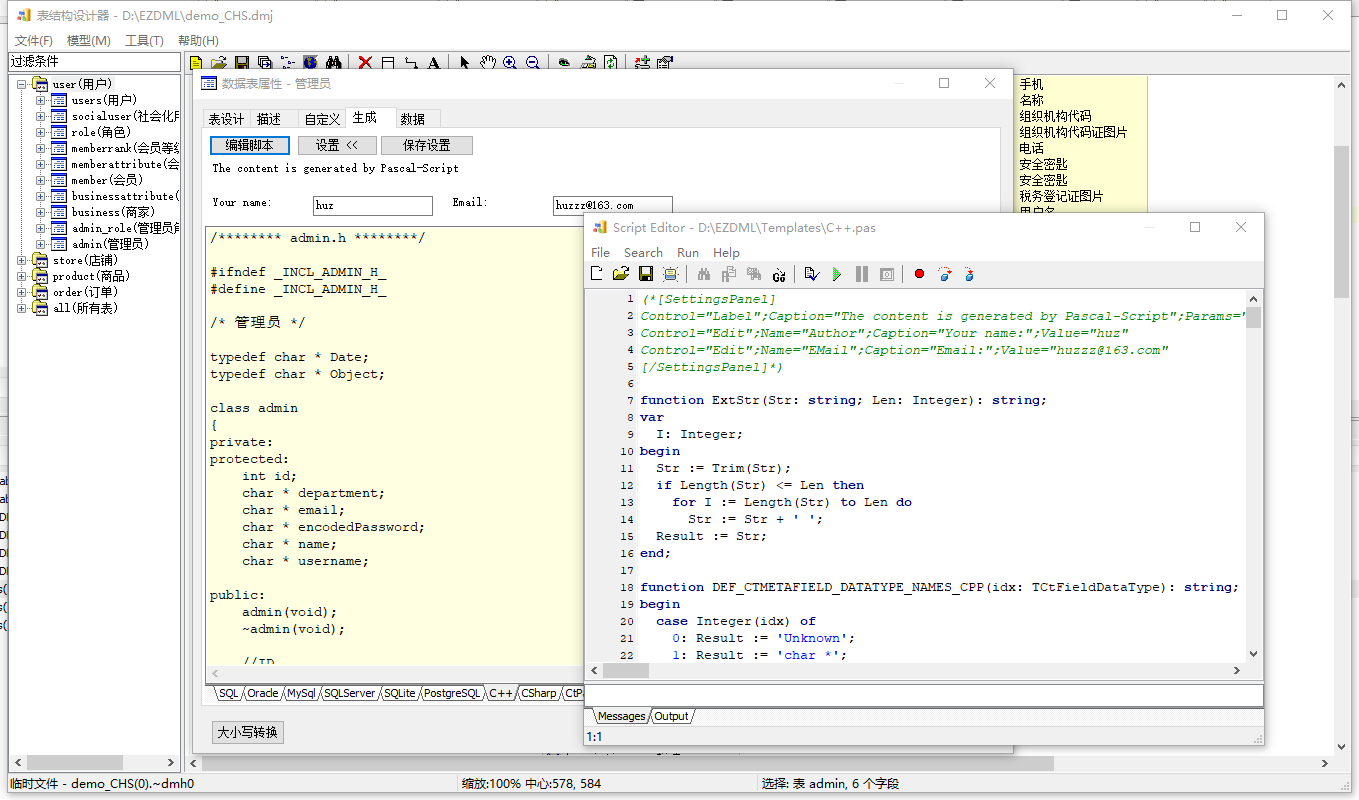
弹出脚本编辑窗口,默认就是JAVASCRIPT的示例了:
简单说下这个脚本窗口:执行NEW命令新建时会自动初始化为示例脚本,默认是JS脚本(再点一下NEW命令就切换为PAS)。JS脚本目前不支持断点和单步调试,按F9运行,F1显示帮助。脚本窗口关闭时会自动保存当前内容到临时文件(每次F9运行脚本时也会)。
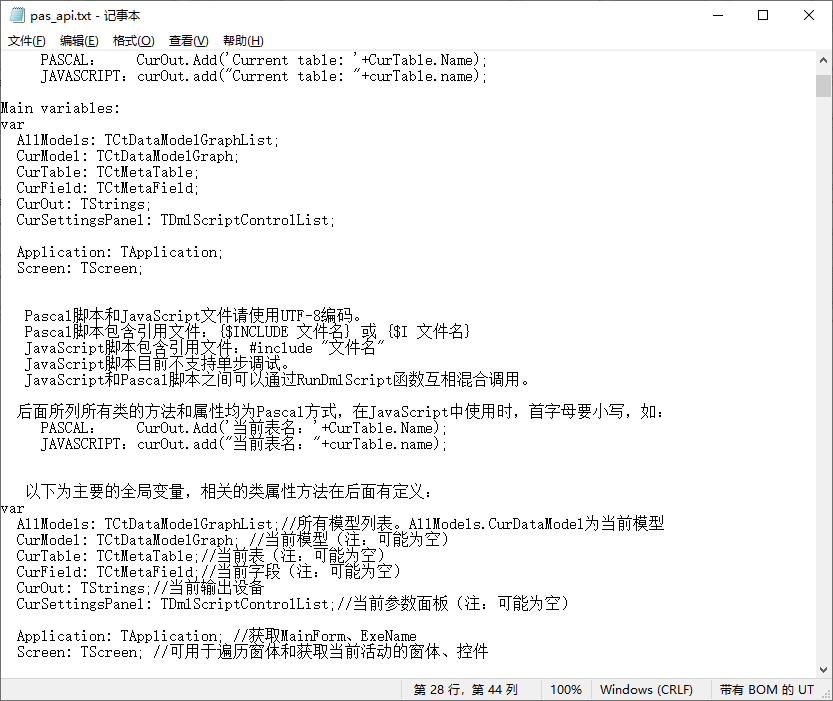
在这个脚本窗口执行”Help”菜单或按F1可显示一些简单的帮助:
回到JAVASCRIPT的示例,往下翻,可以看到一共有五个示例:
演示如何编写JavaScript脚本(再次新建可切换为PascalScript)遍历所有模型、表和字段
演示如何编写脚本页面模板
演示如何编写脚本处理文本文件
演示如何编写脚本遍历对象属性
演示如何在JS脚本中混合调用Pascal脚本
其中只有第一个没有被注释掉,我们就拿它来说事。它显然是i j k三个for循环遍历了模型、表和字段。代码很简单,不过我还是再解释一下:
1 2 3 4 5 6 7 8 9 10 11 12 13 14 15 16 17 18 19 20 21 22 23 24 25 for (var i=0 ; i<allModels.count ; i++) { var md=allModels.getItem (i); curOut.add ('Model' +i+': ' +md.name ); for (var j=0 ; j<md.tables .count ; j++) { var tb = md.tables .getItem (j); curOut.add (' Table' +j+': ' +tb.name ); for (var k=0 ; k<tb.metaFields .count ; k++) { var fd = tb.metaFields .getItem (k); curOut.add (' Field' +k+': ' +fd.name ); } } _gc (); }
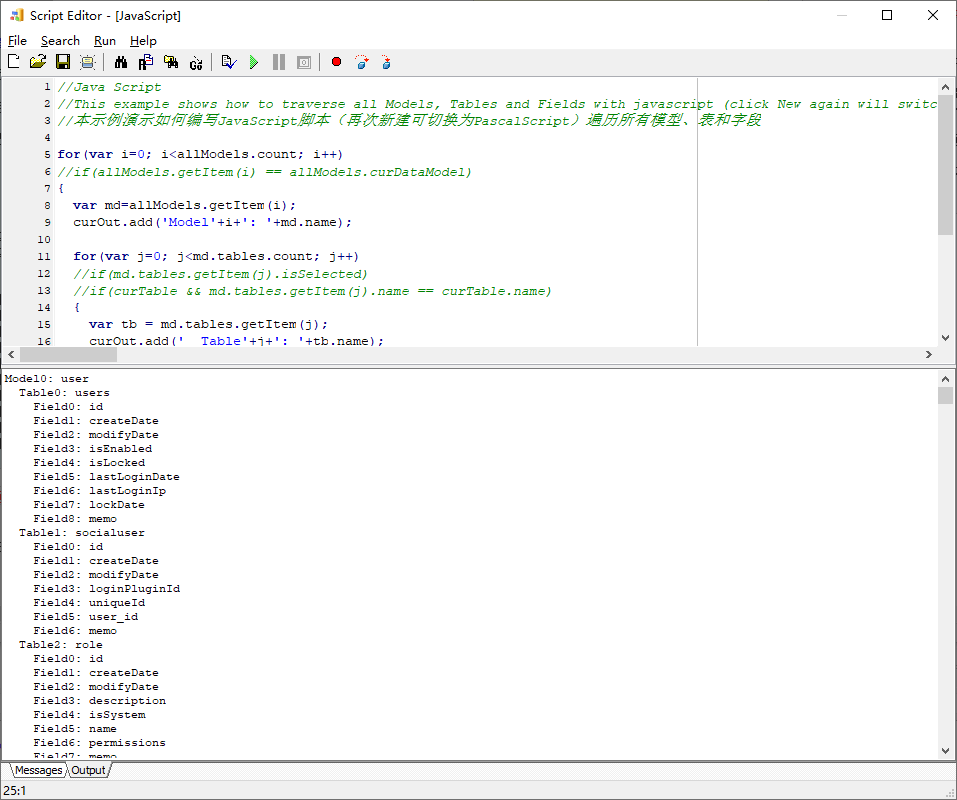
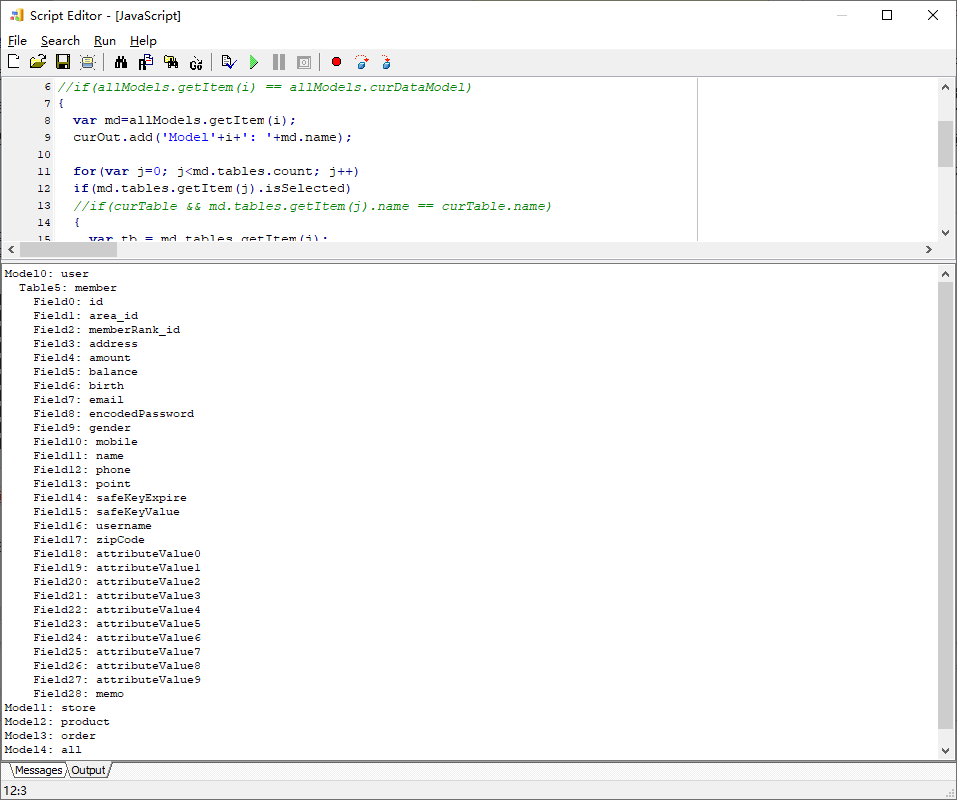
我们把其它示例2345的代码删除,只留下示例1,直接按F9运行,可以看到运行结果输出了所有表和字段:
把第12行//if(md.tables.getItem(j).isSelected)这行前面的//注释符删除,再运行,这时就只输出会员表的信息了,因为我们只选中了会员表:
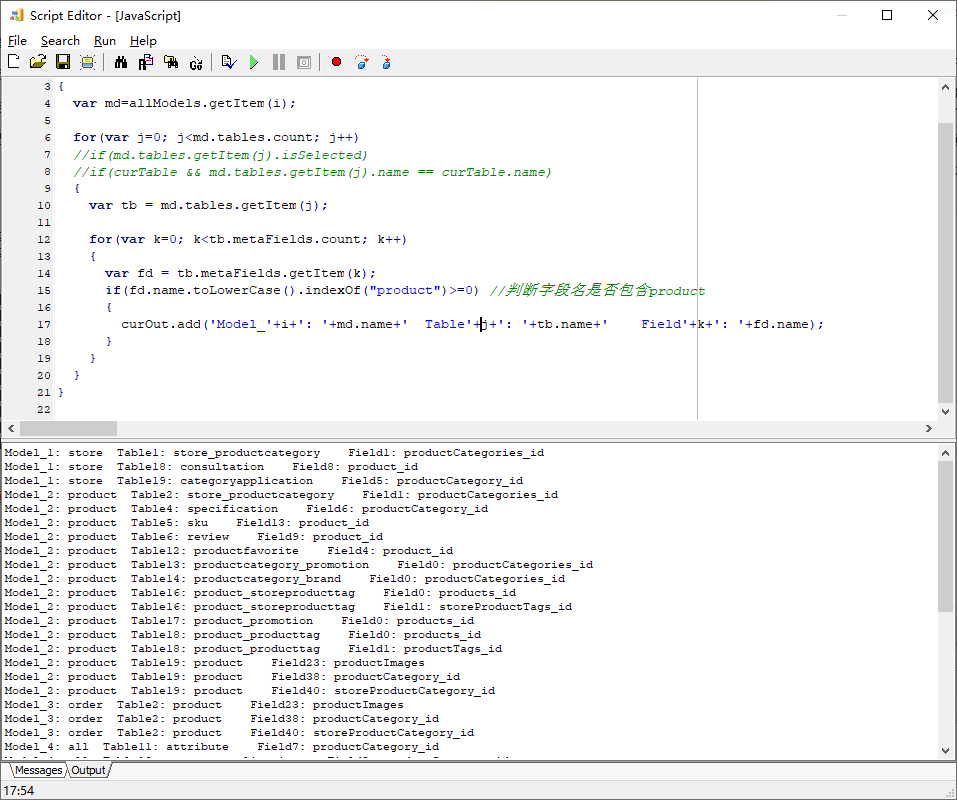
把第12行注掉,增加字段名的判断,并修改输出代码,最终改成下面的样子:
1
2
3
4
5
6
7
8
9
10
11
12
13
14
15
16
17
18
19
20
21
22
23
for (var i=0 ; i<allModels.count ; i++){ var md=allModels.getItem (i); for (var j=0 ; j<md.tables .count ; j++) { var tb = md.tables .getItem (j); for (var k=0 ; k<tb.metaFields .count ; k++) { var fd = tb.metaFields .getItem (k); if (fd.name .toLowerCase ().indexOf ("product" )>=0 ) { curOut.add ('Model_' +i+': ' +md.name +' Table' +j+': ' +tb.name +' Field' +k+': ' +fd.name ); } } } }
运行结果如下,只输出了符合条件的字段:
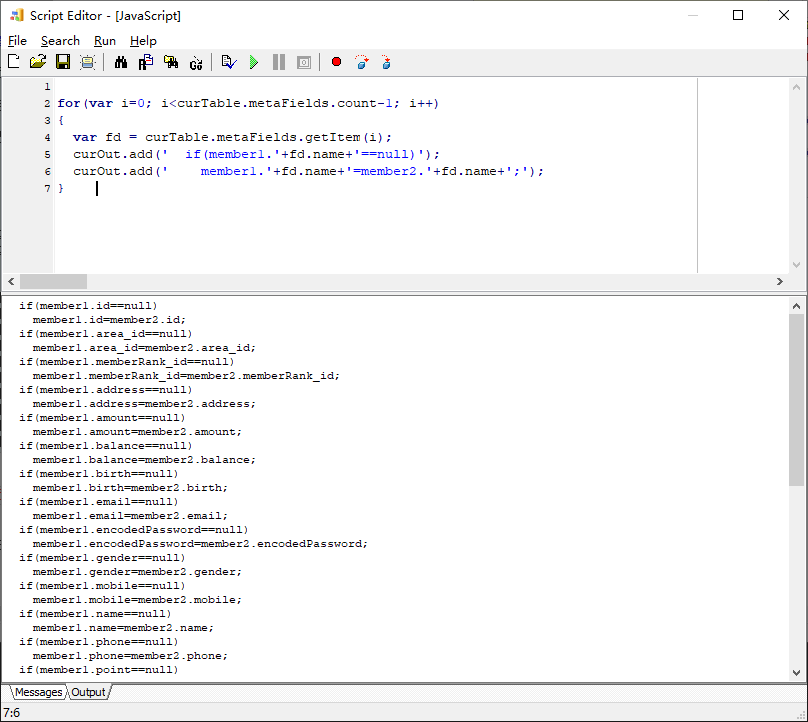
很多时候我们只要处理当前表curTable,假设我要为当前表的字段生成某个赋值代码,这时可以这样遍历字段(请注意要选一个表,以保证当前表curTable有值):
1
2
3
4
5
6
7
for (var i=0 ; i<curTable.metaFields .count -1 ; i++){ var fd = curTable.metaFields .getItem (i); curOut.add (' if(member1.' +fd.name +'==null)' ); curOut.add (' member1.' +fd.name +'=member2.' +fd.name +';' ); }
运行效果:
查询遍历基本上就这样了,下面我们要动手修改了。
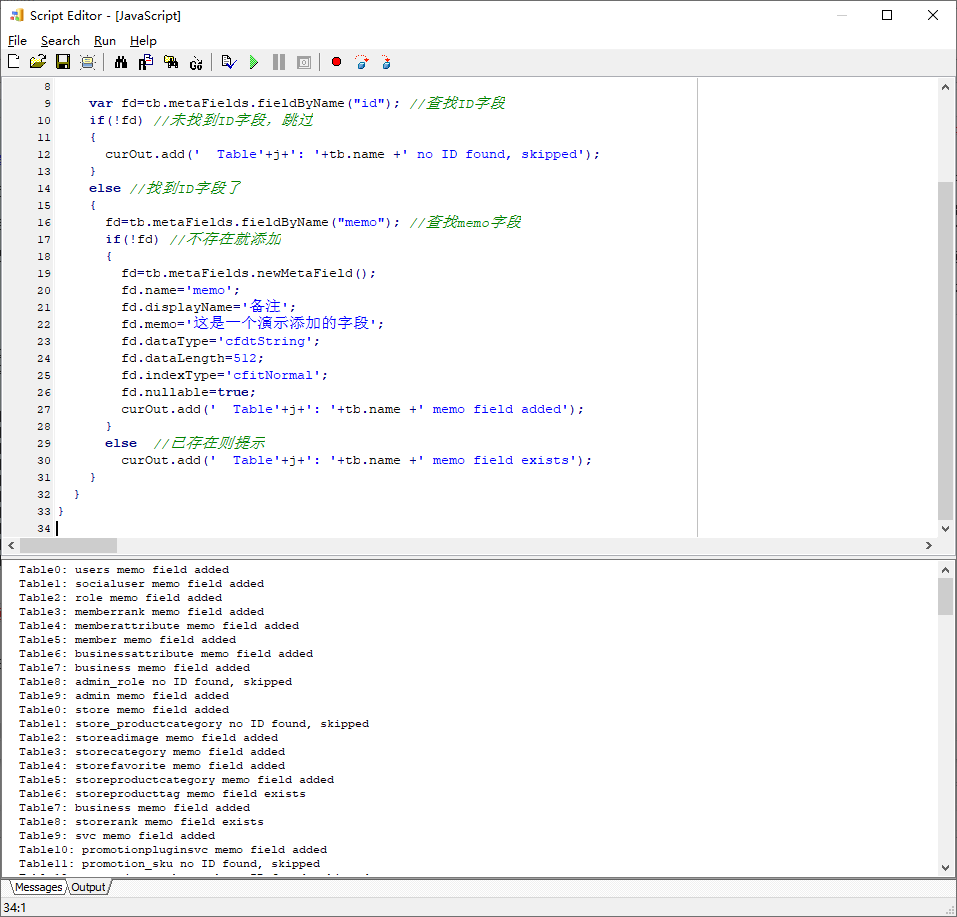
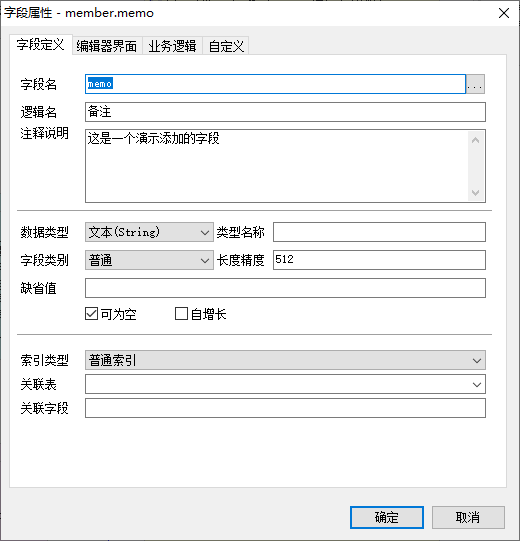
我要给每一个包含字段id的表,增加一个memo备注字段(如果已存在则跳过),类型为字符串,长度512,普通索引(只是为了演示哈,其实模型目录树上有批量添加字段功能,比写脚本简单多了),代码如下:
1
2
3
4
5
6
7
8
9
10
11
12
13
14
15
16
17
18
19
20
21
22
23
24
25
26
27
28
29
30
31
32
33
34
35
for (var i=0 ; i<allModels.count ; i++){ var md=allModels.getItem (i); for (var j=0 ; j<md.tables .count ; j++) { var tb = md.tables .getItem (j); var fd=tb.metaFields .fieldByName ("id" ); if (!fd) { curOut.add (' Table' +j+': ' +tb.name +' no ID found, skipped' ); } else { fd=tb.metaFields .fieldByName ("memo" ); if (!fd) { fd=tb.metaFields .newMetaField (); fd.name ='memo' ; fd.displayName ='备注' ; fd.memo ='这是一个演示添加的字段' ; fd.dataType ='cfdtString' ; fd.dataLength =512 ; fd.indexType ='cfitNormal' ; fd.nullable =true ; curOut.add (' Table' +j+': ' +tb.name +' memo field added' ); } else curOut.add (' Table' +j+': ' +tb.name +' memo field exists' ); } } }
正常来说,我们改了一个表,需要调_syncTableProps(tb)同步属性到模型中其它所有同名的表。不过,这里我们直接遍历了所有模型中的表全改了一遍,就不需要同步了。
运行结果:
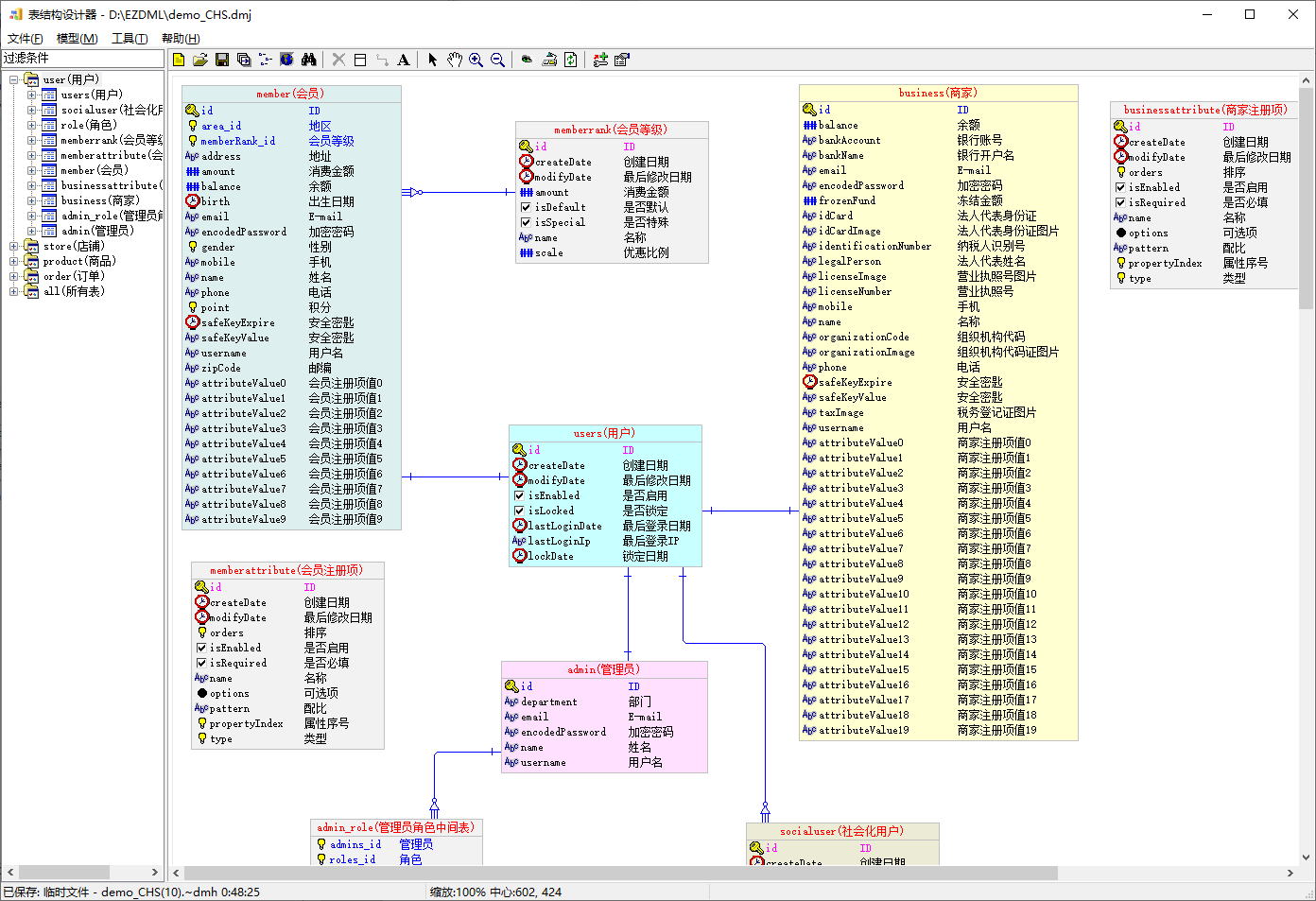
回到模型图刷新一下,大部分表都加上了memo字段:
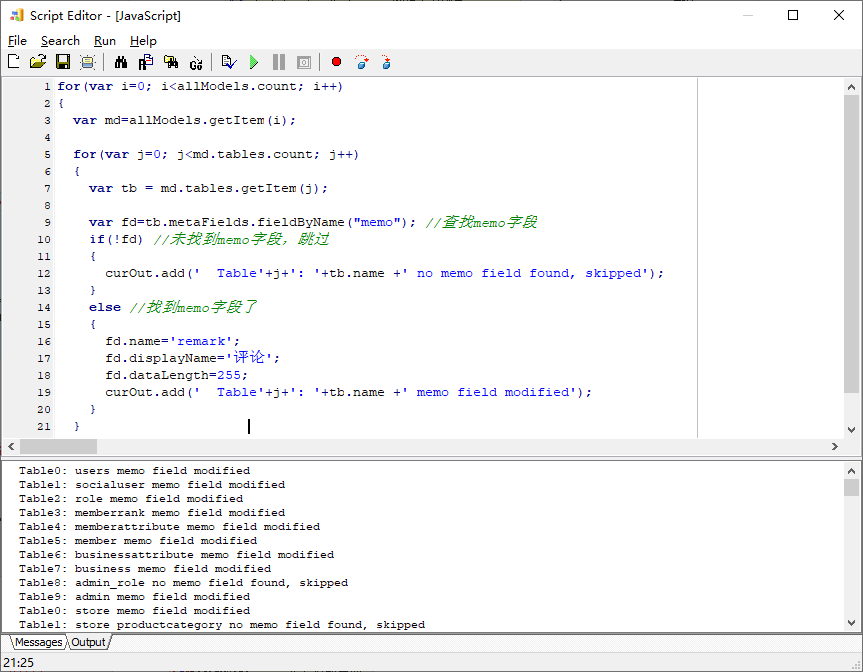
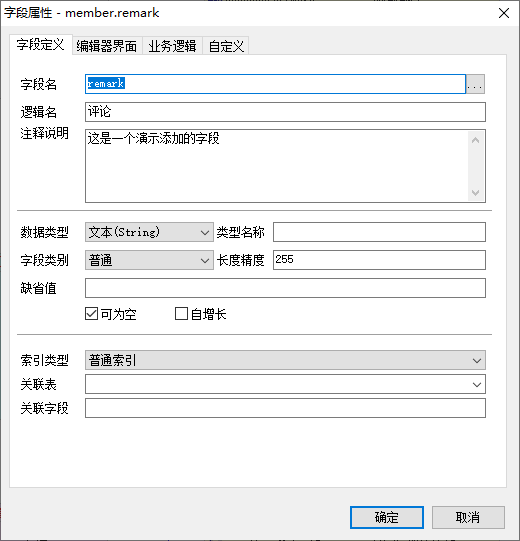
接下来我觉得memo这名字不好,我要把这些memo字段改名为remark,逻辑名为“评论”,长度改为255,代码如下:
1
2
3
4
5
6
7
8
9
10
11
12
13
14
15
16
17
18
19
20
21
22
23
for (var i=0 ; i<allModels.count ; i++){ var md=allModels.getItem (i); for (var j=0 ; j<md.tables .count ; j++) { var tb = md.tables .getItem (j); var fd=tb.metaFields .fieldByName ("memo" ); if (!fd) { curOut.add (' Table' +j+': ' +tb.name +' no memo field found, skipped' ); } else { fd.name ='remark' ; fd.displayName ='评论' ; fd.dataLength =255 ; curOut.add (' Table' +j+': ' +tb.name +' memo field modified' ); } } }
运行结果:
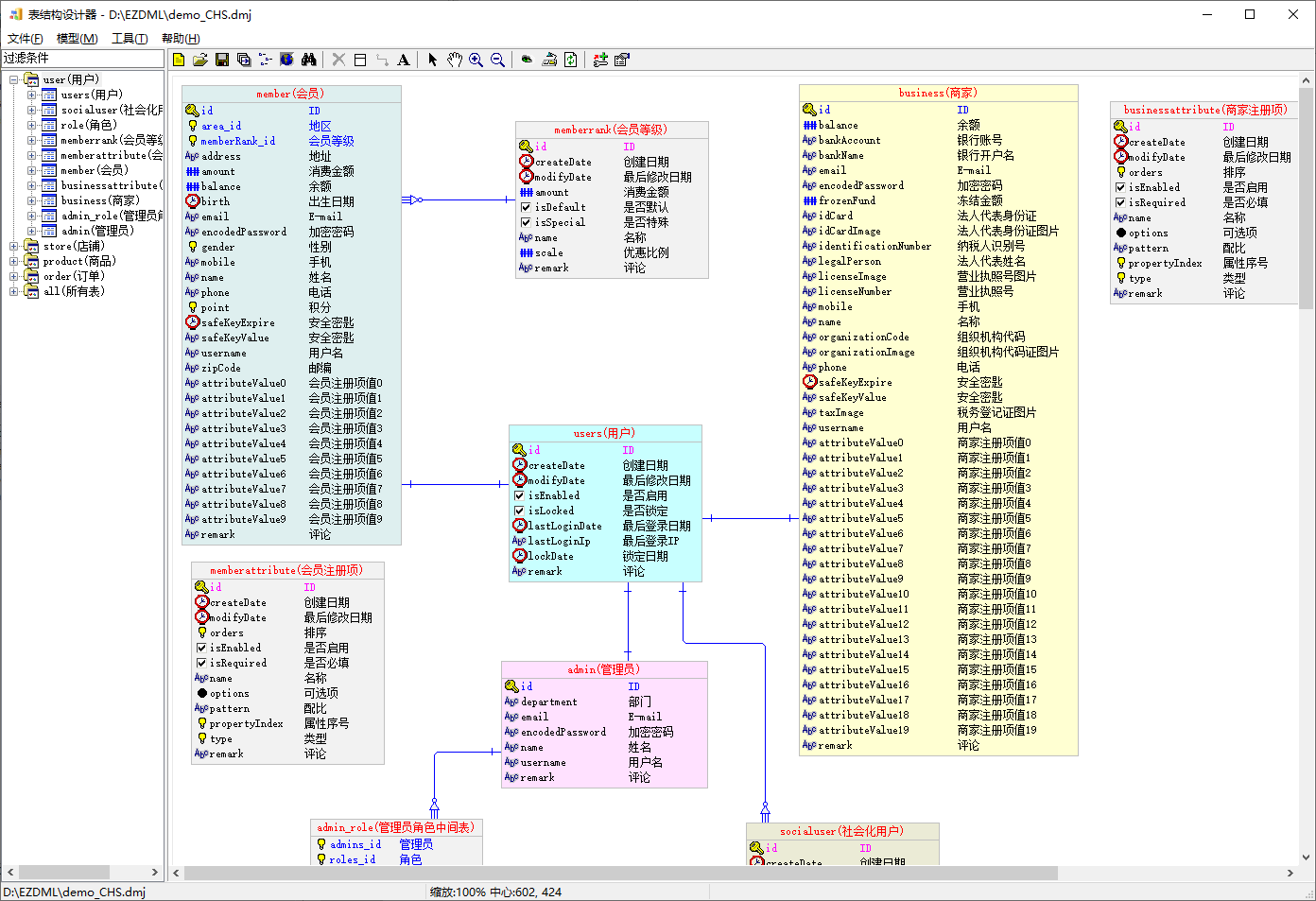
回到模型图,刷新:
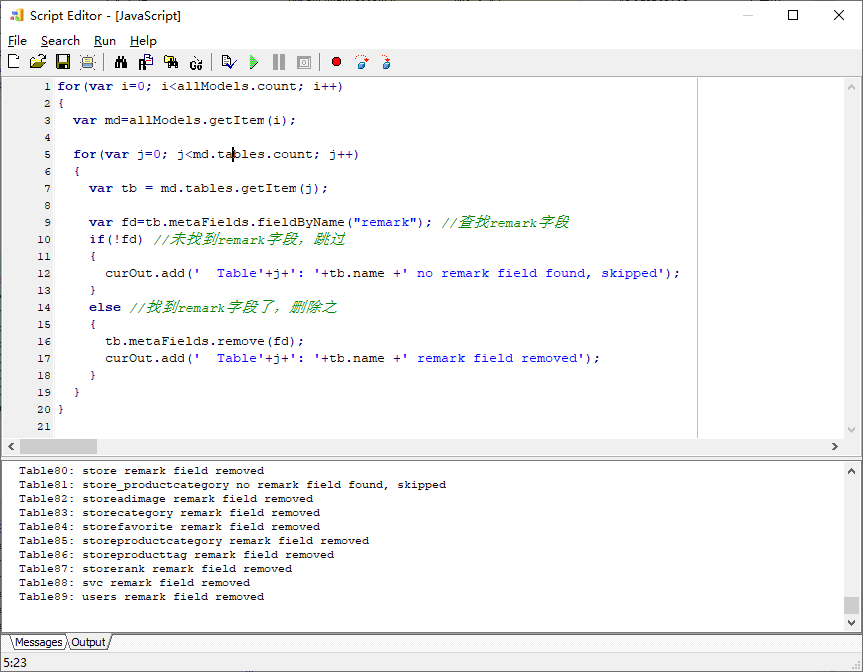
接下来我又后悔了,我觉得remark这字段没什么用,决定删除掉,代码如下:
1
2
3
4
5
6
7
8
9
10
11
12
13
14
15
16
17
18
19
20
21
for (var i=0 ; i<allModels.count ; i++){ var md=allModels.getItem (i); for (var j=0 ; j<md.tables .count ; j++) { var tb = md.tables .getItem (j); var fd=tb.metaFields .fieldByName ("remark" ); if (!fd) { curOut.add (' Table' +j+': ' +tb.name +' no remark field found, skipped' ); } else { tb.metaFields .remove (fd); curOut.add (' Table' +j+': ' +tb.name +' remark field removed' ); } } }
运行结果:
好了,用JS增删改查了一遍,想必你已经有个大概了解了。
PASCAL脚本 还是打开示例文件,选中会员表,右键弹出菜单,选择“执行脚本”:
弹出脚本编辑窗口,默认是JAVASCRIPT的示例:
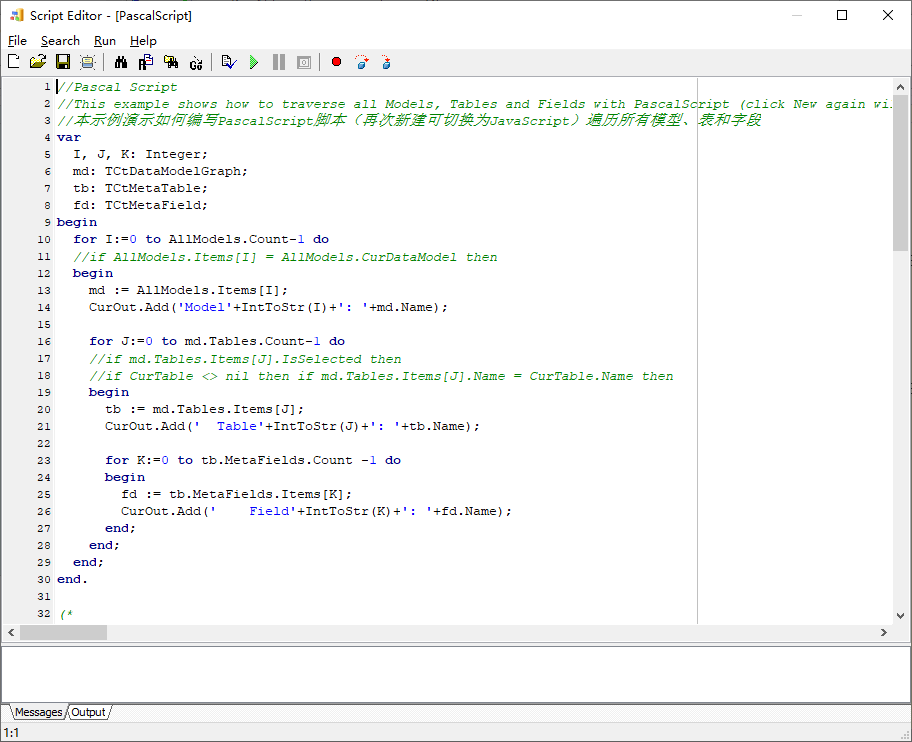
再执行一次File/New菜单命令,切换为PASCAL脚本(如果还是JS,就再点一次):
PASCAL脚本支持断点和单步调试,按F9运行,F1显示帮助。脚本窗口关闭时会自动保存当前内容到临时文件(每次F9运行脚本时也会)。
照例解释一下:
1
2
3
4
5
6
7
8
9
10
11
12
13
14
15
16
17
18
19
20
21
22
23
24
25
26
27
28
var I, J, K: Integer; md: TCtDataModelGraph; tb: TCtMetaTable; fd: TCtMetaField; begin for I:=0 to AllModels.Count-1 do begin md := AllModels.Items[I]; CurOut.Add('Model' +IntToStr(I)+': ' +md.Name ); for J:=0 to md.Tables.Count-1 do begin tb := md.Tables.Items[J]; CurOut.Add(' Table' +IntToStr(J)+': ' +tb.Name ); for K:=0 to tb.MetaFields.Count -1 do begin fd := tb.MetaFields.Items[K]; CurOut.Add(' Field' +IntToStr(K)+': ' +fd.Name ); end ; end ; end ; end .
直接按F9运行,效果跟之前JS的示例是一样的:
增加字段名的判断,并修改输出代码,最终改成下面的样子:
1
2
3
4
5
6
7
8
9
10
11
12
13
14
15
16
17
18
19
20
21
22
23
24
25
26
27
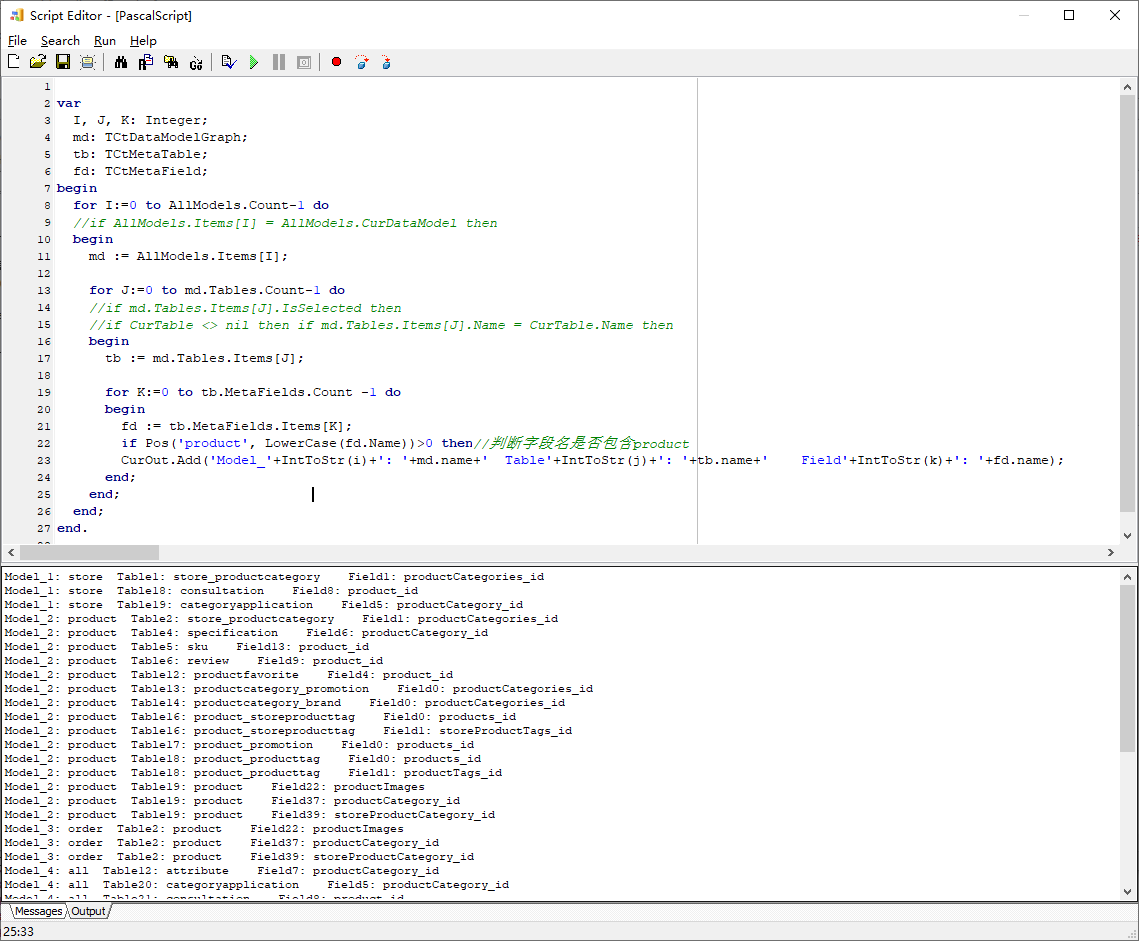
var I, J, K: Integer; md: TCtDataModelGraph; tb: TCtMetaTable; fd: TCtMetaField; begin for I:=0 to AllModels.Count-1 do begin md := AllModels.Items[I]; for J:=0 to md.Tables.Count-1 do begin tb := md.Tables.Items[J]; for K:=0 to tb.MetaFields.Count -1 do begin fd := tb.MetaFields.Items[K]; if Pos('product' , LowerCase(fd.Name ))>0 then CurOut.Add('Model_' +IntToStr(i)+': ' +md.name +' Table' +IntToStr(j)+': ' +tb.name +' Field' +IntToStr(k)+': ' +fd.name ); end ; end ; end ; end .
运行结果如下,只输出了符合条件的字段:
很多时候我们只要处理当前表CurTable,假设我要为当前表的字段生成某个赋值代码,这时可以这样遍历字段(请注意要选一个表,以保证当前表CurTable有值):
1
2
3
4
5
6
7
8
9
10
11
12
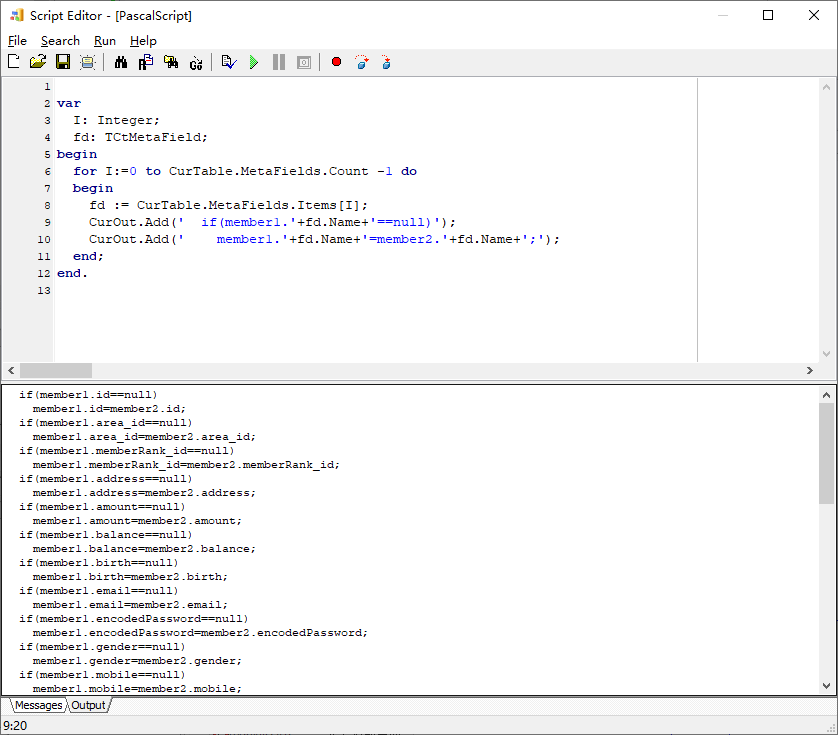
var I: Integer; fd: TCtMetaField; begin for I:=0 to CurTable.MetaFields.Count -1 do begin fd := CurTable.MetaFields.Items[I]; CurOut.Add(' if(member1.' +fd.Name +'==null)' ); CurOut.Add(' member1.' +fd.Name +'=member2.' +fd.Name +';' ); end ; end .
运行效果:
再简单说下批量加字段,要给每一个包含字段id的表,增加一个memo备注字段(如果已存在则跳过),类型为字符串,长度512,普通索引(只是为了演示,其实模型目录树上有批量添加字段功能,比写脚本简单),代码如下:
1
2
3
4
5
6
7
8
9
10
11
12
13
14
15
16
17
18
19
20
21
22
23
24
25
26
27
28
29
30
31
32
33
34
35
36
37
38
39
40
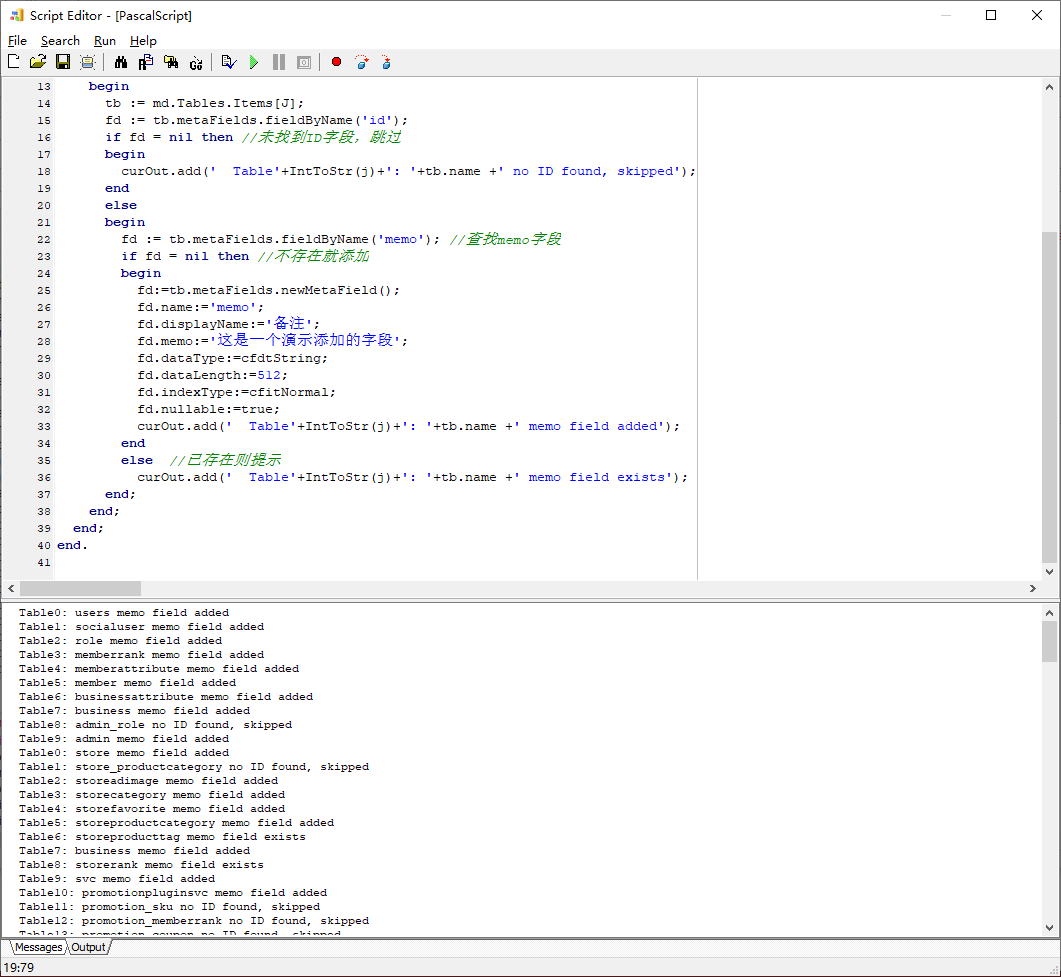
var I, J: Integer; md: TCtDataModelGraph; tb: TCtMetaTable; fd: TCtMetaField; begin for I:=0 to AllModels.Count-1 do begin md := AllModels.Items[I]; for J:=0 to md.Tables.Count-1 do begin tb := md.Tables.Items[J]; fd := tb.metaFields.fieldByName('id' ); if fd = nil then begin curOut.add(' Table' +IntToStr(j)+': ' +tb.name +' no ID found, skipped' ); end else begin fd := tb.metaFields.fieldByName('memo' ); if fd = nil then begin fd:=tb.metaFields.newMetaField(); fd.name :='memo' ; fd.displayName:='备注' ; fd.memo:='这是一个演示添加的字段' ; fd.dataType:=cfdtString; fd.dataLength:=512 ; fd.indexType:=cfitNormal; fd.nullable:=true; curOut.add(' Table' +IntToStr(j)+': ' +tb.name +' memo field added' ); end else curOut.add(' Table' +IntToStr(j)+': ' +tb.name +' memo field exists' ); end ; end ; end ; end .
正常来说,我们改了一个表,需要调SyncTableProps(tb)同步属性到模型中其它所有同名的表。不过,这里我们直接遍历了所有模型中的表全改了一遍,就不需要同步了。
运行结果:
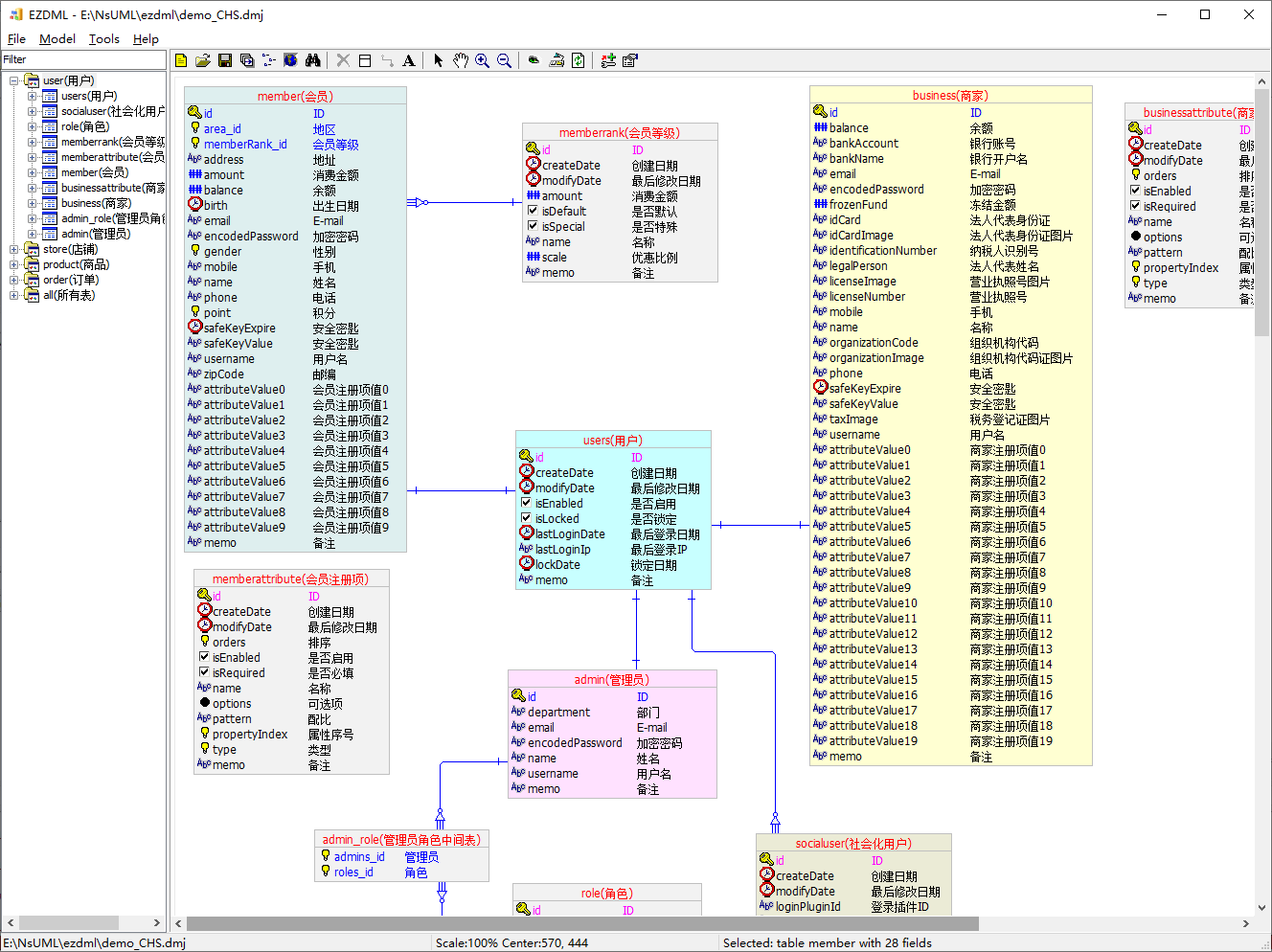
回到模型图,刷新可见效果:
PASCAL脚本就先说到这。
以上就是两种脚本的基本使用方法。
脚本窗口 执行模型菜单下的“运行脚本”即可弹出脚本编辑调试窗口:
脚本调试编辑窗口说明:
新建命令(File|New),连续执行会在JS与PAS之间切换:
新建结果为一个示例脚本,可能是JS也可能会是PAS
如果当前是编辑修改过的JS脚本,新建后也是JS脚本
新建完JS脚本后,如不作任何修改,再次新建,则切换为PAS脚本
新建完PAS脚本后,如不作任何修改,再次新建,则切换为JS脚本
如果当前是编辑修改过的PAS脚本,则新建后也是PAS脚本
打开文件时,按文件扩展名判断脚本类型:
i. .js
ii. .js_
iii. .js~
i. .pas
ii. .ps
iii. .ps_
iv. .ps~
保存文件(FileSave):
Pascal脚本和JavaScript脚本文件均使用UTF-8编码,如果你用外部工具编辑脚本,请遵循此编码规则。
手动保存脚本咱就不说了,说说自动保存。退出脚本窗口时,可能会提示保存,也可能不会,取决于当前脚本的场景,比如右键运行脚本,退出时是自动保存,不会提示的
不管会不会提示,程序都会自动将脚本内容保存到临时文件
每次编译或运行脚本时,程序都会自动将脚本内容保存到临时文件(如果有修改的话)
执行File|Show Temporary File,可查看当前脚本的临时文件目录内容,可在这找回旧的历史版本文件
PAS脚本支持断点、单步调试、变量查看等功能;JS不支持调试,只能编译、运行
编译运行结果在下方显示
特殊复制——编辑器里选择一段文本,鼠标右键弹出菜单,可以复制内容,有以下几种姿势:
直接复制,结果为选中的内容的纯文本
执行特殊复制,可复制出用于JAVA、C、C++、C#、PASCAL、SQL的字符串代码片断
按住SHIFT键复制,结果为所有内容(注:不是选中内容)的带格式(类似HTML)的富文本
高级功能 “JSP”和“PSP”页面模板 用过JSP、ASP、PHP的可能猜到了,这两个是在页面模板中嵌脚本,运行前自动将其翻译成真正的脚本。下面举例说明。
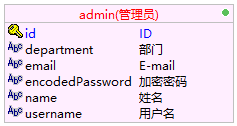
比如有这么一个表:
1
2
3
4
5
6
7
8
9
admin(管理员) --------------------------------------- id(ID) PKInteger //<<关联:users.id>> department(部门) String(255) email(E-mail) String(255) //<<唯一索引,非空>> encodedPassword(加密密码) String(255) //<<非空>> name(姓名) String(255) username(用户名) String(255) //<<唯一索引,非空>>
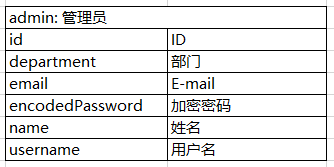
我想输出一个简单的HTML表格:
以JS为例,正常情况下,我们会这样编写脚本:
1 2 3 4 5 6 7 8 9 10 11 12 13 14 15 16 17 18 19 20 21 22 23 24 25 26 27 28 29 30 curOut.add ("<html>" ); curOut.add ("<body>" ); curOut.add ("" ); curOut.add ("<table border=1>" ); curOut.add (" <tr>" ); curOut.add (" <td colspan=\"2\">" ); curOut.add (" " +curTable.name +": " +curTable.caption ); curOut.add (" </td>" ); curOut.add (" </tr>" ); curOut.add ("" ); for (vari=0 ;i<curTable.metaFields .count ;i++){ varf=curTable.metaFields .getItem (i); curOut.add (" <tr>" ); curOut.add (" <td>" ); curOut.add (f.name ); curOut.add (" </td>" ); curOut.add (" <td>" ); curOut.add (f.displayName ); curOut.add (" </td>" ); curOut.add (" </tr>" ); } curOut.add ("" ); curOut.add ("</table>" ); curOut.add ("</body>" ); curOut.add ("</html>" );
比较麻烦和反人类,下面我们换一种姿势,用类似JSP的方式重写,代码如下:
1
2
3
4
5
6
7
8
9
10
11
12
13
14
15
16
17
18
19
20
21
22
23
24
25
26
27
28
29
30
31
32
33
34
<% //以<%开头,宣告这是一个页面模板 %> <html > <body > <tableborder=1> <tr > <tdcolspan="2"> ${curTable.name}: ${curTable.caption} </td > </tr > <% for(vari=0;i<curTable.metaFields.count;i++) { varf=curTable.metaFields.getItem(i); %> <tr > <td > ${f.name} </td > <td > ${f.displayName} </td > </tr > <%}%> </table > </body > </html >
是不是感觉好很多?
页面模板约定如下:
以<%开头,就会认为是JSP或PSP
<%xx%>中的为原始JS、PAS脚本,其它为模板内容
模板中支持插入${xx}作为表达式
如果模板中一段内容中的${xx}不希望当表达式处理,可以用[[[xx]]]]括起来,其中[[[和]]]要单独一行,周围不能有空格
${xx}在其它语言中比较常用,可能会造成混乱(比如生成JSP、VUE文件时),如果某个模板文件不想用${xx},也可以在模板文件任意位置写一个注释//[NO_DOLLAR_EXPRESSION]//,则${xx}会原样输出,这时可以用@[xx]代替。
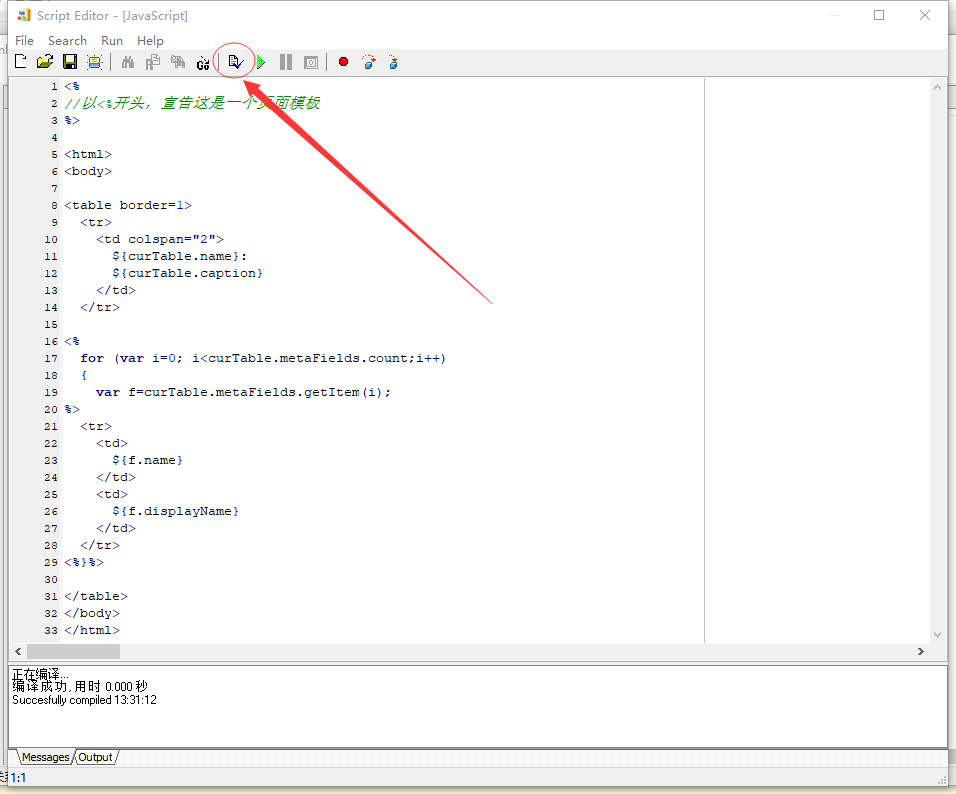
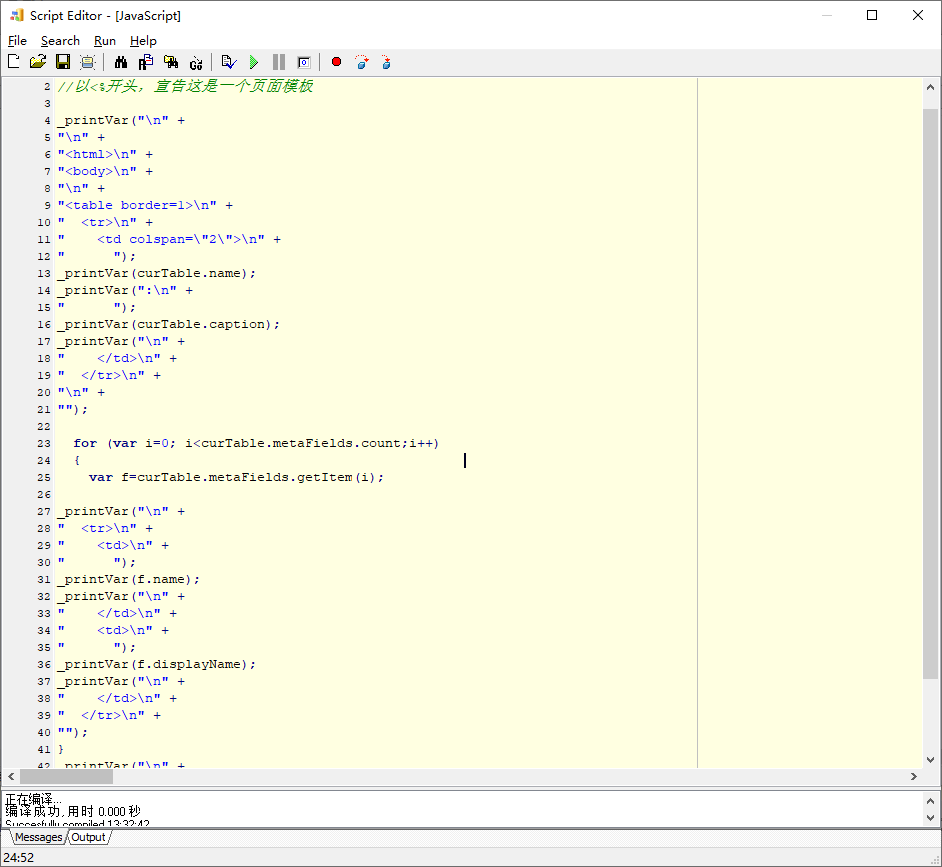
写好后,先不要运行,点击编译工具按钮:
这时会发现,程序会自动预编译处理,将“JSP”转成JS,脚本框变成只读,背景会变成浅黄色:
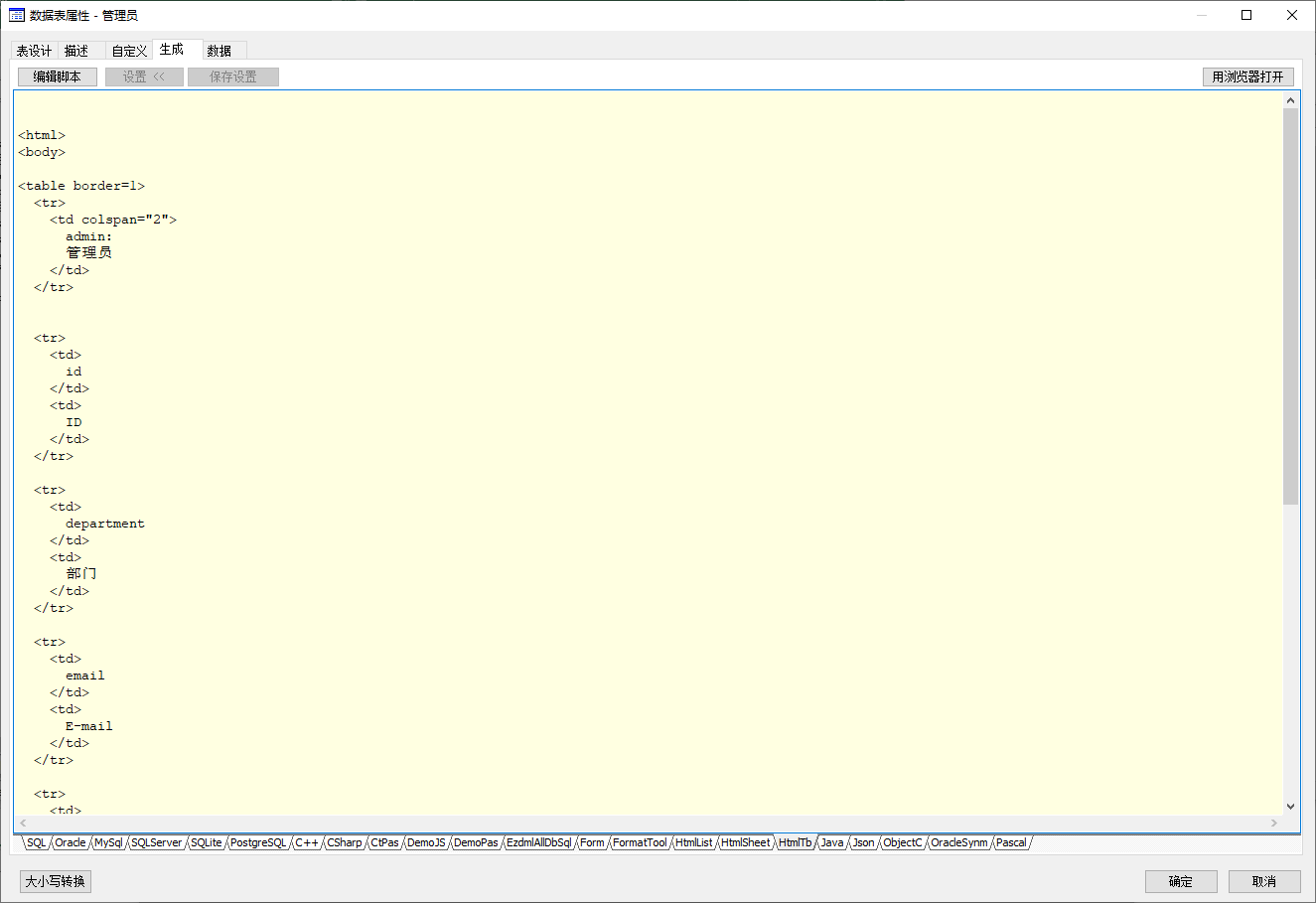
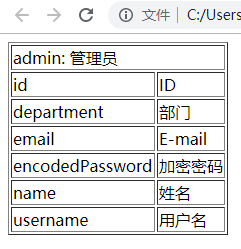
运行结果:
点右侧的“用浏览器打开”(文件名以Html开头的脚本会显示这按钮):
下面是PSP(PASCAL)的版本:
1
2
3
4
5
6
7
8
9
10
11
12
13
14
15
16
17
18
19
20
21
22
23
24
25
26
27
28
29
30
31
32
33
34
35
36
37
38
39
40
<% begin %> <html> <body> <table border=1 > <tr> <td colspan="2 "> $: $ </td> </tr> <% gvar I:Integer; gvar F: TCtMetaField; for I:=0 to CurTable.MetaFields.Count-1 do begin F:=CurTable.MetaFields.Items[I]; %> <tr> <td> $ </td> <td> $ </td> </tr> <%end ;%> </table> </body> </html> <% end .%>
运行效果跟JS版是一样的。
包含引用文件 包含引用文件,程序员都懂的,就是脚本太多了,全放一起麻烦,要分开;或者有公共函数库,不想拷来拷去的,希望一次编写多次引用,要独立出来,方便维护。
Pascal脚本包含引用文件:**{$INCLUDE 文件名}** 或 {$I 文件名}
JavaScript脚本包含引用文件:**#include “文件名”**
包含文件名一般都是以宿主文件所在目录为参考的相对目录的文件名。
JS脚本包含是EZDML自己做的,简单说就是执行前把包含文件内容拼进来(CTRL+F9编译时能看到所有Include文件拼进来后的最终脚本内容);PAS脚本包含由脚本引擎完成,不过调试时也会将内容拼一块。
创建和显示窗体 如果了解Delphi的dfm窗体设计,可以通过new TForm创建Delphi窗体,示例Pascal脚本如下:
1
2
3
4
5
6
7
8
9
10
11
12
13
var frm: TForm; begin frm:=TForm.Create(nil ); try ReadDfmComponents(frm,'[FILE]D:\EZDML_win64\Templates\FormTest.dfm' ); if frm.ShowModal=mrOk then alert('宽度为:' +TEdit(FindChildComp(frm, 'edtWorkspaceWidth' )).Text); finally frm.Free; end ; end .
ReadDfmComponents第二个参数是DFM内容,或者是文件名(需要以[FILE]开头)。
当然,JS也是可以的:
1
2
3
4
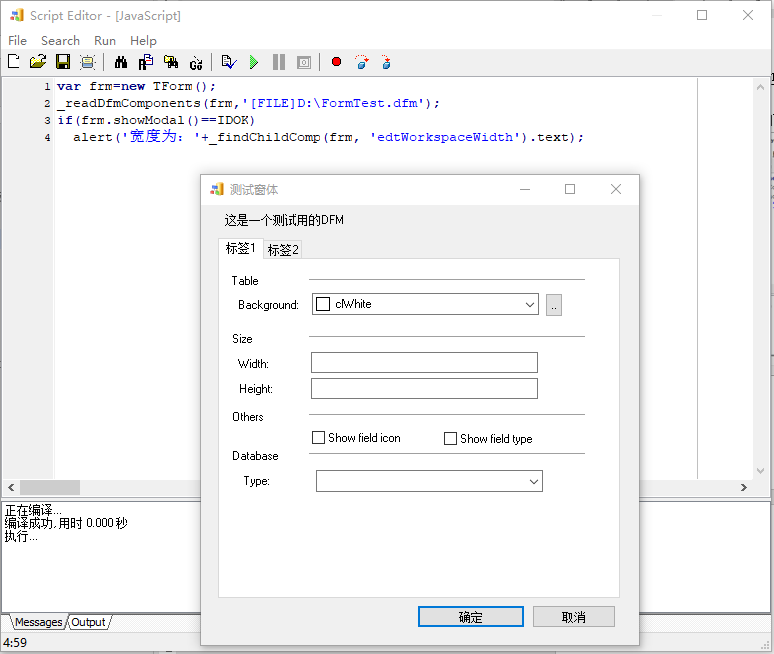
var frm=new TForm ();ReadDfmComponents (frm,'[FILE]D:\\EZDML_win64\\Templates\\FormTest.dfm' );if (frm.showModal ()==IDOK ) alert ('宽度为:' +FindChildComp (frm,'edtWorkspaceWidth' ).text );
运行结果如下:
获取和使用程序主窗体 通过application.mainForm能够直接获取主窗体。获取主窗体有什么用呢?下面以JS为例作演示:
首先,获取主窗体:var frm=application.mainForm;
显示窗体标题:alert(frm.caption);
修改标题:frm.caption=”Hello EZDML”;
获取状态和大小:alert(frm.windowState+” “+frm.boundsRect);
修改位置和大小:frm.left=20;frm.top=10;frm.width=800;frm.height=600;
或者这样也可以:frm.boundsRect=”20,10,800,600”;
设置状态:frm.windowState=’wsMaximized’;
将它隐藏,再显示:
frm.hide();
alert(frm.caption);
frm.show();
查找组件:alert(_findChildComp(frm,’MainMenu1’)._className);
执行以下脚本可以遍历所有组件:
1
2
3
4
5
6
7
8
9
10
var frm=application.mainForm ;var s="Main form componentCount: " +frm.componentCount ;for (var i=0 ;i<frm.componentCount ;i++){ var comp=frm.getComponent (i); if (comp.name ) s=s+"\n" +comp.name +":" +comp._className ; } alert (s);
设置其它属性
比如要去掉主菜单:_setCompPropObject(frm,’Menu’,null);
再加上:_setCompPropObject(frm,’Menu’,_findChildComp(frm,’MainMenu1’));
执行命令
主窗体目前有以下命令:
1
2
3
4
5
6
7
8
9
10
11
12
13
14
15
16
17
18
19
20
21
22
23
24
25
26
27
28
29
30
31
32
33
actOpenLastFile1 actGoTbFilter actNewFile actOpenFile actSaveFile actSaveFileAs actShowFileInExplorer actShowTmprFile actExitWithoutSave actExit actNewTable actNewModel actImportDatabase actGenerateDatabase actGenerateCode actHttpServer actTogglePhyView actModelOptions actExportModel actExecScript actFindObjects actEditSettingFile actEditMyDict actEditGlobalScript actBrowseScripts actBackupDatabase actRestoreDatabase actSqlTool actCharCodeTool actBrowseCustomTools actQuickStart actEzdmlHomePage actAboutEzdml
比如要执行actAboutEzdml打开“关于”:
_findChildComp(frm,’actAboutEzdml’).execute();
关闭它(注意:程序会结束):frm.close();
以上过程,对其它窗体(可用screen.activeForm对象获取当前窗体,或用screen遍历所有窗体,参见后面的说明)也适用,这里不展开了。
运行其它程序 如果要运行一个EXE,或打开一个文档,方法是调ShellOpen这个过程,它的声明如下:
1 procedure ShellOpen (FileName, Parameters, Directory: String ) ;
使用示例如下(PAS):
1
2
3
4
begin ShellOpen('notepad.exe' ,'' ,'' ); end .
结果是打开了记事本。
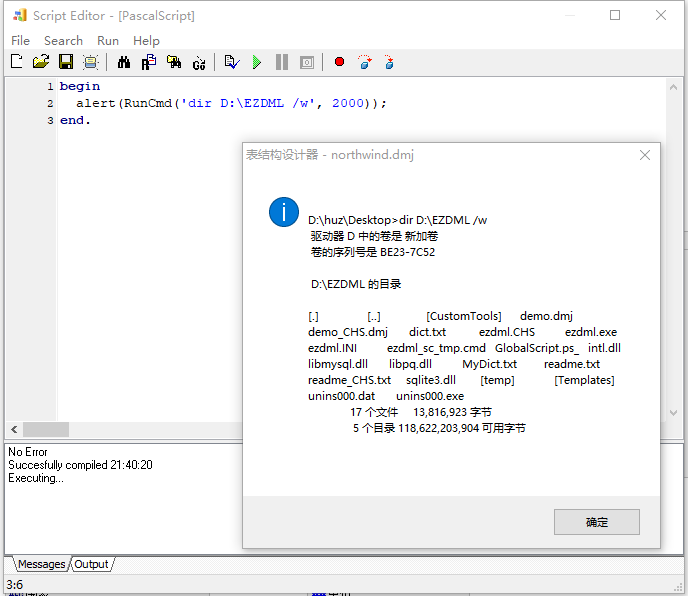
如果要运行一个批处理DOS命令,则需要用RunCmd这个函数,其声明如下:
1 function RunCmd (cmd: string ; timeout: Integer) :string ;
示例如下(PAS):
1
2
3
4
begin alert(RunCmd('dir D:\EZDML /w' , 2000 )); end .
效果截个图:
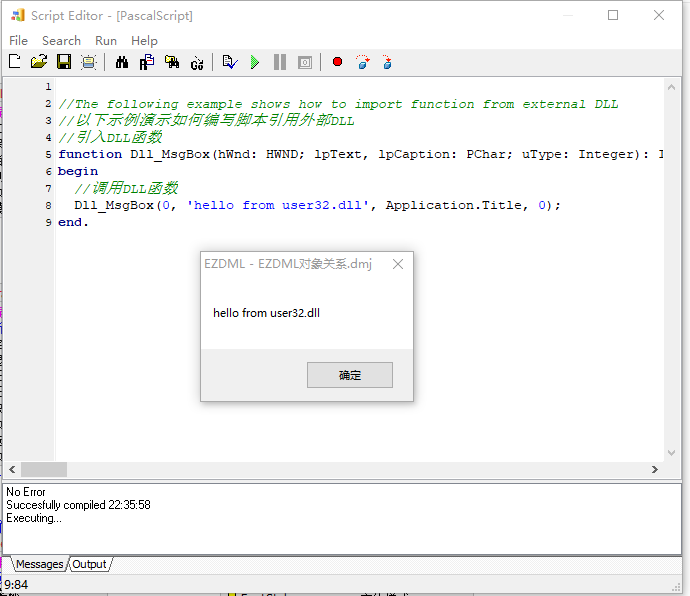
加载DLL PAS支持加载DLL,JS不支持。PAS加载DLL的示例如下:
1 2 3 4 5 6 7 8 9 function Dll_MsgBox (hWnd: HWND; lpText, lpCaption: PChar; uType: Integer) :external 'MessageBoxA@user32.dll stdcall' ;begin Dll_MsgBox(0 , 'hello from user32.dll' , Application.Title, 0 ); end .
JS虽然不能直接支持DLL,但JS可以混合调用PAS来间接调用DLL,参见下节。
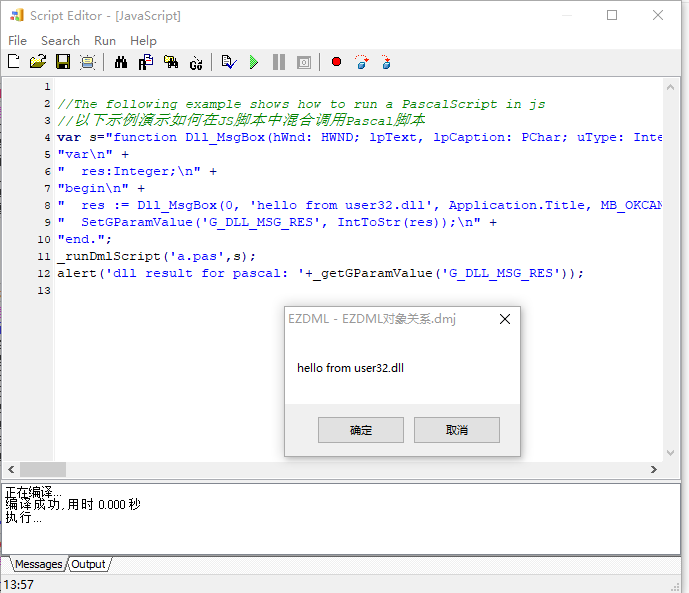
JS与PAS混合 JS可以混合调用PAS,比如利用PAS来调用DLL,再通过全局变量将结果传回来,主要是用这个方法:
1 _runDmlScript (AFileName , AScript );
示例如下:
1 2 3 4 5 6 7 8 9 10 11 12 vars="function Dll_MsgBox(hWnd: HWND; lpText, lpCaption: PChar; uType: Integer): Integer; external 'MessageBoxA@user32.dll stdcall';\n" + "var\n" +" res:Integer;\n" +"begin\n" +" res := Dll_MsgBox(0, 'hello from user32.dll', Application.Title, MB_OKCANCEL);\n" +" SetGParamValue('G_DLL_MSG_RES', IntToStr(res));\n" +"end." ;_runDmlScript ('a.pas' ,s);alert ('dll result for pascal: ' +_getGParamValue ('G_DLL_MSG_RES' ));
运行效果如下:
反过来PAS调JS也是可以的。理论上JS调JS和PAS调PAS也是可以的(吃饱了撑的),都是调这个方法,这里不展开了。
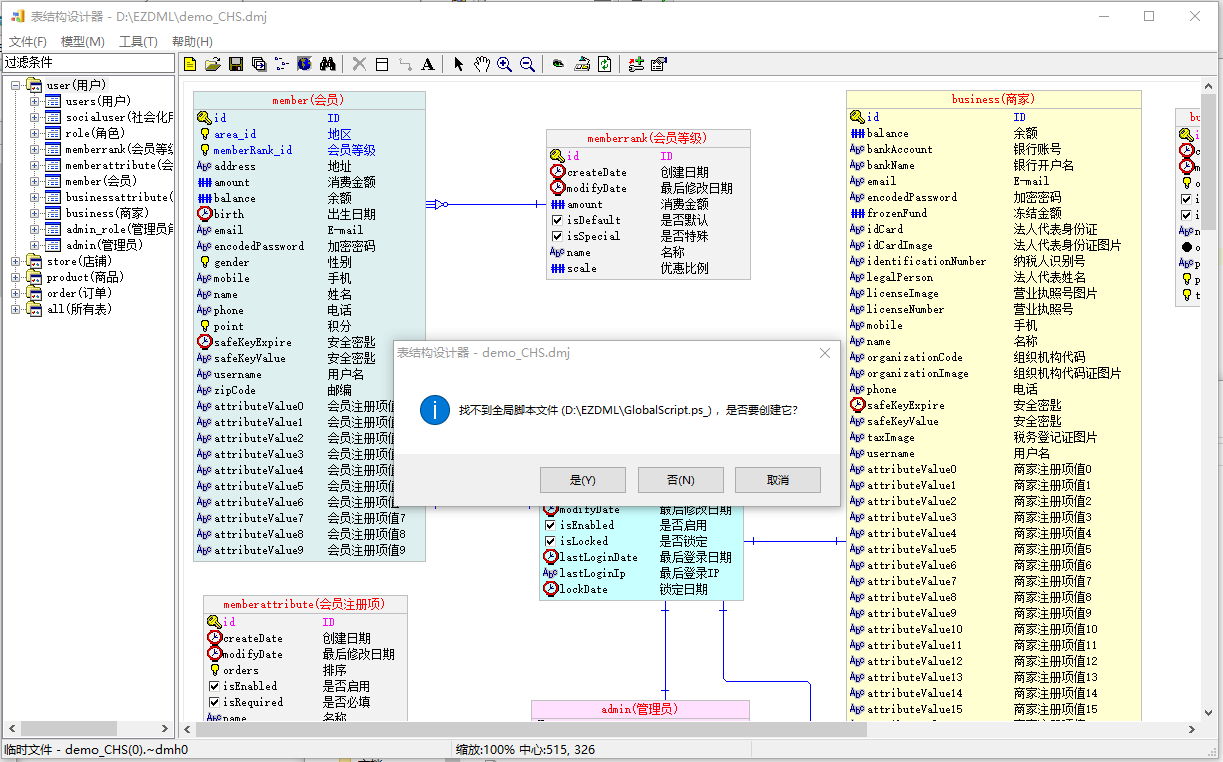
全局事件脚本 全局事件脚本文件为GlobalScript.ps_,位于主程序目录下。你可以在这接管生成SQL、弹出窗口等事件。由于没找到JS拦截事件的方式,该脚本目前仅支持PASCAL,不支持JAVASCRIPT。
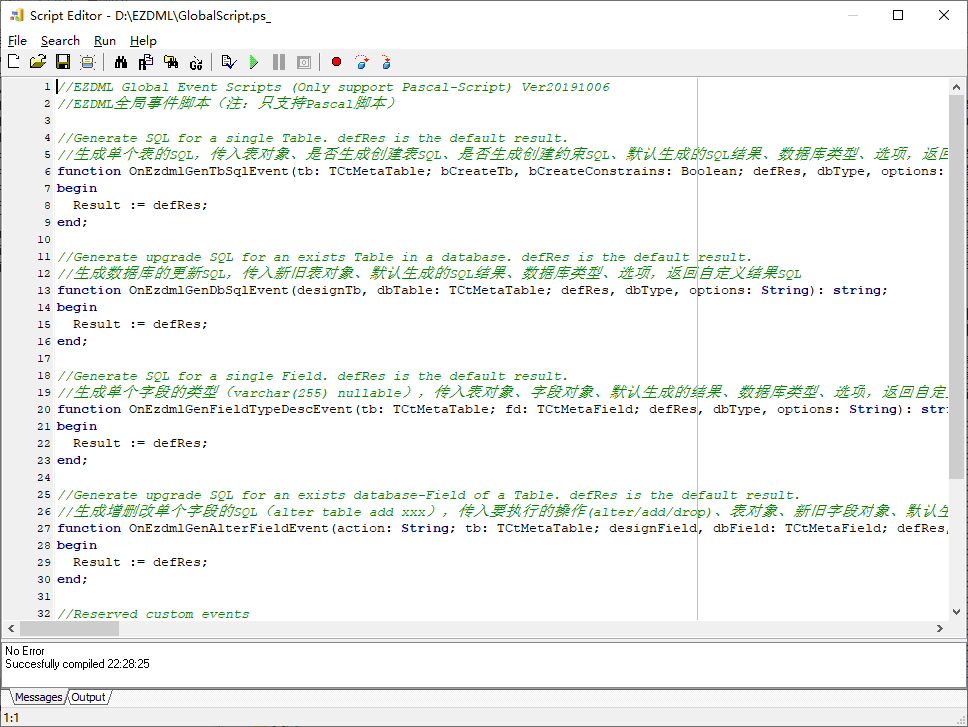
执行主窗口菜单命令“工具|编辑全局事件脚本”,第一次时程序会提示创建全局脚本文件:
点“是”创建并打开全局脚本进行编辑调试:
1 2 3 4 5 6 7 8 9 10 11 12 13 14 15 16 17 18 19 20 21 22 23 24 25 26 27 28 29 30 31 32 33 34 35 36 37 38 39 40 41 42 43 44 45 46 47 48 function OnEzdmlGenTbSqlEvent (tb: TCtMetaTable; bCreateTb, bCreateConstrains: Boolean; defRes, dbType, options: String ) :string ;begin Result := defRes; end ;function OnEzdmlGenDbSqlEvent (designTb, dbTable: TCtMetaTable; defRes, dbType, options: String ) :string ;begin Result := defRes; end ;function OnEzdmlGenFieldTypeDescEvent (tb: TCtMetaTable; fd: TCtMetaField; defRes, dbType, options: String ) :string ;begin Result := defRes; end ;function OnEzdmlGenAlterFieldEvent (action: String ; tb: TCtMetaTable; designField, dbField: TCtMetaField; defRes, dbType, options: String ) :string ;begin Result := defRes; end ;function OnEzdmlGenDataSqlEvent (tb: TCtMetaTable; sqlType, defRes, param1, param2, dbType, options: string ) :string ;begin Result := defRes; end ;function OnEzdmlCmdEvent (cmd, param1, param2: String ; parobj1, parobj2: TObject) :string ;begin Result := '' ; end ;begin end .
全局事件脚本文件为GlobalScript.ps_,位于主程序目录下。你可以在这接管生成SQL、弹出窗口等事件。该脚本仅支持PASCAL,不支持JAVASCRIPT。
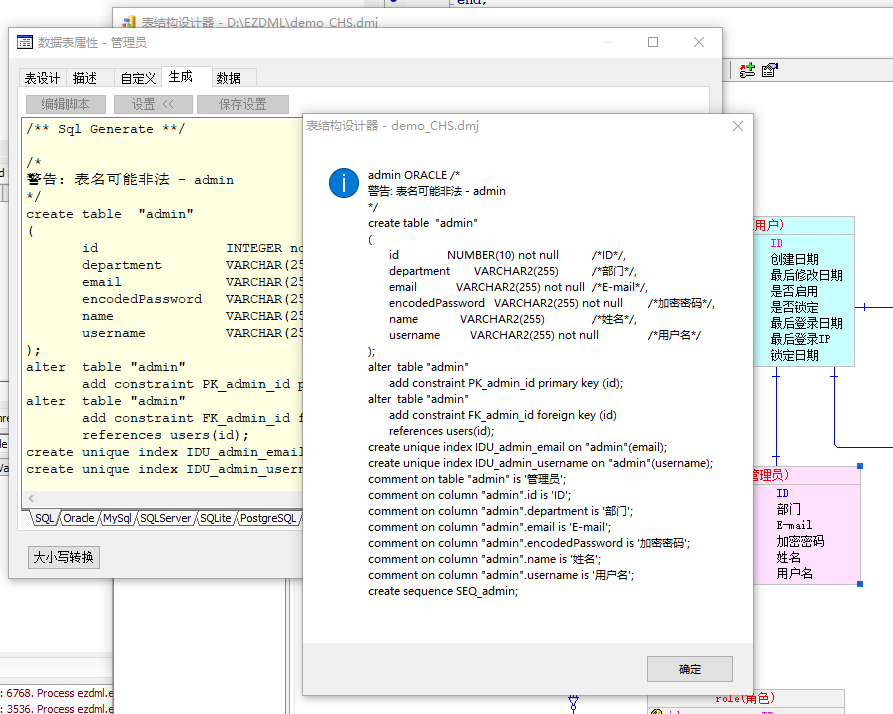
比如我们改一下第一个函数,加一行代码,把一些参数SHOW出来:
1 2 3 4 5 6 7 8 function OnEzdmlGenTbSqlEvent (tb: TCtMetaTable; bCreateTb, bCreateConstrains: Boolean; defRes, dbType, options: String ) :string ;begin alert(tb.name +' ' +dbType+' ' +defRes); Result := defRes; end ;
保存退出,打开admin表,并在生成切换几个数据库,这过程中你会不断地看到这行代码执行的结果:
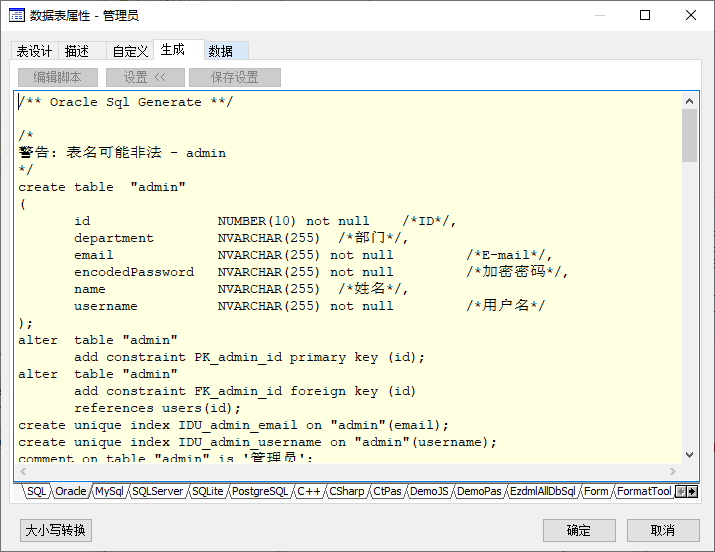
假设我们对生成的结果中的VARCHAR2不满意,要替换为NVARCHAR,我们可以再次编辑全局事件脚本,这样改一下:
1
2
3
4
5
6
function OnEzdmlGenTbSqlEvent (tb: TCtMetaTable; bCreateTb, bCreateConstrains: Boolean; defRes, dbType, options: String ) :string ;begin Result := defRes; Result := StringReplace(Result, 'VARCHAR2' , 'NVARCHAR' , [rfReplaceAll]); end ;
保存退出,再次打开admin表,切到ORACLE生成页,结果如下:
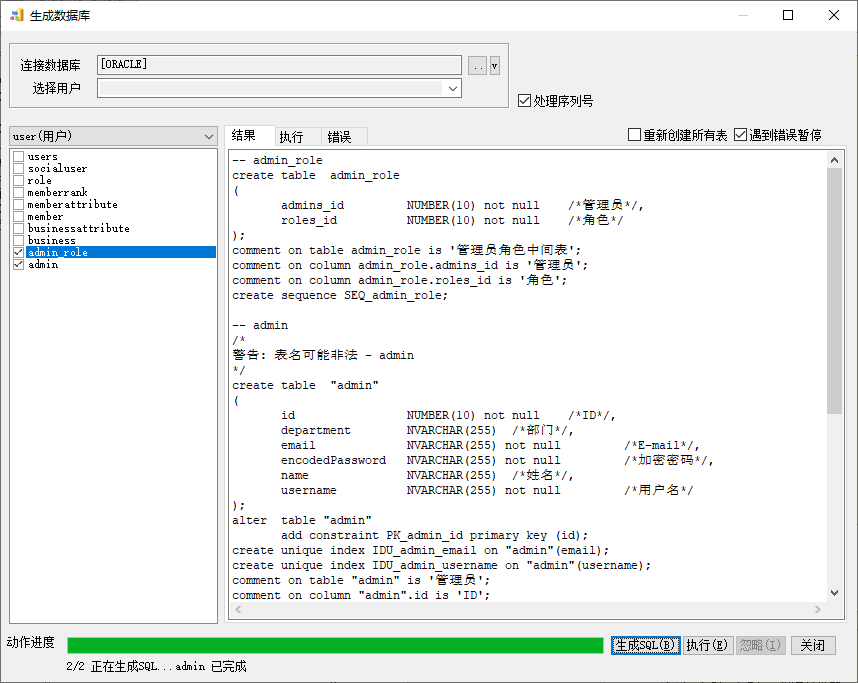
生成数据库的SQL也是一样发生了变化:
另外,OnEzdmlCmdEvent事件可拦截以下事件(cmd,param1):
MAINFORM,CREATE:主窗口创建时触发
MENU_ACTION,Tools_CustomMenu等:点击主菜单自定义工具等操作时触发
FIELD_PROP_DIALOG,SHOW/HIDE:字段属性窗口显示、隐藏时触发
TABLE_PROP_DIALOG,SHOW/HIDE:表属性窗口显示、隐藏时触发
NEW_MODEL:创建模型图时触发
NEW_TABLE:创建表时触发
MAINFORM,CLOSE:主窗口关闭时触发
CHECK_CUSTOM_DICT_NAME:执行“大小写转换|应用MyDict.txt检查”时触发,可在这里做额外的处理工作
EXTRACT_LOGIC_NAME_FROM_MEMO:执行“大小写转换|注释转为逻辑名”时,如果逻辑名为空,需要从注释中获取,此时将触发此事件。你可以接管事件,按自己的需要生成逻辑名
其它更多事件可按注释中的示例通过WriteLog记录日志来获取,就不一一说明了。
应用场景 列一下脚本使用的几个场景。
右键运行脚本 就是直接右键执行脚本了,用于临时想执行点脚本干点啥:
带参数启动EXE运行脚本 EZDML支持传以下启动参数:
如果传一个参数,则参数可以是一个DML模型文件名(dmx、dmh或dmj)由程序直接打开,也可以是一个脚本文件名(js或pas)来加载并执行,EZDML将通过文件扩展名来判断
如果传两个参数,则参数1应为一个DML模型文件名(dmx、dmh或dmj),参数二为脚本文件名(js或pas),程序将在打开参数一模型文件后再加载执行参数二的脚本
如果想执行完脚本就退出,不显示界面,可以这样:
只传一个脚本文件名参数(如果需要加载文件,可以在脚本里执行allModels.loadFromFile(xx))
在脚本里直接调_abortOut()中止
这时主窗口不显示就会直接退出。
如需要同时启动MCP服务,可加参数act=McpServer
单表生成代码 表属性的生成页中,除了前面几个数据库SQL是原生代码生成的,后面的是由脚本模板文件生成,可自行编辑脚本生成自己想要的结果。
表属性中“生成”的脚本模板位于Templates目录下,此目录下的JS和PAS(如果有同名的JS和PAS,则JS优先)会直接在表属性的“生成”页中显示。
表属性中“生成”的脚本模板中可以加载参数面板,通过参数面板来获取用户输入的内容。参见《参数面板》一节。
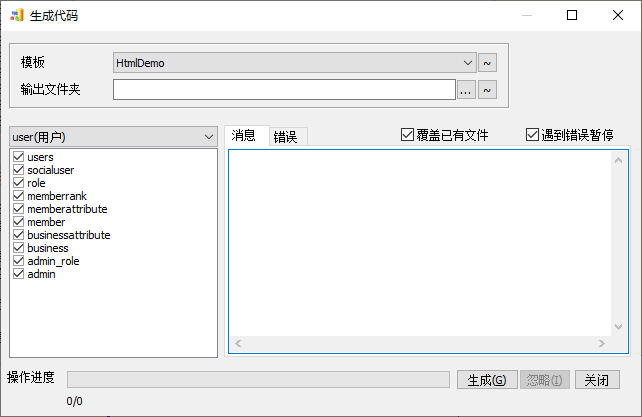
批量生成代码 执行菜单命令“模型|生成代码”,会使用Templates目录下的文件作为模板批量生成代码文件。
其中输出文件夹如果不填则默认使用EZDML\temp目录。
如果有子目录,则子目录将作为一个项目来生成。对子目录生成代码时,程序会检查有没有_dml_config.INI文件配置,有的话读取_dml_config.INI这个生成配置文件,此文件告诉程序要如何执行生成操作,不在这个文件里的文件和文件夹默认就是直接复制了。示例如下:
1
2
3
4
5
6
7
8
9
10
11
12
13
14
15
16
17
18
19
20
21
[start.html]——对于start.html这个文件的配置 run_as_script=pas——该文件其实是一个PAS脚本文件,要作为PAS脚本加载执行,生成最终结果。可选值:pas js encoding=ansi——该文件输出时转为ANSI编码,默认utf8,可选值:空,utf8,ansi 20200310:注意仅控制输出文件编码,输入脚本文件必须为utf8编码 [index_top.html]——对于index_top.html这个文件的配置 rename=#curmodel_name#_index_top.html——该文件生成时要重命名,前面加当前模型名 run_as_script=js——该文件其实是一个JavaScript脚本文件,要作为JS脚本加载执行,生成最终结果 encoding=ansi——该文件输出时转为ANSI编码,默认utf8,可选值:空,utf8,ansi [table_ui] ——对于table_ui这个目录的配置 rename=ui_#curtable_name:LowerCase#——该目录生成时要重命名,新文件名为ui_加当前表名的小写 loop_each_table=1——该目录下的文件、脚本需要对每一个表都执行一遍生成过程,该子目录下应该也要有一个_dml_config.INI来控制生成过程 skip_exists=1——不覆盖已经存在的目标文件,避免重复生成 [dml_settings] create_root_folder=0——不创建根目录,只把子目录和文件输出,仅用于根目录 auto_open_on_finished=start.html——生成结束时打开这个文件,仅用于根目录 auto_open_on_finished_mac=start.html——生成结束时打开这个文件,仅用于根目录且苹果MACOS系统 auto_open_on_finished_linux=start.html——生成结束时打开这个文件,仅用于根目录且linux系统
生成代码文件名支持一些简单运算,如:
1
2
[CSharp.pas] rename=#curmodel_name:UpperCase#_to_#curtable_name:AutoCapitalize:CamelCaseToUnderline:UpperCase#.cs
冒号后的运算符可以连续多个,表示连续进行多次运算。
目前支持的运算符有:
AutoCapitalize——自动大小写
UpperCase——大写
LowerCase——小写
Capitalize——首字母大写
UnCapitalize——首字母小写
CamelCaseToUnderline——驼峰命名转下划线命名
UnderlineToCamelCase——下划线命名转驼峰命名
ChnToPY——中文转拼音
ClassName——用于代码中的类名,中文转拼音,驼峰命名,首字母大写
ClassNameSafe——用于代码中的类名,中文转拼音,驼峰命名,首字母大写;如果类名是关键词,会自动添加Ez_前缀
PackageName——用于代码中的包名,中文转拼音,驼峰命名转下划线命名
JavaPackageName——用于java代码中的包名,中文转拼音,去掉下划线,全小写
FieldName——用于代码中的类属性或方法名,中文转拼音,驼峰命名,首字母小写
FieldNameSafe——用于代码中的类属性或方法名,中文转拼音,驼峰命名,首字母小写;如果类名是关键词,会自动添加Ez_前缀
每一次脚本执行前,系统会对以下全局变量赋值:
GCODE_SRC_ROOT——源模板所在文件夹
GCODE_DST_ROOT——生成目标文件夹
GCODE_SRC_FILENAME——源文件名(如D:\EZDML\templates\test\ index_top.html)
GCODE_DST_FILETEMPLATE——目标文件名配置(如#curmodel_name#_index_top.html)
GCODE_DST_FILENAME——目标文件名(如D:\testout\users_index_top.html)
GCODE_ENCODING——目标文件字符编码(默认UTF-8)
脚本中可以用GetGParamValue、SetGParamValue方法来获取、修改这些变量。
脚本执行后,默认会将CurOut内容以指定的编码保存到目标文件,你可以在脚本中修改全局变量GCODE_ENCODING和GCODE_DST_FILENAME来改变编码和目标文件名。
如果你自己用脚本保存了文件,或者不希望系统帮你保存文件,可以在脚本中用SetGParamValue将全局变量GCODE_DST_FILENAME的值清空,或者直接调用AbortOut中止脚本执行(注:AbortOut仅中止当前脚本、当前表)。
关于文件编码特别说明一下,如不指定encoding,会认为文件编码是UTF8,生成结果文件也是UTF8。
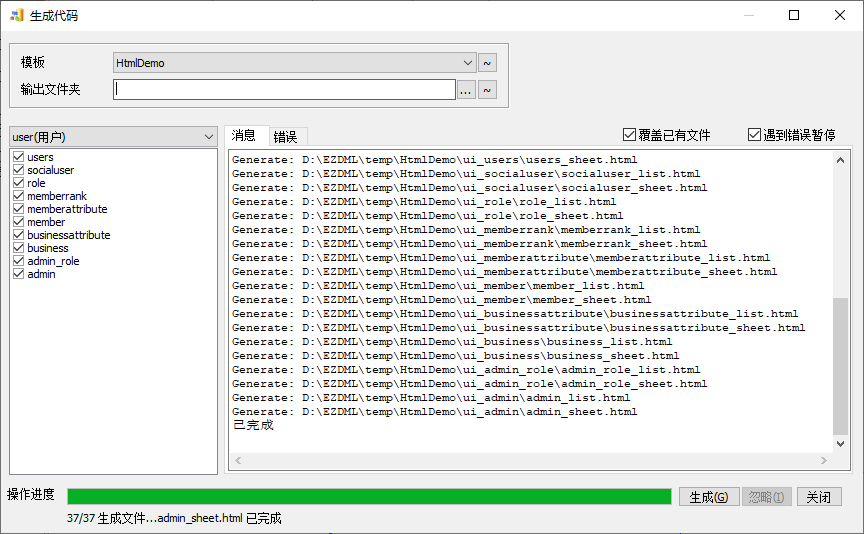
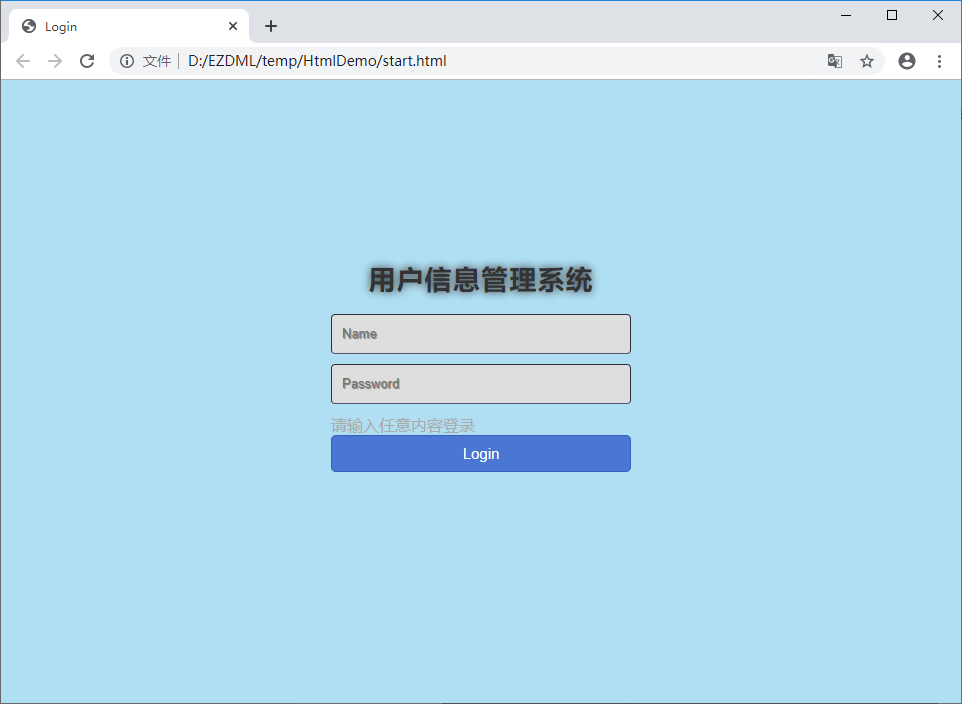
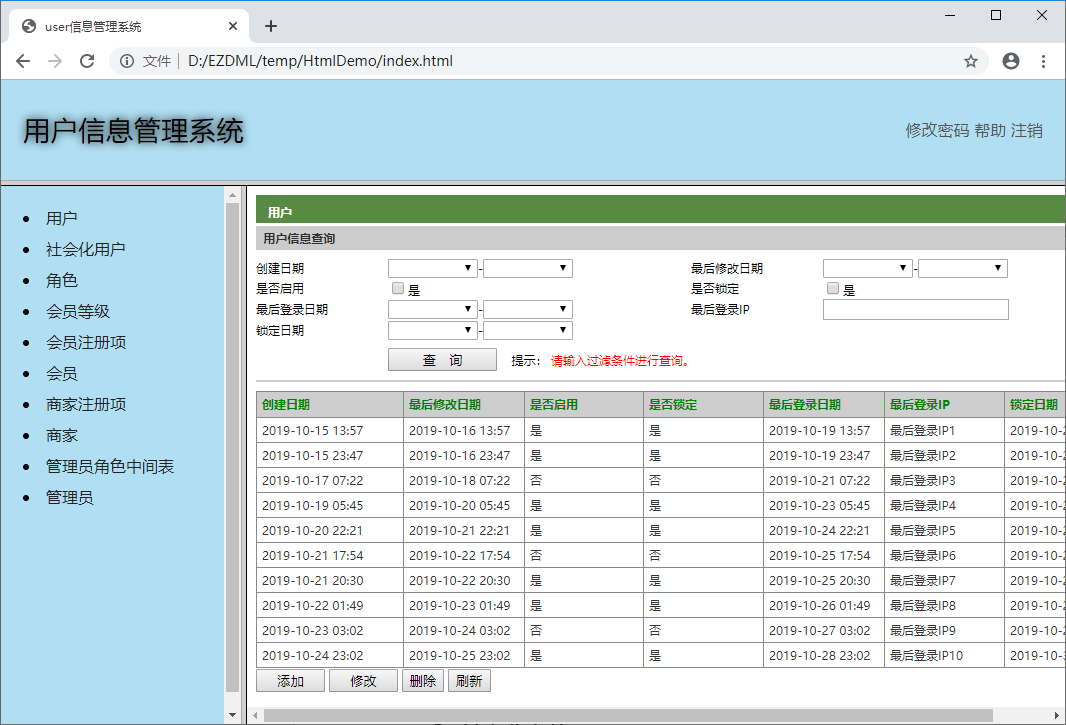
示例项目生成的结果:
生成完成自动按指示设置打开目标启动文件:
以下内容写于2019年或更早:
1 嗯,别怕,只是生成了个假的DEMO。要是真能直接生成个系统就不好了,大家都要失业了。话说,现在AI这么发达,失业恐怕是迟早的事,唉!
显然乐观了,EZDML现在能生成整个可运行系统,AI更是疯狂暴击程序员。
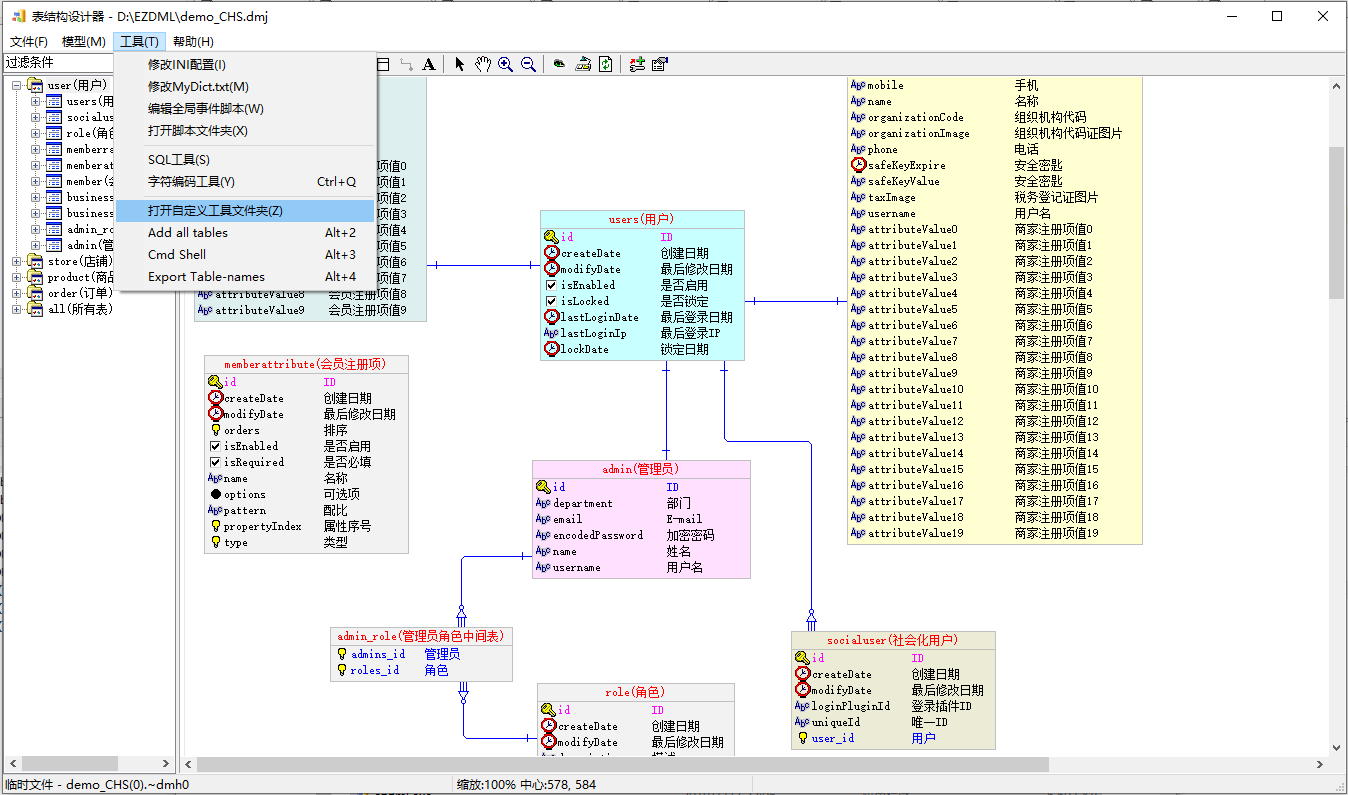
自定义工具 工具下面最后一组菜单,是根据EZDML\CustomTools目录下的文件自动生成的,此文件夹下的每个文件都会生成一个工具菜单。点击时会直接打开相应的文件;如果是PAS或JS文件,则尝试加载为脚本执行。
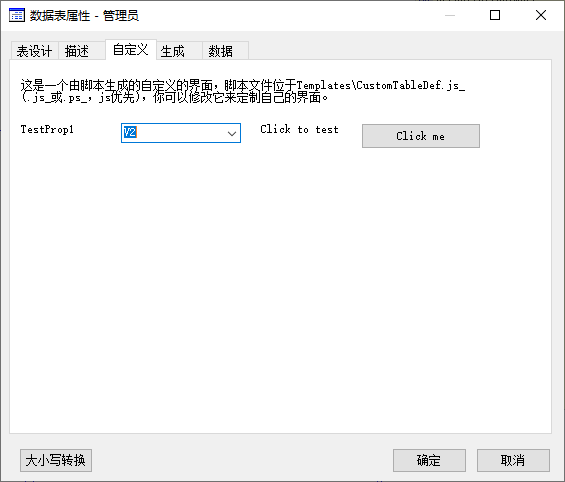
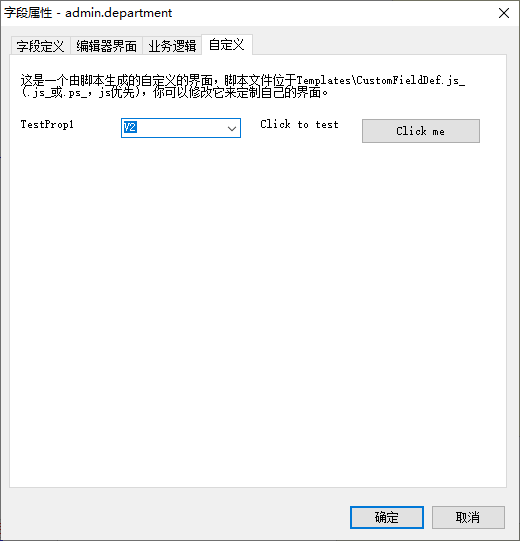
自定义表属性UI 自定义表属性UI由脚本文件CustomTableDef.js_/.ps_控制,位于Templates目录下。在INI中设置EnableCustomPropUI=1后,表属性会多一页自定义,自定义的界面由此脚本生成。
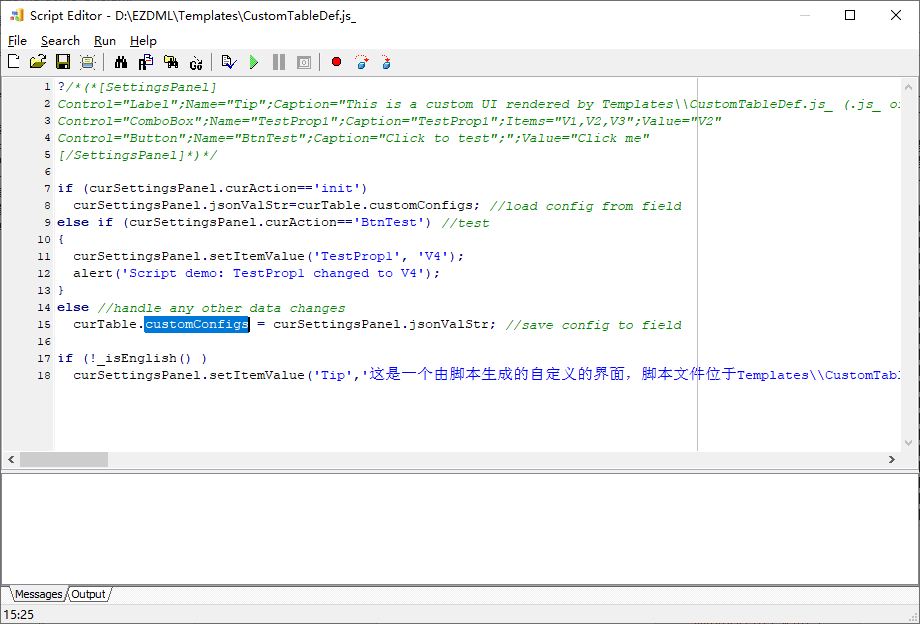
将对应的脚本拖到调试编辑窗口里打开:
可以看到,这里是直接用customConfigs来加载和保存JSON结果了。
另外可注意到,第一次加载执行脚本时,参数面板的CurAction的值为init,表示初始化。后续任何值被编辑修改发生改变(或点击按钮)时,参数面板的CurAction的值会重新写入,并重新执行整个脚本。
自定义字段属性UI 跟自定义表属性UI差不多是一样的,只是对应的文件名为CustomFieldDef.js_/.ps_
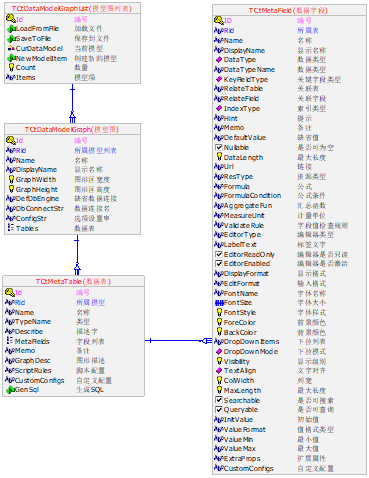
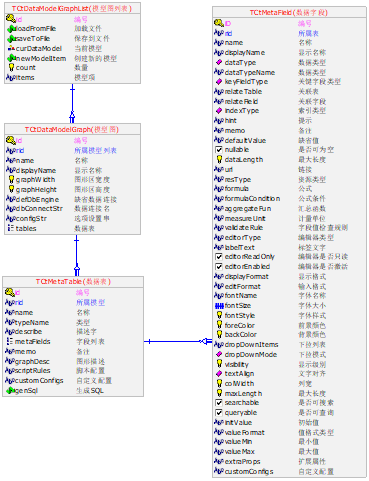
对象关系图 先看看这张对象关系图(本来想用visio的,后来想想好像EZDML也能做):
太大也不容易看,缩小下就清楚了:
类名都有TCtMeta前缀,因为:
a) Dephi的类默认都是以T开头,我猜是Type的意思?
b) CT是我自己做的一套基类的简称
c) Meta是元数据的意思
上面首字母是大写的,用JS的可能不习惯,可写段脚本改一下:
1
2
3
4
5
6
7
8
9
10
11
for (varj=0 ;j<curModel.tables .count ;j++){ vartb=curModel.tables .getItem (j); for (vark=0 ;k<tb.metaFields .count ;k++) { varfd=tb.metaFields .getItem (k); vars=fd.name ; fd.name =s.substring (0 ,1 ).toLowerCase ()+s.substr (1 ); } }
模型图、表、字段是EZDML的核心对象,简单说明如下:
一个DML文件就对应了一个模型图列表 (TCtDataModelGraphList)对象,通过allModels这个全局变量获取,可以直接调它的loadFromFile(fileName)和saveToFile(fileName)方法存取文件,例如这样:allModels.saveToFile(‘d:\ab.dmj’);。
通过模型图列表对象 (TCtDataModelGraphList)的getItem(i)(PAS里是Items[i]),可以遍历获取模型图对象(TCtDataModelGraph);也可以直接用curModel这个全局变量获取当前模型图。
模型图对象(TCtDataModelGraph)的tables属性是一个列表对象,可通过它的getItem(i)(PAS里是Items[i])遍历获取数据表对象(TCtMetaTable);也可以直接用curTable这个全局变量获取当前表(注意:当前表可能为空)。
表对象(TCtMetaTable)的metaFields属性是一个列表对象,可通过它的getItem(i)(PAS里是Items[i])遍历获取数据字段对象(TCtMetaField);也可以直接用curField这个全局变量获取当前字段(注意:当前字段可能为空)。
核心对象 EZDML的核心对象就是三个:
模型图(TCtDataModelGraph)
表(TCtMetaTable)
字段(TCtMetaField)。
它们有对应的集合列表对象:
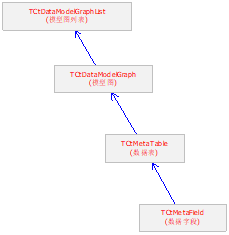
它们之间有上下层级包含关系:
公共属性 EZDML的三个核心对象——模型图(TCtDataModelGraph)、表(TCtMetaTable)、字段(TCtMetaField)——它们都是从一个公共对象TCtMetaObject继承,有公共的属性方法,TCtMetaObject定义如下:
1 2 3 4 5 6 7 8 9 10 11 12 13 14 15 16 17 18 19 20 21 22 23 24 25 26 27 28 29 30 31 32 33 34 35 36 37 38 39 40 41 42 43 44 45 46 47 48 49 50 51 52 53 54 55 56 57 58 59 60 61 62 63 TCtMetaObject = class (TObject)public procedure DoCustomEvent (EvtParamA, EvtParamB: string ) ;virtual ;procedure SortByOrderNo ;virtual ;procedure SortByName ;virtual ;procedure Reset ;virtual ;procedure AssignFrom (ACtObj: TCtObject) ;virtual ;procedure LoadFromFile (fn: string ) ;virtual ;procedure SaveToFile (fn: string ) ;virtual ;property ID: Integer read FID write FID; property CtGuid: stringread FCtGuid write FCtGuid;property PID: Integer read FPID write FPID;property RID: Integer read FRID write FRID;property Name : stringread FName write SetName;property Caption: stringread FCaption write SetCaption;property TypeName: stringread FTypeName write FTypeName;property Memo: stringread FMemo write FMemo;property DisplayText: stringread GetDisplayText;property CreateDate: TDateTime read FCreateDate write FCreateDate;property Creator: Integer read FCreator write FCreator;property CreatorName: stringread FCreatorName write FCreatorName;property ModifyDate: TDateTime read FModifyDate write FModifyDate;property Modifier: Integer read FModifier write FModifier;property ModifierName: stringread FModifierName write FModifierName;property HistoryID: Integer read FHistoryID write FHistoryID;property VersionNo: Integer read FVersionNo write FVersionNo;property LockStamp: stringread FLockStamp write FLockStamp;property DataLevel: _ENUM_TctDataLevel read FDataLevel write FDataLevel;property OrderNo: Double read FOrderNo write FOrderNo;property SubItems: TCtObjectList read GetSubItem write SetSubItem;property HasSubItems: Boolean read GetHasSubItems;property ParentList: TCtObjectList read FParentList write FParentList;property GlobeList: TCtGlobList read FGlobeList write SetGlobeList;property UserObjectList: TStrings read GetUserObjectList;property UserObjectCount: Integer read GetUserObjectCount;property UserObject[Index : string ]: TObject read GetUserObject write SetUserObject;property ParamList: TStrings read GetParamList;property Param[Name : string ]: stringread GetParam write SetParam;property JsonStr: string read GetJsonStr write SetJsonStr; property MetaModified: Boolean read GetMetaModified write SetMetaModified;property IsSelected: Boolean read FIsSelected write FIsSelected; end ;
读写属性
id: number - 对象的内部唯一整型标识(如表 ID,字段 ID)。
ctGuid: string - 对象的全球唯一匹配识别 GUID。
pid: number - 父级对象的 ID。
rid: number - 关联的根对象 ID。
name: string - 逻辑名称(代码引用名,如表名 sys_user)。
caption: string - 展示标题说明(中文描述,如表中文名 用户表)。
typeName: string - 对象的内部类型分类标签。
memo: string - 备注内容。
createDate / modifyDate: number - 创建与修改的浮点型 TDateTime。
creator / modifier: number - 创建及修改者用户内部 ID。
creatorName / modifierName: string - 创建与修改者名字。
historyID: number - 历史记录 ID。
versionNo: number - 对象的修改版本次数。
lockStamp: string - 锁定戳。
dataLevel: TctDataLevel - 数据级别。
orderNo: number - 用于控制排序的浮点数。
subItems: TCtObjectList - 子集列表容器。
parentList: TCtObjectList - 自身被接纳所处的父级容器列表。
globeList: TCtObjectList - 全局对象列表。
customAttr1 ~ customAttr5: string - 5个供二次开发自由读写的自定义字段属性。
calValue: number - 临时计算使用的整型缓存变量。
calString: string - 临时计算使用的字符串缓存变量.
jsonStr: string - 元数据对象的完整 JSON 表达文本;MCP JSON 工具读写的也是该属性。
metaModified: Boolean - 脏标记,表示元数据自上次保存后是否有变动。
isSelected: Boolean - 在设计区画布上是否被鼠标选中。
isChecked: Boolean - 在列表多选框中是否被勾选。
只读属性
nameCaption: string - 返回复合的“名称 - 标题”样式文字。
displayText: string - UI上实际呈递表现出的字符串。
hasSubItems: Boolean - 是否存在下辖子级。
userObjectList: TStringList - 用户自定义对象名列表。
userObjectCount: number - 用户自定义对象数量。
paramList: TStringList - 参数列表。
paramCount: number - 附加扩展参数的个数。
方法
getParam(name) / setParam(name, value): 读写任意名字的附加配置参数。
getUserObject(name) / setUserObject(name, obj): 绑定/读取用户自定义数据对象。
sortByOrderNo() / sortByName(): 对当前对象直辖下的子集列表按照 orderNo 或 name 重排。
reset(): 清空或重置该对象所有属性到初始默认配置。
assignFrom(srcObj): 从另一个 TCtObject 深度拷贝全部属性值到自身。
loadFromFile(path) / saveToFile(path): 从外部 JSON 元数据文件加载或序列化保存。
saveToTempFile(ext): 快速存盘至系统的临时文件夹中,返回临时文件的绝对路径。
execCmd(cmd, p1, p2): 向底层实体引擎派发特定的底层定制命令并获取返回字符串。
doCustomEvent(a, b): 触发对象自定义事件。
每一个表、字段对象都有这么多属性、方法。
列表 EZDML的三个核心对象对应的列表对象——模型图列表(TCtDataModelGraphList)、表集合(TCtMetaTableList)、字段列表(TCtMetaFieldList)——它们也是从一个公共对象对象继承而来,这个公共对象就是TCtObjectList了,其定义如下:
1
2
3
4
5
6
7
8
9
10
11
12
13
14
15
16
17
18
19
20
21
22
23
24
25
26
27
28
29
30
31
32
33
34
TCtObjectList = class (TList)public procedure CheckMaxSeq ;virtual ;procedure AssignFrom (ACtObj: TCtObjectList) ;virtual ;function NewObj :virtual ;procedure NotifyChildFree (AItem: TCtObject) ;virtual ;function CreateGlobeList :virtual ;function ItemByID (AID: Integer) :virtual ;function ItemByName (AName: string ; bCaseSensive: Boolean = False) :virtual ;function NameOfID (AID: Integer) :string ; virtual ;procedure Pack ;virtual ;procedure MereRemove (AItem: TCtObject) ;virtual ;procedure SortByOrderNo ;virtual ;procedure SortByName ;virtual ;procedure SaveCurrentOrder ;virtual ;property Items[Index : Integer]: TCtObject read GetCtItem write SetCtItem; default ;property GlobeList: TList read FGlobeList write FGlobeList;end ;
只读属性
count: number - 列表中包含的实体总数。
capacity: number - 列表内部容量。
方法
getItem(index): 根据从 0 开始的物理序号提取对象。
setItem(index, obj): 在指定位置强制注入/替换对象指针。
getCtItem(index) / setCtItem(index, obj): 元数据对象索引读写接口。
add(obj): 追加一个元素对象,返回新添加位置索引。
clear(): 彻底清空列表(注意:元数据列表清空将同时释放其管理的对象内存)。
delete(index): 移除并销毁指定索引位置的对象。
exchange(index1, index2): 交换两个元素位置。
insert(index, obj): 在指定位置插入对象。
move(curIndex, newIndex): 移动对象位置。
remove(obj): 检索并移除销毁指定的对象。
mereRemove(obj): 只从列表移除对象,不释放对象。
indexOf(obj): 检索对象的物理索引序号,未找到返回 -1。
pack(): 重新排版数组并清除占位的空指针实体。
assignFrom(srcList): 从另一个列表复制内容。
newObj(): 实例化一个当前列表所管理类型的新元素并追加至末尾。
notifyChildFree(obj): 子项释放通知。
createGlobeList(): 创建全局列表。
itemByID(id): 根据整型 ID 全局匹配查找子实体,失败返回 null。
itemByName(name): 根据逻辑名称匹配子实体(缺省忽略大小写)。
itemByCtGuid(guid): 根据 GUID 检索子实体。
nameOfID(id): 查询指定 ID 实体对象的名字。
sortByOrderNo() / sortByName(): 按照物理显示顺序或字母重排实体数组。
saveCurrentOrder(): 将物理索引转换为各子项的 orderNo 值保存。
checkMaxSeq(): 检查并修正最大序号。
遍历 对于CT列表对象(如TCtMetaFieldList、TCTMetaTableList)的遍历获取(结合count属性for循环),PASCAL里是Items[i],而JS则需要通过getItem(i)方法(v3.74起可以直接用数组下标[i]方式)。
对于JS脚本,v3.74起支持 JS Array 的 forEach 等标准数组遍历操作,支持 像普通 JavaScript 数组一样进行遍历和下标索引访问 。tables[0] 代表获取第一个表。
父类TList 这个TCtObjectList又是从TList列表继承的,TList定义如下:
1
2
3
4
5
6
7
8
9
10
11
12
13
14
15
16
TList = class (TObject)public function Add (Item: TObject) :procedure Clear ;virtual ;procedure Delete (Index : Integer) ;procedure Exchange (Index1, Index2: Integer) ;function IndexOf (Item: TObject) :procedure Insert (Index : Integer; Item: TObject) ;procedure Move (CurIndex, NewIndex: Integer) ;function Remove (Item: TObject) :procedure Pack ;property Capacity: Integer read FCapacity write SetCapacity;property Count: Integer read FCount write SetCount;property Items[Index : Integer]: TObject read GetItem write SetItem; default ;end ;
注:v3.74起,TList在JS中实现了Array的遍历方法。
模型图 定义说明都是很枯燥的,能坚持看到这里不容易。
模型图本质上就是一个容器,把表装在里面。可通过allModels这个列表遍历所有模型图,也可以直接用curModel这个全局变量获取当前模型图。
模型图对象定义如下(嗯,前面公共属性方法都列得差不多了,这里就没多少内容了):
1
2
3
4
5
6
7
8
9
10
11
12
13
14
15
16
17
18
19
20
TCtDataModelGraph = class (TCtMetaObject)public property DisplayName: stringread GetDisplayName;property GraphWidth: Integer read FGraphWidth write FGraphWidth;property GraphHeight: Integer read FGraphHeight write FGraphHeight;property DefDbEngine: stringread FDefDbEngine write FDefDbEngine;property DbConnectStr: stringread FDbConnectStr write FDbConnectStr;property ConfigStr: stringread FConfigStr write FConfigStr;property Tables: TCtMetaTableList read FTables write FTables;property OwnerList: TCtDataModelGraphList read FOwnerList;end ;
属性方法:
只读属性 displayName : UI 上实际显示的模型图名称。
读写属性 graphWidth / graphHeight : 画布的像素宽度与高度。
读写属性 defDbEngine : 数据库默认方言类型(如 'ORACLE', 'MYSQL')。
读写属性 dbConnectStr : 数据源的默认物理连接字符串。
读写属性 configStr : 该页面独立的复杂行为控制选项。
读写属性 modelPath : 导出文件或生成代码时的归档目录相对路径。
读写属性 purviewRoles : 配置具备访问当前模块的角色名。
读写属性 publishType : TCtModulePublishType - 模块发布类别。
读写属性 extraProps : 模型图扩展属性。
读写属性 tables : TCtMetaTableList - 该画布页面中呈现的数据表集合列表。
只读属性 ownerList : 所属模型图列表。
方法 isCatalog() : Boolean - 是否为单纯的分组目录节点。
方法 isModel() : Boolean - 是否为容纳实体表的真正模型图。
对应的模型图列表对象定义如下:
1
2
3
4
5
6
7
8
9
TCtDataModelGraphList = class(TCtObjectList) public procedure LoadFromFile(fn: string); procedure SaveToFile(fn: string); function TableCount: Integer; function NewModelItem: TCtDataModelGraph; property CurDataModel: TCtDataModelGraph read GetCurDataModel write FCurDataModel; end;
属性 curDataModel : TCtDataModelGraph [读写] - 读写当前前台展示的活动模型页面。
方法 loadFromFile(path) / saveToFile(path) : 从文件加载或保存模型列表。
方法 newModelItem() : 新建一个可视化的模型图页面并返回它。
方法 newCatalogItem() : 新建一个分组目录节点并返回它。
方法 tableCount() : 统计该层级下的表总数。
如果想在当前模型中新建一个表,可以这样写(JS):
1
2
var tb = curModel.tables .newTableItem ();tb.name =”新建表123 ”;
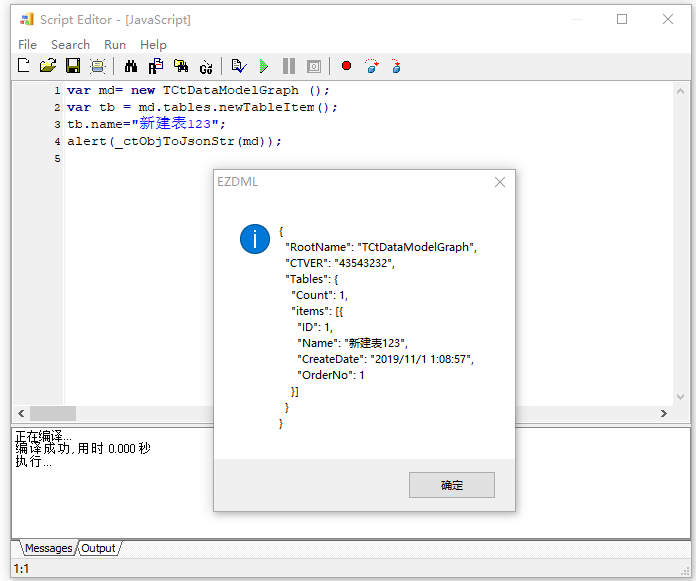
当然,你也可以凭空在内存中创建一个临时的模型图:
1
2
3
4
var md= new TCtDataModelGraph ();var tb = md.tables .newTableItem ();tb.name =”新建表123 ”; alert (_ctObjToJsonStr (md));
没办法看到图,不过看看JSON结果还是可以的(请注意CtObjToJsonStr是PAS实现的,出来的结果首字母是大写的):
表 表也是一个容器,把字段装在里面了。
在选择了表的时候,可以直接用curTable(PAS里其实是CurTable,不过PAS里大小写不敏感)这个全局变量获取当前表(如果没有选中有的话取出来是空的)。
表的类定义如下:
1
2
3
4
5
6
7
8
9
10
11
12
13
14
15
16
17
18
19
20
21
22
23
24
25
26
27
28
29
30
31
32
33
34
35
36
37
38
39
40
41
42
43
44
45
46
47
48
49
TCtMetaTable = class(TCtMetaObject) public //状态保存恢复接口 procedure SyncPropFrom(ACtTable: TCtMetaTable); virtual; function GetTableComments: string; virtual; function GetPrimaryKeyNames(AQuotDbType: string = ''): string; function IsText: Boolean; function IsTable: Boolean; function IsSqlText: Boolean; function GenSqlEx(bCreatTb: Boolean; bFK: Boolean; dbType: string = ''; dbEngine: TCtMetaDatabase = nil): string; virtual; function GenSql(dbType: string = ''): string; virtual; function GenSqlWithoutFK: string; virtual; function GenFKSql: string; virtual; function GenDqlDmlSql(dbType: string = ''): string; virtual; function GenSelectSql(maxRowCount: Integer; dbType: string = ''): string; virtual; function GetCustomConfigValue(AName: string): string; procedure SetCustomConfigValue(AName, AValue: string); property OwnerList: TCtMetaTableList read FOwnerList; //编号 //property ID;(祖先类已定义) //名称 //property Name; //类型 //TYPENAME为空或TABLE时是表,为TEXT时是纯文字 //property TypeName; //备注 //property Memo; //图形描述 property GraphDesc: stringread FGraphDesc write FGraphDesc; //元字段列表 property MetaFields: TCTMetaFieldList read GetMetaFields; //主键字段名 property KeyFieldName: stringread GetKeyFieldName; //描述字 property Describe: stringread GetDescribe write SetDescribe; //自定义配置 property CustomConfigs: stringread FCustomConfigs write FCustomConfigs; //脚本配置 property ScriptRules: stringread FScriptRules write FScriptRules; end;
主要属性
ownerList: TCtMetaTableList [只读] - 直属的容器列表。
customModId: string [读写] - 自定义模块 ID。
metaFields: TCtMetaFieldList [只读] - 该表拥有的字段(列)集合列表。
keyFieldName: string [只读] - 提取的主键列名称(若为联合主键则返回第一个)。
realTableName: string [只读] - 结合命名规则自动计算并替换后缀后的实际物理表名。
physicalName: string [读写] - 用户定义写入的原始物理表名。
UIDisplayName: string [只读] - 中文或UI上的综合标识名称(包含中文注释标题)。
UIDisplayText: string [读写] - 强制用户指定的画布别名。
bgColor: number [读写] - 颜色整型代码(如 RGB 数值)。
graphDesc: string [读写] - 表在画布中的几何定位及排布坐标配置。
describe: string [读写] - 详细的表结构描述说明。
sketchyDescribe: string [只读] - 简述文本。
designNotes: string [读写] - 设计备忘录。
genDatabase / genCode: Boolean [读写] - 正向建库/代码生成时是否包含该表的开关。
publishType: TCtModulePublishType [读写] - 发布类型。为cmptNone时默认不应生成代码,为 cmptAuto 取决上所属父模型的发布类型。
isReadOnly: Boolean [读写] - 表是否处于界面只读防修改保护。
viewSQL / listSQL: string [读写] - 用于非物理表(视图 SQL 编写或界面分页查询连表 SQL)。
extraSQL: string [读写] - 建表指令后紧跟并下发给数据库的附带批量 SQL 代码。
UILogic / businessLogic: string [读写] - 表表单界面前端拦截与保存时后台脚本逻辑。
extraProps: string [读写] - 扩展属性。
customConfigs: string [读写] - JSON 序列化存储的扩展定制配置项。
scriptRules: string [读写] - 表强校验和填补规则的表达式。
SQLWhereClause / SQLOrderByClause / SQLAlias: string [读写] - 连表提取数据的各种过滤、排序和别名子句。
ownerCategory / groupName: string [读写] - 归档目录与 UI 中的分组栏位名。
partitionInfo: string [读写] - 针对海量数据的分区表方案定义。
identifyCode: string [读写] - 表级别的特殊验证特征码。
purviewRoles / dataPurview: string [读写] - 表单访问控制角色名与行级过滤 SQL 权限串。
主要方法
syncPropFrom(table): 从另一张表同步属性。
getTableComments(): 生成表注释文本。
isTable() / isText() / isSqlText(): 是否为真实物理表、便签面板、或存储过程 SQL 文本。
isManyToManyLinkTable(): Boolean - 是否为多对多交叉桥接关联表。
getPrimaryKeyNames(quotDbType): 获取主键字段名集合,逗号分隔,可指定数据库引用风格。
getTitleFieldName(): 获取标题字段名。
getPrimaryKeyField(): 返回第一个主键字段对象 TCtMetaField。
getOneToManyInfo(fksOnly): 获取一对多关联信息。
getManyToManyInfo(): 获取多对多关联信息。
fieldOfChildTable(childTableName): 搜索在此表中对外引用了 childTableName 的外键字段对象。
genSqlEx(createTb, fk, dbType): 生成 DDL,可控制是否包含建表和外键。
genSql(dbType): 返回适应目标数据库类型的 CREATE TABLE DDL 建表 SQL 文本。
genSqlWithoutFK(): 生成不包含 FOREIGN KEY 声明的建表 DDL。
genFKSql(): 单独生成添加外键约束的 ALTER TABLE DDL 语句。
genDqlDmlSql(dbType): 生成 DQL/DML SQL。
genSelectSql(maxCount, dbType): 自动装配并返回一个标准取数的 SELECT * FROM ... SQL 语句。
getSpecKeyNames(keyFieldTp, quotDbType): 获取指定键类型字段名。
getPossibleKeyName(keyFieldTp): 获取推荐键名。
getDemoJsonData(rowIndex, opt, fields): 生成调试用的假数据 JSON 数组文本。
getCustomConfigValue(name) / setCustomConfigValue(name, val): 读写特定配置 JSON 中的值。
对应的表集合(列表)对象定义如下:
1
2
3
4
5
6
TCtMetaTableList = class(TCtMetaObjectList) public function NewTableItem: TCtMetaTable; property OwnerModel: TCtDataModelGraph read FOwnerModel; end;
只读属性 ownerModel : 指向持有此表列表的模型图页面对象。
读写属性 describe : 该表列表总括性描述。
方法 newTableItem() : 创建并加入一张新表,返回该表对象。
属性很少是不是,没办法,就一个列表来的,祖先传下来的东西已经够用了。
字段 在选择了字段的时候,可以直接用curField这个全局变量获取当前表(如果没有选中有的话取出来是空的)。
字段的类定义如下:
1
2
3
4
5
6
7
8
9
10
11
12
13
14
15
16
17
18
19
20
21
22
23
24
25
26
27
28
29
30
31
32
33
34
35
36
37
38
39
40
41
42
43
44
45
46
47
48
49
50
51
52
53
54
55
56
57
58
59
60
61
62
63
64
65
66
67
68
69
70
71
72
73
74
75
76
77
78
79
80
81
82
83
84
85
86
87
88
89
90
91
92
93
94
95
96
97
98
99
100
101
102
103
104
105
106
107
108
109
110
111
112
113
114
115
116
117
118
119
120
121
122
123
124
TCtMetaField = class(TCtMetaObject) public //状态保存恢复接口 function GetLogicDataTypeName: string; function GetFieldTypeDesc(bPhy: Boolean = False; dbType: string = ''): string; function GetFieldComments: string; function GetFieldDefaultValDesc(dbType: string = ''): string; function GetConstraintStr: string; procedure SetConstraintStr(Value: string); function GetConstraintStrEx(bWithKeys, bWithRelate: Boolean): string; procedure SetConstraintStrEx(Value: string; bForce: Boolean); function GetCustomConfigValue(AName: string): string; procedure SetCustomConfigValue(AName, AValue: string); property OwnerList: TCtMetaFieldList read FOwnerList; property OwnerTable: TCtMetaTable read GetOwnerTable; //编号 //property ID; //表编号 //property RID; //名称 //property Name; //显示名称 property DisplayName: stringread FDisplayName write FDisplayName; //数据类型 property DataType: _ENUM_TCtFieldDataType read FDataType write FDataType; //数据类型 property DataTypeName: stringread FDataTypeName write FDataTypeName; //关键字段类型_IdPidRid... property KeyFieldType: _ENUM_TCtKeyFieldType read FKeyFieldType write FKeyFieldType; //关联表 property RelateTable: stringread FRelateTable write FRelateTable; //关联字段 property RelateField: stringread FRelateField write FRelateField; //索引类型_0无1唯一2普通 property IndexType: _ENUM_TCtFieldIndexType read FIndexType write FIndexType; //提示 property Hint: stringread FHint write FHint; //备注 //property Memo; //缺省值 property DefaultValue: stringread FDefaultValue write SetDefaultValue; //是否可为空 property Nullable: Boolean read GetNullable write FNullable; //最大长度 property DataLength: Integer read FDataLength write FDataLength; //精度 property DataScale: Integer read FDataScale write FDataScale; //注:后面的属性是跟界面逻辑相关,对大部分人都是没有用的 //链接 property Url: stringread FUrl write FUrl; //资源类型 property ResType: stringread FResType write FResType; //公式 property Formula: stringread FFormula write FFormula; //公式条件 property FormulaCondition: stringread FFormulaCondition write FFormulaCondition; //汇总函数 property AggregateFun: stringread FAggregateFun write FAggregateFun; //计量单位 property MeasureUnit: stringread FMeasureUnit write FMeasureUnit; //字段值检查规则 property ValidateRule: stringread FValidateRule write FValidateRule; //编辑器类型 property EditorType: stringread FEditorType write FEditorType; //标签文字 property LabelText: stringread FLabelText write FLabelText; //编辑器是否只读 property EditorReadOnly: Boolean read FEditorReadOnly write FEditorReadOnly; //编辑器是否激活 property EditorEnabled: Boolean read FEditorEnabled write FEditorEnabled; //显示格式 property DisplayFormat: stringread FDisplayFormat write FDisplayFormat; //输入格式 property EditFormat: stringread FEditFormat write FEditFormat; //字体名称 property FontName: stringread FFontName write FFontName; //字体大小 property FontSize: Double read FFontSize write FFontSize; //字体样式 property FontStyle: Integer read FFontStyle write FFontStyle; //前景颜色 property ForeColor: Integer read FForeColor write FForeColor; //背景颜色 property BackColor: Integer read FBackColor write FBackColor; //下拉列表 property DropDownItems: stringread FDropDownItems write FDropDownItems; //下拉模式_0无1选择2编辑3添加 property DropDownMode: _ENUM_TCtFieldDropDownMode read FDropDownMode write FDropDownMode; //DML图形描述 property GraphDesc: stringread FGraphDesc write FGraphDesc; //显示级别 property Visibility: Integer read FVisibility write FVisibility; //文字对齐 property TextAlign: _ENUM_TAlignment read FTextAlign write FTextAlign; //列宽 property ColWidth: Integer read FColWidth write FColWidth; //最大长度 property MaxLength: Integer read FMaxLength write FMaxLength; //是否可搜索 property Searchable: Boolean read FSearchable write FSearchable; //是否可查询 property Queryable: Boolean read FQueryable write FQueryable; //初始值 property InitValue: stringread FInitValue write FInitValue; //值格式类型 property ValueFormat: stringread FValueFormat write FValueFormat; //最小值 property ValueMin: stringread FValueMin write FValueMin; //最大值 property ValueMax: stringread FValueMax write FValueMax; //扩展属性 property ExtraProps: stringread FExtraProps write FExtraProps; //自定义配置 property CustomConfigs: stringread FCustomConfigs write FCustomConfigs; end;
主要属性
ownerList: TCtMetaFieldList [只读] - 字段所归属的列表。
ownerTable: TCtMetaTable [只读] - 字段所归属的主表对象。
displayName: string [读写] - 字段中文说明/业务名。
dataType: TCtFieldDataType [读写] - 内部中立数据类型代号。
dataTypeName: string [读写] - 物理数据库对应的具体类型声明(如 'VARCHAR2(100)')。
keyFieldType: TCtKeyFieldType [读写] - 是否是主键/外键等(普通, 主键PK, 外键FK)。
relateTable: string [读写] - 外键所映射关联的主表逻辑名(如 'sys_user')。
relateTableRealName: string [只读] - 关联主表在后缀计算后真实的物理表名。
relateField: string [读写] - 关联主表的关联字段(常为主键)。
indexType: TCtFieldIndexType [读写] - 索引形式(无, 普通索引, 唯一约束 UNIQUE)。
indexFields: string [读写] - 联合索引中共同参编的其它协作字段列表。
url: string [读写] - 链接地址。
resType: number [读写] - 资源类型。
resSQL: string [读写] - 资源 SQL。
resSQLWhere: string [读写] - 资源 SQL 条件。
nullable: Boolean [读写] - 数据库底层是否允许 NULL。
required: Boolean [读写] - 前端表单是否为必填项(是否打红星)。
dataLength: number [读写] - 物理字符/字节长度。
dataScale: number [读写] - 小数精度。
maxLength: number [读写] - 界面输入控制的最大字符数限制。
defaultValue: string [读写] - 建表时的默认值。
initValue: string [读写] - 界面新增记录时预填入的初始文本值。
valueMin / valueMax: string [读写] - 取值的区间限制上限与下限。
DBCheck: string [读写] - 字段绑定的物理 CHECK 过滤约束条件。
SQLExpression: string [读写] - 对应虚拟字段的提取拼接 SQL 表达式。
formula / formulaCondition: string [读写] - 满足前置条件时触发回填运算的计算公式。
aggregateFun: string [读写] - 聚合函数。
measureUnit: string [读写] - 计量单位。
validateRule: string [读写] - 校验规则。
editorType: string [读写] - 指定前端录入渲染的组件微件类型(如 'TEXT', 'DATE', 'MEMO', 'COMBO' 等)。
labelText: string [读写] - 表单标签文字。
editorReadOnly / editorEnabled: Boolean [读写] - 编辑状态下置灰或只读。
explainText / hint: string [读写] - 气泡提示语或辅助性输入注解文字。
visibility: number [读写] - 显示级别。
isHidden / hideOnList / hideOnEdit / hideOnView: Boolean [读写] - 分别控制该列在不同使用场景下的显隐遮蔽。
displayFormat / editFormat / valueFormat: string [读写] - 数字千分位或日期展示掩码。
fontName / fontSize / fontStyle / foreColor / backColor: [读写] - 控制界面上单元格展现的字体、大小、高亮色及背景色。
textAlign: TCtTextAlignment [读写] - 对齐方式(靠左, 居中, 靠右)。
fixColType: TCtFieldFixColType [读写] - 表格列冻结样式(不冻结, 左侧固定, 右侧固定)。
colWidth: number [读写] - 初始列的像素宽度。
searchable / queryable / exportable: Boolean [读写] - 是否可搜索、可查询、可导出。
autoMerge / colSortable / showFilterBox: Boolean [读写] - 控制重复相邻行内容自动合并、允许点击列头重新排序、或顶部显示快捷过滤框。
dropDownItems: string [读写] - 枚举静态下拉选项,多行换行分割。
dropDownSQL: string [读写] - 动态拉取下拉列表的 SQL 指令。
dropDownMode: TCtFieldDropDownMode [读写] - 下拉选择限制模式。
itemColCount: number [读写] - 下拉/选项每行列数。
textClipSize: number [读写] - 文本裁剪长度。
sheetGroup / colGroup: string [读写] - 表单分页选项卡(Tab)的归类名字,以及多层复合表头的分组名。
extraProps: string [读写] - 扩展属性。
editorProps: string [读写] - 编辑器扩展属性。
graphDesc: string [读写] - 图形描述。
customConfigs: string [读写] - 自定义配置。
designNotes: string [读写] - 字段设计注解。
autoTrim: Boolean [读写] - 是否自动去除首尾空格。
UILogic / businessLogic: string [读写] - 前端逻辑与业务逻辑。
isFactMeasure: Boolean [读写] - 是否标记为度量分析值。
desensitised: Boolean [读写] - 界面渲染时是否脱敏打码。
testDataRules / testDataNullPercent: [读写] - 模拟仿真生成假数据的规律引擎及随机空白几率。
fieldWeight: number [读写] - 字段权重。
主要方法
isPK() / isFK() / isPhysicalField() / isSqlSelField(): 判断是否为主键、外键、物理存在的字段、参与 SQL 选择的字段。
getLogicDataTypeName(): 返回逻辑数据类型名。
isLobField(dbType): Boolean - 是否为大文本块 LOB 字段。
getPhyDataTypeName(dbType): 返回对应的物理数据库类型名(如 NVARCHAR2 等)。
getFieldTypeDesc(bPhy, dbType): 返回包含长度精度的完整属性陈述描述(如 VARCHAR2(50) )。
getFieldComments(): 返回字段注释文本。
getFieldDefaultValDesc(dbType): 返回默认值描述。
getConstraintStr(dbType): 获取字段约束的 DDL 构建串。
setConstraintStr(value): 写入字段约束串。
getConstraintStrEx(withKeys, withRelate): 获取扩展字段约束串。
setConstraintStrEx(value, force): 写入扩展字段约束串。
hasValidComplexIndex(): 判断是否有有效复合索引。
possibleKeyFieldType(): 推断键类型。
canDisplay(tp): 判断指定显示场景下是否可显示。
isRequired(): 判断字段是否必填。
getLabelText(): 获取标签文字。
possibleEditorType(): 推断编辑器类型。
getSQLSelExpression(): 获取 SQL 选择表达式。
possibleTextAlign(): 推断文本对齐方式。
getRelateTableObj(): 返回所指向引用的外键主表对象 TCtMetaTable(若非外键返回 null)。
getRelateTableField(): 返回所引用的外键表的主键字段对象 TCtMetaField。
getRelateTableTitleField(): 返回所引用的外键表中通常用于显示中文代称的标识字段对象。
genDemoData(rowIndex, opt, dataset): 根据规则随机产出该列的一个假数据样本。
getDemoItemList(textOnly): 获取演示下拉项。
possibleDemoDataRule(): 推断测试数据生成规则。
extractDropDownItemsFromMemo(): 从备注中提取下拉项。
getRelateTableDemoJson(rowIndex, opt): 获取关联表演示 JSON。
getCustomConfigValue(name) / setCustomConfigValue(name, val): 读写特定配置 JSON 中的值。
字段列表定义:
1
2
3
4
5
6
7
8
9
10
11
TCtMetaFieldList = class(TCtObjectList) private protected public function NewMetaField: TCtMetaField; function FieldByName(AName: string): TCtMetaField; property OwnerTable: TCtMetaTable read FOwnerTable; end;
只读属性 ownerTable : 指向持有此字段列表的父表对象 TCtMetaTable。
方法 newMetaField() : 在表末尾追加创建一个新的字段对象 TCtMetaField 并返回它。
方法 fieldByName(name) : 根据字段逻辑名称进行查找,忽略大小写。
方法 fieldByDisplayName(dispName) : 根据字段的 DisplayName 别称匹配寻找。
方法 fieldByLabelName(label) : 根据界面表单的标签文字查找字段。
字段相关的枚举类型,参见后面的《枚举类型》一节。
扩展对象 输出 就是那个全局变量curOut了,它其实是一个TStringList对象,参见TStringList的定义。
在不同时候,curOut的指向不一样,一般是指向一个内存对象,但调试时可能指向调试窗口的输出框,表属性生成时指向生成结果框,或者说,这些情况下执行完成后会把CurOut的结果拷贝到结果框中。而其它情况下,它可能不重要,没地方显示,执行完成就扔了,你看不到它的内容。
参数面板 这个是EZDML的“小发明”,有时需要输入点参数,老是用InputBox输入框太单调,写代码做窗体对话框又太烦,因此搞了个折中的方案:某些情况下(目前就是表或字段的属性页里)在脚本的最前面插一段特别的注释,就可以生成一个参数面板,显示在界面上,每当你修改了值或点了按钮,参数就会记下来,并重新执行你的脚本,你就可以在脚本里存取这些参数了。
参数设置面板配置格式如下,包括(和 )(Javascript下还需要在前后加/**/注释),属性间不能有空格,放在PAS文件的最前面:
1
2
3
4
5
6
7
8
9
10
11
(*[SettingsPanel] Control="Label";Caption="Please choose the parameters";Params="[FULLWIDTH][HEIGHT=40]" Control="Edit";Name="Author";Caption="Your name";";Value="huz";Params="[FULLWIDTH]" Control="Edit";Name="IsTest";Caption="Test flag";";Value="1";Params="[HIDDEN]" Control="Memo";Name="Introduce";Caption="Introduce";";Value="Your info..#13#10 to be continued..";Params="[FULLWIDTH][HEIGHT=80]" Control="ComboBox";Name="GenType";Caption="Generate type";Items="Type1,Type2,Type3";Value="Type1" Control="RadioBox";Name="Param1";Caption="Param1";Items="V1,V2,V3";Value="V1" Control="CheckBox";Name="Param2";Caption="Param2";Items="V1";Value="V2" Control="Button";Name="Help";Caption="Click here for help";";Value="Help..." [/SettingsPanel]*)
在脚本中可以使用curSettingsPanel这个全局变量来获取参数面板对象,参数面板对应的类是TDmlScriptControlList,它是一个列表(TList),每个子项的对象类为TDmlScriptControl,TDmlScriptControl的定义如下:
1
2
3
4
5
6
7
8
9
10
11
12
13
14
15
16
17
18
19
20
21
22
23
24
25
26
27
{ DML脚本控件 } TDmlScriptControl = class(TObject) private public function HasValue: Boolean; //编号 property Id: Integer read FId write FId; //控件类型 property ControlType: stringread FControlType write FControlType; //名称 property Name: stringread FName write FName; //标题 property Caption: stringread FCaption write FCaption; //子项 property Items: stringread FItems write FItems; //值 property Value: stringread FValue write SetValue; //其它参数 property Params: stringread FParams write FParams; //描述字 property TextDesc: stringread GetTextDesc write SetTextDesc; //关联控件 property Control: TControl read FControl write FControl; end;
面板读写属性
id: number - 控件 ID。
controlType: string - 控件类型。
name: string - 控件名。
caption: string - 控件标题。
items: string - 候选项。
value: string - 当前值。
params: string - 扩展参数。
textDesc: string - 说明文本。
control: TControl - 实际 LCL 控件对象。
面板方法 TDmlScriptControlList 的定义:
1
2
3
4
5
6
7
8
9
10
11
12
13
14
15
16
17
18
19
20
TDmlScriptControlList = class(TList) public function NewItem: TDmlScriptControl; virtual; function GetItemValue(AName: string): string; procedure SetItemValue(AName: string; AValue: string); procedure RegenControls; procedure SaveSettings; property Items[Index: Integer]: TDmlScriptControl read GetItem write PutItem; default; property CurFileName: stringread FCurFileName write FCurFileName; property CurAction: stringread FCurAction write FCurAction; //描述字 property TextDesc: stringread GetTextDesc write SetTextDesc; //JSON值 property JsonValStr: stringread GetJsonValStr write SetJsonValStr; property ParentWnd: TWinControl read FParentWnd write FParentWnd; end;
列表读写属性
curFileName: string - 当前脚本文件名。
curAction: string - 当前动作。
textDesc: string - 配置面板说明文本。
jsonValStr: string - 控件值 JSON 文本。
parentWnd: TWinControl - 父窗口对象。
列表方法
newItem(): 新建一个控件配置项 TDmlScriptControl。
getItem(index) / putItem(index, obj): 读写指定索引的控件配置项。
getItemValue(name) / setItemValue(name, value): 按控件名读取或写入控件值。
regenControls(): 重新生成界面控件。
saveSettings(): 保存当前设置。
再强调下,不是所有地方都会加载这个参数面板配置。
全局变量 以下为主要的全局变量:
AllModels: TCtDataModelGraphList;//所有模型列表。
CurModel: TCtDataModelGraph; //当前模型(注:可能为空)
CurTable: TCtMetaTable;//当前表(注:可能为空)
CurField: TCtMetaField;//当前字段(注:可能为空)
CurOut: TStringList;//当前输出设备
CurSettingsPanel: TDmlScriptControlList;//当前参数面板(注:可能为空)
Application: TApplication; //程序应用对象,可获取MainForm、ExeName
Screen: TScreen; //屏幕对象,可用于遍历窗体和获取当前活动的窗体、控件
环境参数 这里列举一些常用的环境参数获取方法(PAS):
主程序EXE文件名:Application.ExeName
应用文件目录:GetEnv(‘APPFOLDER’)
主窗口:Application.MainForm
当前焦点所在窗口:Screen.ActiveForm
当前焦点控件:Screen.ActiveControl
当前(或最近一次)连接的数据库类型:CurDbType()
当前WINDOWS用户名:GetEnv(‘WINUSER’)
当前WINDOWS计算机名:GetEnv(‘COMPUTER’)
当前机器IP:GetEnv(‘IP’)
当前DML文件全名:GetEnv(‘DMLFILEPATH’)
当前程序命令行:GetEnv(‘CMDLINE’)
当前选中的对象:GetSelectedCtMetaObj()
当前系统类型(WINDOWS/DARWIN/UNIX):GetEnv(‘SYSTEMTYPE’)
当前系统架构位数(32位/64位):GetEnv(‘ARCHBITS’)
全局方法 以下函数是Pascal的实现,在JavaScript中也可以直接使用。
注:标准的alert、confirm、prompt是默认就支持的,另外还增加了toast、choice函数。
1
2
3
4
5
6
7
8
9
10
11
12
13
14
15
16
17
18
19
20
21
22
23
24
25
26
27
28
29
30
31
32
33
34
35
36
37
38
39
40
41
42
43
44
45
46
47
48
49
50
51
52
53
54
55
56
57
58
59
60
61
62
63
64
65
66
67
68
69
70
71
72
73
74
75
76
77
78
79
80
81
82
83
84
85
86
87
88
89
90
91
92
93
94
95
96
97
98
99
100
101
102
103
104
105
106
107
108
109
110
111
112
113
114
115
116
117
118
119
120
121
122
123
124
125
126
127
128
129
130
131
132
133
134
135
136
137
138
139
140
141
142
143
144
145
146
147
148
149
150
151
152
153
154
155
156
157
158
159
160
161
162
163
164
165
function ExecAppCmd (Cmd, param1, param2: String ) :String ;function GetEnv (const AName: string ) :string ;function GetSelectedCtMetaObj :function CtObjToJsonStr (ACtObj: TCtMetaObject) :String ;function ReadCtObjFromJsonStr (ACtObj: TCtMetaObject; AJsonStr: String ) :procedure Sleep (milliseconds: Cardinal) ;function EncodeDate (Year, Month, Day: Word) :function EncodeTime (Hour, Min, Sec, MSec: Word) :function DayOfWeek (const DateTime: TDateTime) :function Date :function Time :function Now :function CurrentTimeMillis :function DateTimeToJSTime (D: TDateTime) :function JSTimeToDateTime (tm: Int64) :function DateToStr (D: TDateTime) :string ;function StrToDate (const s: string ) :function FormatDateTime (const fmt: string ; D: TDateTime) :string ;function TimeToStr (const DateTime: TDateTime) :string ;function DateTimeToStr (const DateTime: TDateTime) :string ;function StrToTime (const S: string ) :function StrToTimeDef (const S: string ; constDefault: TDateTime) :function StrToDateTime (const S: string ) :function StrToDateTimeDef (const S: string ; constDefault: TDateTime) :function FileAge (const FileName: string ) :function FileExists (const FileName: string ) :function DirectoryExists (const Directory: string ) :function ForceDirectories (Dir: string ) :function FileGetDate (Handle: Integer) :function FileSetDate (Handle: Integer; Age: Integer) :function FileGetAttr (const FileName: string ) :function FileSetAttr (const FileName: string ; Attr: Integer) :function FileIsReadOnly (const FileName: string ) :function FileSetReadOnly (const FileName: string ; ReadOnly: Boolean) :function DeleteFile (const FileName: string ) :function RenameFile (const OldName, NewName: string ) :function ChangeFileExt (const FileName, Extension: string ) :string ;function ExtractFilePath (const FileName: string ) :string ;function ExtractFileDir (const FileName: string ) :string ;function ExtractFileDrive (const FileName: string ) :string ;function ExtractFileName (const FileName: string ) :string ;function ExtractFileExt (const FileName: string ) :string ;function ExpandFileName (const FileName: string ) :string ;function ExtractRelativePath (const BaseName, DestName: string ) :string ;function ExtractShortPathName (const FileName: string ) :string ;function FileSearch (const Name , DirList: string ) :string ;function DiskFree (Drive: Byte) :function DiskSize (Drive: Byte) :function FileDateToDateTime (FileDate: Integer) :function DateTimeToFileDate (DateTime: TDateTime) :function GetCurrentDir :string ;function SetCurrentDir (const Dir: string ) :function CreateDir (const Dir: string ) :function RemoveDir (const Dir: string ) :function StrToFloatDef (const S: string ; constDefault: Extended) :procedure Beep ;function StringReplace (const S, OldPattern, NewPattern: string ; Flags: TReplaceFlags) :string ;function Format (const Format: string ; const Args: arrayof Variant) :string ;procedure Randomize ;function RandomI (Range: Integer) :function RandomD :function CtGenGUID :string ;procedure Writeln (s: string ) ;function Readln (question: string ) :string ;procedure WriteLog (s: string ) ;function InputBox (const ACaption, APrompt, ADefault: string ) :string ;function InputMemoQuery (const ACaption, APrompt: string ; var Value: string ; bReadOnly: Boolean) :procedure Toast (const Msg: string , closeTimeMs: Integer) ;function Choice (const APrompt, Items, ADefault: string ) :string ;procedure RaiseErr (msg: string ) ;procedure Abort ;procedure RaiseErrOut (msg: string ) ;procedure AbortOut ;function CtCopyStream (src,dst: TStream; Count: LongInt) :procedure ShowMessage (const Msg: string ) ;procedure MsgBox (const Msg: Variant) ;procedure Alert (const Msg: Variant) ;function EscapeXml (const XML: Variant) :string ;procedure ShellOpen (FileName, Parameters, Directory: String ) ;function OpenFileDialog (const ATitle, AFilter, AFileName: string ; bMulti: Boolean) :string ;function OpenPicDialog (const ATitle, AFilter, AFileName: string ; bMulti: Boolean) :string ;function ExtractCompStr (const Strsrc: string ; const sCompS, sCompE: string ; bCaseInsensitive: Boolean; const Def: string ) :string ;function AddOrModifyCompStr (const Strsrc, SubVal: string ; const sCompS, sCompE: string ; bCaseInsensitive: Boolean) :string ;function RunCmd (cmd: string ; timeout: Integer) :string ; function StringExtToWideCode (Str: string ) :string ; function WideCodeNarrow (Str: string ) :string ; function GetClassName (v: TObject) :string ; functionCreateComponent (AOwner: TComponent; const AClassName: string ): TComponent; procedureReadDfmComponents(ARoot: TComponent; constDfm: string ); function FindChildComp (AOwner: TComponent; const AName: string ) :procedure SetCompPropValue (AComponent: TComponent; AKey, sValue: string ) ;function GetCompPropValue (AComponent: TComponent; AKey: string ) :string ; function GetCompPropObject (AComponent: TComponent; AKey: string ) :procedure SetCompPropObject (AComponent: TComponent; AKey: string ; sValue: TObject) ;function Utf8Encode (const WS: WideString) :String ;function Utf8Decode (const S: String ) :function URLEncode (const msg: String ) :String ;function URLDecode (const url: string ) :string ;function Utf8URLEncode (const msg: String ) :String ;function GetPointerByObj (v: TObject) :function GetObjByPointer ( p: Integer) :function GetPointerByStr (var v: string ) :function GetStrByPointer ( p: Integer) :string ;function GetPointerByWStr (var v: WideString) :function GetWStrByPointer ( p: Integer) :function Send_Msg (AHandle: Integer; Msg: Integer; wParam: Integer; lParam: Integer) :function Send_StrMsg (AHandle: Integer; Msg: Integer; wParam: WideString; lParam: WideString) :function TextToShortCut (Text: string ) :function ChnToPY (Value: string ) :string ;function GetGParamValue (AName: string ) :string ; function GetGParamObject (AName: string ) :procedure SetGParamValue (AName, AValue: string ) ;procedure SetGParamObject (AName: string ; AObject: TObject) ;procedure SetGParamValueEx (AName, AValue: string ; AObject: TObject) ;function IsReservedKeyworkd (str: string ) :function GetDbQuotName (AName, dbType: string ) :string ;function GetIdxName (ATbn, AFieldName: string ) :string ;function GetAppDefTempPath :string ; function GetUnusedFileName (AFileName: string ) :string ; function Clipboard :function IsEnglish :function CurDbType :String ; function ExecCtDbLogon (DbType, database, username, password: string ; bSavePwd, bAutoLogin, bShowDialog: Boolean; opt: string ) :string ; function ExecSql (sql, opts: string ) :function ExecSql (sql, opts: string ) :function GetUrlData (URL, PostData, Opts: string ) :string ; function CurAction :string ;function GetParamValue (AName: string ) :string ;function GetParamValueDef (AName,ADef: string ) :string ;procedure SyncTableProps (Tb: TCtMetaTable) ;procedure RunDmlScript (AFileName, AScript: string ) ;procedure PrintVar (const AVal: Variant) ;
终端输出与调试 (Output & Log)
Print(val)Write(val)print(val)write(val)
旧版 : _print(val) / _write(val)
参数 : val: any - 待输出的数据。
说明 : 向终端/脚本控制台输出信息,不带换行。
Println(val)Writeln(val)println(val)writeln(val)
旧版 : _println(val) / _writeln(val)
参数 : val: any - 待输出的数据(可选)。
说明 : 向终端/脚本控制台输出信息,带换行。
Trace(val)
旧版 : _trace(val)
参数 : val: any - 调试数据。
说明 : 追踪并打印变量的详细内部结构或信息。
Readln(question)
旧版 : _readln(question)
参数 : question: string - 输入提示文字。
返回值 : string - 用户输入的文本。
说明 : 读取一行用户输入。
PrintVar(val)
旧版 : _printVar(val)
参数 : val: any - 待输出的数据。
说明 : 向终端/脚本控制台输出信息,不带换行
WriteLog(str)
旧版 : _writeLog(str)
参数 : str: string - 日志行文本。
说明 : 将记录写入系统级日志。
界面与弹窗交互 (Dialogs & GUI)
Alert(msg)alert(msg)ShowMessage(msg)
旧版 : _alert(msg) / _showMessage(msg)
参数 : msg: string - 提示消息。
说明 : 弹出原生系统警告框。
Confirm(msg)confirm(msg)
旧版 : _confirm(msg)
参数 : msg: string - 询问信息。
返回值 : Boolean - 点击“是/确定”返回 true,点击“否/取消”返回 false。
说明 : 弹出是否确认的选择框。
Prompt(msg, initVal)prompt(msg, initVal)
旧版 : _prompt(msg, initVal)
参数 :
msg: string - 输入提示信息。
initVal: string - 默认初始值。
返回值 : string - 用户输入的文本,取消则返回空。
说明 : 弹出一个单行文本输入交互框。
Toast(msg, closeTimeMs)toast(msg, closeTimeMs)
旧版 : _toast(msg, closeTimeMs)
参数 :
msg: string - 吐司气泡文字。
closeTimeMs: number - 自动关闭时长(毫秒)。
说明 : 在主窗口侧边弹出一个悬浮淡出式“吐司”提示框。
Choice(msg, items, initVal)choice(msg, items, initVal)
旧版 : _choice(msg, items, initVal)
参数 :
msg: string - 选项面板标题提示。
items: string - 逗号或换行分隔的可选列表选项字符串。
initVal: string - 缺省定位的选项。
返回值 : string - 用户选择的值。
说明 : 弹出一个下拉单选选择框。
MsgBox(msg, title, flags)
旧版 : _msgBox(msg, title, flags)
参数 :
msg: string - 询问内容。
title: string - 弹出框标题。
flags: number - 常量按钮及图标的复合掩码值(如 MB_YESNO | MB_ICONQUESTION)。
返回值 : number - 代表所按按钮的 ID(如 IDYES / IDNO)。
说明 : 高级原生询问框定制。
InputBox(title, query, defaultVal)
旧版 : _inputBox(title, query, defaultVal)
参数 : 标题、查询提示及缺省默认值。
返回值 : string。
InputMemoQuery(title, query, textVal)
旧版 : _inputMemoQuery(title, query, textVal)
参数 : 标题、多行文字描述提示、默认输入的大段多行文本。
返回值 : string - 用户编写的完整大段文本。
说明 : 弹出一个支持多行文本编辑的对话框。
ShellOpen(fileName, params, dir)
旧版 : _shellOpen(fileName, params, dir)
说明 : 调用系统打开文件、目录或外部程序。
OpenFileDialog(title, filter, fileName, multi)OpenPicDialog(title, filter, fileName, multi)
旧版 : _openFileDialog(...) / _openPicDialog(...)
说明 : 打开文件/图片选择对话框。
文件系统与磁盘操作 (File & Directory)
ReadFile(filePath)
旧版 : _readFile(filePath)
参数 : filePath: string - 文件绝对路径。
返回值 : string - 读取的整个文件文本内容。
WriteFile(filePath, content)
旧版 : _writeFile(filePath, content)
参数 :
filePath: string - 文件绝对路径。
content: string - 要写入的文本。
说明 : 写入文本到文件(如果文件存在则会覆盖)。
DeleteFile(filePath)
旧版 : _deleteFile(filePath)
参数 : filePath: string - 文件路径。
返回值 : Boolean - 是否删除成功。
RenameFile(oldName, newName)
旧版 : _renameFile(oldName, newName)
参数 : 原始文件名,新文件名。
返回值 : Boolean。
FileExists(filePath)DirectoryExists(dirPath)
旧版 : _fileExists(filePath) / _directoryExists(dirPath)
参数 : 路径。
返回值 : Boolean - 是否存在该文件/文件夹。
ForceDirectories(dirPath)CreateDir(dirPath)
旧版 : _forceDirectories(dirPath) / _createDir(dirPath)
参数 : 文件夹路径。
说明 : 递归创建目录(若中间父级目录不存在将自动补全)。
RemoveDir(dirPath)
旧版 : _removeDir(dirPath)
说明 : 删除空目录。
ReadDirectory(dirPath)
旧版 : _readDirectory(dirPath)
参数 : 文件夹路径。
返回值 : string - 以换行分隔的该目录下所有文件及子文件夹名单。
GetCurrentDir()SetCurrentDir(dir)
旧版 : _getCurrentDir() / _setCurrentDir(dir)
说明 : 获取/修改当前脚本运行环境的工作目录。
FileAge(filePath)
旧版 : _fileAge(filePath)
返回值 : number - 文件的时间戳代码(失败返回 -1)。
FileGetDate(handle)FileSetDate(handle, age)
旧版 : _fileGetDate(handle) / _fileSetDate(handle, age)
说明 : 针对打开的文件句柄进行日期读写。
FileGetAttr(filePath)FileSetAttr(filePath, attr)
旧版 : _fileGetAttr(filePath) / _fileSetAttr(filePath, attr)
说明 : 读写文件属性标志(如只读、隐藏、系统文件等)。
FileIsReadOnly(filePath)
旧版 : _fileIsReadOnly(filePath)
返回值 : Boolean - 文件是否被设为了写保护。
FileSearch(name, list)
旧版 : _fileSearch(name, list)
说明 : 在分号分隔的路径列表中搜索指定名字的文件。
DiskFree(drive)DiskSize(drive)
旧版 : _diskFree(drive) / _diskSize(drive)
参数 : drive: number - 磁盘驱动器盘符代号(0 代表当前,1 代表 A 盘,3 代表 C 盘)。
返回值 : number - 磁盘空闲/总容量大小(字节)。
FileDateToDateTime(fileDate)DateTimeToFileDate(dateTime)
旧版 : _fileDateToDateTime(fileDate) / _dateTimeToFileDate(dateTime)
说明 : 在文件日期整型值和 Delphi TDateTime 浮点值之间转换。
路径处理 (Path Parsing)
ExtractFilePath(filePath)
旧版 : _extractFilePath(filePath)
返回值 : string - 返回路径中最后的斜杠(及之前)的目录部分(如 C:\dir\)。
ExtractFileDir(filePath)
旧版 : _extractFileDir(filePath)
返回值 : string - 返回去除末尾斜杠后的目录部分(如 C:\dir)。
ExtractFileDrive(filePath)
旧版 : _extractFileDrive(filePath)
返回值 : string - 返回盘符(如 C:)。
ExtractFileName(filePath)
旧版 : _extractFileName(filePath)
返回值 : string - 返回包含后缀的纯文件名(如 test.txt)。
ExtractFileExt(filePath)
旧版 : _extractFileExt(filePath)
返回值 : string - 返回带点号的扩展名(如 .txt)。
ChangeFileExt(filePath, newExt)
旧版 : _changeFileExt(filePath, newExt)
说明 : 替换原路径中的后缀名并返回新路径。
ExpandFileName(filePath)
旧版 : _expandFileName(filePath)
说明 : 将相对路径解析转换成绝对路径。
ExtractRelativePath(baseName, destName)
旧版 : _extractRelativePath(baseName, destName)
说明 : 计算 destName 相对 baseName 的相对路径。
ExtractShortPathName(filePath)
旧版 : _extractShortPathName(filePath)
说明 : 获取系统短路径名。
时间与日期 (Date & Time)
_now()
返回值 : number - 代表当前时间的 Delphi 浮点 TDateTime。
说明 : 当前代码仅注册下划线版本,未生成 Now() 别名。
_date()_time()
说明 : 获取当天日期/当前时间的浮点 TDateTime 值。
CurrentTimeMillis()
旧版 : _currentTimeMillis()
返回值 : number - Java 风格的毫秒级时间戳。
EncodeDate(year, month, day)EncodeTime(hour, min, sec, msec)
旧版 : _encodeDate(year, month, day) / _encodeTime(hour, min, sec, msec)
说明 : 根据年月日时分秒装配并返回浮点型 TDateTime。
DayOfWeek(dateTime)
旧版 : _dayOfWeek(dateTime)
参数 : dateTime: number - TDateTime 浮点数。
返回值 : number - 星期几(1 代表星期天,2 代表星期一,…,7 代表星期六)。
DateTimeToJSTime(dateTime)JSTimeToDateTime(jsTime)
旧版 : _dateTimeToJSTime(dateTime) / _jsTimeToDateTime(jsTime)
说明 : 负责在 Delphi TDateTime 浮点与 JS 自带 Date 毫秒级时间戳之间互相转换。
DateToStr(date)TimeToStr(time)DateTimeToStr(dateTime)
旧版 : _dateToStr(date) / _timeToStr(time) / _dateTimeToStr(dateTime)
说明 : 将 TDateTime 格式化转换为系统缺省习惯的日期、时间或完整文本字符串。
StrToDate(str)StrToTime(str)StrToDateTime(str)
旧版 : _strToDate(str) / _strToTime(str) / _strToDateTime(str)
说明 : 从规范字符串反解析成浮点型 TDateTime(失败则抛出异常)。
StrToTimeDef(str, def)StrToDateTimeDef(str, def)StrToFloatDef(str, def)
旧版 : _strToTimeDef(str, def) / _strToDateTimeDef(str, def) / _strToFloatDef(str, def)
说明 : 解析字符串时间或浮点数,失败则采用传入的默认值。当前代码未注册 StrToDateDef。
FormatDateTime(formatStr, dateTime)
旧版 : _formatDateTime(formatStr, dateTime)
参数 :
formatStr: string - 格式化模板,如 'yyyy-mm-dd hh:nn:ss.zzz'。
dateTime: number - 待转化时间。
返回值 : string。
文字编码与通用工具 (Encoding & Utils)
StringReplace(str, oldPattern, newPattern, flags)
旧版 : _stringReplace(str, oldPattern, newPattern, flags)
参数 :
str: string - 原始文字。
oldPattern: string - 被替换词。
newPattern: string - 新词。
flags: string - 'rfReplaceAll'(全部替换)和 'rfIgnoreCase'(忽略大小写)组成的选项串。
返回值 : string。
Format(formatStr, argsArray)
旧版 : _format(formatStr, argsArray)
参数 : Delphi 风格的格式化串(如 '%s has %d tables')以及对应的参数数组(如 ['ModelA', 15])。
返回值 : string。
EscapeXml(val)
旧版 : _escapeXml(val)
说明 : 对文本中的 XML 敏感字(如 <, >, &, ")进行实体转码。
CodeTextForLang(text, lang)
旧版 : _codeTextForLang(text, lang)
说明 : 将文本块按目标语言的字符串语法规则转义(如转义 JS/Java 双引号)。
ExtractCompStr(str, startMark, endMark, caseInsensitive, def)AddOrModifyCompStr(str, subVal, startMark, endMark, caseInsensitive)
旧版 : _extractCompStr(...) / _addOrModifyCompStr(...)
说明 : 提取或新增/修改成对标记之间的片段文本。
StringExtToWideCode(str)WideCodeNarrow(str)
旧版 : _stringExtToWideCode(str) / _wideCodeNarrow(str)
说明 : 扩展字符串与宽字符编码文本转换。
Utf8Encode(str)Utf8Decode(str)
旧版 : _utf8Encode(str) / _utf8Decode(str)
说明 : UTF-8 编码/解码。
URLEncode(str)URLDecode(str)
旧版 : _uRLEncode(str) / _uRLDecode(str)
说明 : 对 URL 中的特殊非安全字符进行 ASCII % 转义。
Utf8URLEncode(str)
旧版 : _utf8URLEncode(str)
说明 : 先按 UTF-8 编码后再做 URL 转义。
DmlStrLength(str)
旧版 : _dmlStrLength(str)
说明 : 按 EZDML 规则计算字符串长度。
ChnToPY(chnStr, opt)
旧版 : _chnToPY(chnStr, opt)
参数 : chnStr: string - 汉字文本。opt: string - 转换模式,如 'pinyin' (拼音全拼) 或 'first' (拼音首字母)。
返回值 : string。
说明 : 汉字快速拼音化工具。
AutoCapProc(str, opt)
旧版 : _autoCapProc(str, opt)
说明 : 根据 EZDML 命名规则进行自动大小写/命名转换。
IfElse(condition, trueVal, falseVal)
旧版 : _ifElse(condition, trueVal, falseVal)
说明 : 按条件返回两个值之一。
Clipboard()IsReservedKeyword(word)
旧版 : _isReservedKeyword(word)
说明 : 判断字符串是否为数据库常用保留字。
Randomize()RandomI(range)RandomD()
旧版 : _randomize() / _randomI(range) / _randomD()
说明 : 初始化随机种子,产生随机整数(在 [0, range-1] 区间),产生随机浮点数(在 [0, 1] 区间)。
Beep()RunCmd(cmd, timeout)ExecAppCmd(cmd, param1, param2)
旧版 : _runCmd(cmd, timeout) / _execAppCmd(cmd, param1, param2)
说明 : 执行控制台命令或在独立进程环境执行外部命令。
GetUrlData(url, postData, opts)
旧版 : _getUrlData(url, postData, opts)
说明 : 发起 HTTP 请求并返回内容。
GetEnv(name)GetEnvVar(name, def)SetEnvVar(name, value)
旧版 : _getEnv(name) / _getEnvVar(name, def) / _setEnvVar(name, value)
说明 : 读取或设置环境变量。
CreateComponentReadDfmComponentsFindChildComp
旧版 : _createComponent / _readDfmComponents / _findChildComp
说明 : 动态创建、读取和查找 LCL 组件。
SetCompPropValueGetCompPropValueSetCompPropObjectGetCompPropObject
旧版 : 对应下划线版本。
说明 : 读写组件属性值或对象引用。
GetPointerByObj(obj)GetObjByPointer(ptr)
旧版 : _getPointerByObj(obj) / _getObjByPointer(ptr)
说明 : 对象和指针整数之间互转,属于低层桥接工具。
Send_Msg(handle, msg, wParam, lParam)
旧版 : _send_Msg(handle, msg, wParam, lParam)
说明 : 发送窗口消息。
TextToShortCut(text)
旧版 : _textToShortCut(text)
说明 : 将快捷键文本转换为快捷键代码。
数据模型与正向工程 (Database & Model)
CurDbType()
旧版 : _curDbType()
返回值 : string - 当前模型连接的数据库方言引擎代号(如 'ORACLE', 'MYSQL', 'POSTGRESQL')。
ExecCtDbLogon(dbType, dbName, user, pwd, savePwd, autoLogin, showDlg, opt)
旧版 : _execCtDbLogon(dbType, dbName, user, pwd, savePwd, autoLogin, showDlg, opt)
说明 : 触发数据库连接登录流程,若参数指定了 showDlg = true 则弹出数据库登录 UI 弹窗。
ExecSql(sql, opts)
旧版 : _execSql(sql, opts)
参数 :
sql: string - 执行的查询或非查询 SQL 语句。
opts: string - 配置参数项。
返回值 : 非查询SQL返回空;查询SQL返回JSON字典对象,包含字段和记录信息,示例:
脚本:var ds = _execSql(“SELECT user_id, user_name FROM sys_user WHERE user_id > 1”);
输出:{“fields”:[“user_id”,”user_name”],”rows”:[{“user_id”:2,”user_name”:”admin”},{“user_id”:7,”user_name”:”guest”}]}
说明 : 对已连接的物理数据库发起 SQL 指令。
SyncTableProps(tableObj)
旧版 : _syncTableProps(tableObj)
说明 : 强制使指定的物理表属性结构快速覆盖分发同步到其它模型图中的快捷映射副本上。
GetDbQuotName(dbType, name)GetIdxName(tableName, fields, typeName)
旧版 : _getDbQuotName(dbType, name) / _getIdxName(tableName, fields, typeName)
说明 : 取得对应数据库方言包围保护的合法标识名称;或根据规则为表合成出特定字段的唯一索引物理名称。
GetCtDropDownItemsText(dropDownItems)GetCtDropDownTextOfValue(...)GetCtDropDownValueOfText(...)
旧版 : _getCtDropDownItemsText(dropDownItems) / _getCtDropDownTextOfValue(...) / _getCtDropDownValueOfText(...)
说明 : 快速辅助翻译解析字段枚举设置中(如 1:男,2:女)的选项值与展示标签。
GenData(rule)GenDataEx(field, rule, defVal, rowIndex, opt, dataSet)
旧版 : _genData(rule) / _genDataEx(field, rule, defVal, rowIndex, opt, dataSet)
说明 : 调用 EZDML 内置的数据生成引擎生产用于仿真的测试假数据。
GetSelectedCtMetaObj()
旧版 : _getSelectedCtMetaObj()
返回值 : 当前选中的元数据对象,未选中时返回 null。
CtGenGUID()
旧版 : _ctGenGUID()
说明 : 生成 GUID 字符串。
CtObjToJsonStr(obj, fullProps, skipChild)ReadCtObjFromJsonStr(obj, jsonStr)
旧版 : _ctObjToJsonStr(obj, fullProps, skipChild) / _readCtObjFromJsonStr(obj, jsonStr)
说明 : 元数据对象与 JSON 字符串互相转换。
GetAppDefTempPath()GetAppTempFileName(fileName)GetUnusedFileName(fileName)
旧版 : _getAppDefTempPath() / _getAppTempFileName(fileName) / _getUnusedFileName(fileName)
说明 : 获取应用临时目录、临时文件名或未占用文件名。
IsEnglish()
旧版 : _isEnglish()
说明 : 判断当前语言环境是否英文。
全局跨域参数字典 (Global Properties)
GetGParamValue(name)SetGParamValue(name, val)
旧版 : _getGParamValue(name) / _setGParamValue(name, val)
说明 : 读取/设置跨脚本会话保存的全局强类型字符串键值。
SetGParamValueEx(name, val, obj)
旧版 : _setGParamValueEx(name, val, obj)
说明 : 写入全局参数值并关联对象引用。
GetGParamObject(name)SetGParamObject(name, obj)
旧版 : _getGParamObject(name) / _setGParamObject(name, obj)
说明 : 跨会话暂存或拉取一个 JS/Pascal 原生对象引用。
脚本执行与流控 (Script Control)
LoadFile(filePath)
旧版 : _loadFile(filePath)
说明 : 引入、加载并立即执行另外一个外部 JavaScript 文件的内容(类似 Node.js 的 require)。
RunDmlScript(fileName, scriptText)
旧版 : _runDmlScript(fileName, scriptText)
说明 : 动态装载并编译执行一段 EZDML 自有 DSL 脚本。
Sleep(ms)
旧版 : _sleep(ms)
参数 : ms: number - 睡眠时长(毫秒)。
说明 : 阻断挂起当前脚本执行流一段时间。
RaiseErr(msg)Abort()
旧版 : _raiseErr(msg) / _abort()
说明 : 显式抛出异常或静默中断当前执行流。
RaiseErrOut(msg)AbortOut()
旧版 : _raiseErrOut(msg) / _abortOut()
说明 : 输出错误/中断信息后停止当前脚本。
Exit()
旧版 : _exit()
说明 : 强行终止退出当前的 JavaScript 脚本执行流。
全局参数 所谓全局参数,就是只要程序不关闭就一直存在的一个参数列表,方便你在多次执行脚本时传递一些内容。
全局参数的读写就是靠下面几个方法:
1
2
3
4
5
6
function GetGParamValue (AName: string ) :string ; function GetGParamObject (AName: string ) :procedure SetGParamValue (AName, AValue: string ) ;procedure SetGParamObject (AName: string ; AObject: TObject) ;procedure SetGParamValueEx (AName, AValue: string ; AObject: TObject) ;
常量 下面这些常量可以直接在脚本里用(PAS和JS里都可以):
MB_OK
MB_OKCANCEL
MB_ABORTRETRYIGNORE
MB_YESNOCANCEL
MB_YESNO
MB_RETRYCANCEL
MB_ICONQUESTION
MB_ICONWARNING
MB_ICONERROR
MB_ICONINFORMATION
MB_ICONSTOP
MB_DEFBUTTON1
MB_DEFBUTTON2
MB_DEFBUTTON3
MB_DEFBUTTON4
IDOK
IDCANCEL
IDABORT
IDRETRY
IDIGNORE
IDYES
IDNO
IDCLOSE
IDCONTINUE
枚举类型 对于枚举类型,如整数字段数据类型cfdtInteger,PAS里可直接用cfdtInteger,JS脚本里是用字符串‘cfdtInteger’来转换的。
表字段相关的枚举类型主要有:
TctDataLevel = (ctdlUnknown, ctdlNormal, ctdlNew, ctdlModify, ctdlDeleted, ctdlDraft, ctdlDebug);
TCtFieldDataType = (
TCtKeyFieldType =
TCtFieldIndexType =
其它 接下来的是一些周边对象的说明。
这里只列EZDML脚本支持的内容,各类属性方法的详细说明就随意了,有需要的请参考DELPHI的文档。
JS里不支持数组下标方式取对象属性,所以PAS里类似Items[I]、Components[I]、Controls[I]、Forms[I]之类的属性,在JS里要写成getItem(i)、getComponent(i)、getControl(i)、getForm(i)等。
TComponent DELPHI的基础对象之一,接下来的Control、WinControl、Form、Screen、Application都是它的子类,定义如下:
1
2
3
4
5
6
7
8
9
10
11
12
13
14
15
TComponent = class (TPersistent)private public function FindComponent (const AName: string ) :property Components[Index : Integer]: TComponent read GetComponent;property ComponentCount: Integer read GetComponentCount;property ComponentIndex: Integer read GetComponentIndex write SetComponentIndex;property ComponentState: _ENUM_TComponentState read FComponentState;property ComponentStyle: _ENUM_TComponentStyle read FComponentStyle;property Owner: TComponent read FOwner;property Name : Stringread FName write SetName stored False;property Tag: Longint read FTag write FTag default0;end ;
TControl 控件的祖先类,继承自TComponent,后面的WinControl、Form是它的子类,你在EZDML上看到的所有界面,基本上都是它的子类。
1
2
3
4
5
6
7
8
9
10
11
12
13
14
15
16
17
18
19
20
21
22
23
24
25
26
27
28
29
30
31
32
33
34
35
36
37
38
39
40
41
42
43
44
45
46
TControl = class(TComponent) private public procedure BringToFront; function ClientToScreen(const px, py: Integer): String; function Dragging: Boolean; property Enabled: Boolean read GetEnabled write SetEnabled stored IsEnabledStored default True; function HasParent: Boolean; override; procedure Hide; procedure Invalidate; virtual; procedure Refresh; procedure Repaint; virtual; function ScreenToClient(const px, py: Integer): String; procedure SendToBack; procedure SetBounds(ALeft, ATop, AWidth, AHeight: Integer); virtual; procedure Show; procedure Update; virtual; property Action: TBasicAction read GetAction write SetAction; property Align: _ENUM_TAlign read FAlign write SetAlign default alNone; property Anchors: Stringread FAnchors write SetAnchors stored IsAnchorsStored default [akLeft, akTop]; property BoundsRect: Stringread GetBoundsRect write SetBoundsRect; property ClientHeight: Integer read GetClientHeight write SetClientHeight stored False; property ClientRect: Stringread GetClientRect; property ClientWidth: Integer read GetClientWidth write SetClientWidth stored False; property Parent: TWinControl read FParent write SetParent; property ShowHint: Boolean read FShowHint write SetShowHint stored IsShowHintStored; property Visible: Boolean read FVisible write SetVisible stored IsVisibleStored default True; property Left: Integer read FLeft write SetLeft; property Top: Integer read FTop write SetTop; property Width: Integer read FWidth write SetWidth; property Height: Integer read FHeight write SetHeight; property Cursor: Integer read FCursor write SetCursor default crDefault; property Hint: stringread FHint write FHint stored IsHintStored; property Caption: Stringread GetCaption write SetCaption; property Text: Stringread GetText write SetText; property Color: Integer read FColor write SetColor stored IsColorStored default clWindow; property FontName: Stringread GetFontName write SetFontName; property FontSize: Integer read GetFontSize write SetFontSize; property FontColor: Integer read GetFontColor write SetFontColor; property ParentColor: Boolean read FParentColor write SetParentColor default True; property ParentFont: Boolean read FParentFont write SetParentFont default True; property ParentShowHint: Boolean read FParentShowHint write SetParentShowHint default True; end;
TWinControl 这是Windows自带的组件的封装,最大的特点是它有窗口句柄Handle,就是hWnd。定义如下:
1
2
3
4
5
6
7
8
9
10
11
12
13
14
15
16
17
18
19
20
21
22
23
24
25
26
27
28
29
30
31
32
33
TWinControl = class(TControl) public constructor Create(AOwner: TComponent); override; destructor Destroy; override; function CanFocus: Boolean; dynamic; function ContainsControl(Control: TControl): Boolean; function ControlAtPos(const Pos_X, PosY: Integer; AllowDisabled: Boolean; AllowWinControls: Boolean = False; AllLevels: Boolean = False): TControl; procedure DisableAlign; property DoubleBuffered: Boolean read FDoubleBuffered write FDoubleBuffered; procedure EnableAlign; function FindChildControl(const ControlName: string): TControl; function Focused: Boolean; dynamic; function HandleAllocated: Boolean; procedure HandleNeeded; procedure InsertControl(AControl: TControl); procedure RemoveControl(AControl: TControl); procedure Realign; procedure ScaleBy(M, D: Integer); procedure ScrollBy(DeltaX, DeltaY: Integer); procedure SetFocus; virtual; procedure UpdateControlState; property AlignDisabled: Boolean read GetAlignDisabled; property MouseInClient: Boolean read FMouseInClient; property Controls[Index: Integer]: TControl read GetControl; property ControlCount: Integer read GetControlCount; property Handle: HWnd read GetHandle; property ParentWindow: HWnd read FParentWindow write SetParentWindow; property Showing: Boolean read FShowing; property TabOrder: Integer read GetTabOrder write SetTabOrder default -1; property TabStop: Boolean read FTabStop write SetTabStop default False; end;
TForm为窗体对象,定义如下:
1
2
3
4
5
6
7
8
9
10
11
12
13
14
15
16
17
18
19
20
21
22
23
24
TForm = class(T..WinControl) public constructor Create(AOwner: TComponent); override; destructor Destroy; override; procedure Close; function CloseQuery: Boolean; virtual; procedure DefocusControl(Control: TWinControl; Removing: Boolean); procedure FocusControl(Control: TWinControl); procedure Hide; procedure Print; procedure Release; function SetFocusedControl(Control: TWinControl): Boolean; virtual; procedure Show; function ShowModal: Integer; virtual; property Active: Boolean read FActive; property ActiveControl: TWinControl read FActiveControl write SetActiveControl stored IsForm; property BorderStyle: _ENUM_TFormBorderStyle read FBorderStyle write SetBorderStyle stored IsForm default bsSizeable; property ModalResult: Integer read FModalResult write FModalResult; property WindowState: _ENUM_TWindowState read FWindowState write SetWindowState stored IsForm default wsNormal; end;
程序主窗体可以通过application.mainForm获得,参见Application对象的说明。
程序的所有窗体可以通过screen. getForm(i)(JS)或Screen.Forms[I](PAS)遍历,参见TScreen对象的说明。
TScreen DELPHI的屏幕对象,定义如下:
1
2
3
4
5
6
7
8
9
10
11
12
13
14
15
16
17
18
19
20
21
22
23
24
25
26
27
28
29
30
31
32
33
34
35
36
37
38
39
40
41
42
43
44
45
46
47
48
49
50
TScreen = class(TComponent) private public constructor Create(AOwner: TComponent); override; destructor Destroy; override; function MonitorFromPoint(const Point_X, Point_Y: Integer; MonitorDefault: _ENUM_TMonitorDefaultTo = mdNearest): TMonitor; function MonitorFromRect(const Rect_Left, Rect_Top, Rect_Right, Rect_Bottom: Integer; MonitorDefault: _ENUM_TMonitorDefaultTo = mdNearest): TMonitor; function MonitorFromWindow(const Handle: THandle; MonitorDefault: _ENUM_TMonitorDefaultTo = mdNearest): TMonitor; procedure DisableAlign; procedure EnableAlign; procedure Realign; procedure ResetFonts; property ActiveControl: TWinControl read FActiveControl; property ActiveCustomForm: TCustomForm read FActiveCustomForm; property ActiveForm: TForm read FActiveForm; property CustomFormCount: Integer read GetCustomFormCount; property CustomForms[Index: Integer]: TCustomForm read GetCustomForms; property CursorCount: Integer read FCursorCount; property Cursor: Integer read FCursor write SetCursor; property Cursors[Index: Integer]: THandle read GetCursors write SetCursors; property DataModules[Index: Integer]: TDataModule read GetDataModule; property DataModuleCount: Integer read GetDataModuleCount; property FocusedForm: TCustomForm read FFocusedForm write FFocusedForm; property SaveFocusedList: TList read FSaveFocusedList; property MonitorCount: Integer read GetMonitorCount; property Monitors[Index: Integer]: TMonitor read GetMonitor; property DesktopRect: TRect read GetDesktopRect; property DesktopHeight: Integer read GetDesktopHeight; property DesktopLeft: Integer read GetDesktopLeft; property DesktopTop: Integer read GetDesktopTop; property DesktopWidth: Integer read GetDesktopWidth; property WorkAreaRect: TRect read GetWorkAreaRect; property WorkAreaHeight: Integer read GetWorkAreaHeight; property WorkAreaLeft: Integer read GetWorkAreaLeft; property WorkAreaTop: Integer read GetWorkAreaTop; property WorkAreaWidth: Integer read GetWorkAreaWidth; property Fonts: TStrings read GetFonts; property FormCount: Integer read GetFormCount; property Forms[Index: Integer]: TForm read GetForm; property Imes: TStrings read GetImes; property DefaultIme: stringread GetDefaultIme; property Height: Integer read GetHeight; property PixelsPerInch: Integer read FPixelsPerInch; property PrimaryMonitor: TMonitor read GetPrimaryMonitor; property Width: Integer read GetWidth; end;
TApplication 应用程序生命周期管理对象,只有一个的,通过全局变量application访问,类定义如下:
1
2
3
4
5
6
7
8
9
10
11
12
13
14
15
16
17
TApplication = class(TComponent) public function MessageBox(const Text, Caption: PChar; Flags: Longint = MB_OK): Integer; procedure Minimize; procedure Restore; procedure ProcessMessages; procedure Terminate; property Active: Boolean read FActive; property ActiveFormHandle: Cardinal read GetActiveFormHandle; property ExeName: stringread GetExeName; property Handle: Cardinal read FHandle write SetHandle; property MainForm: TForm read FMainForm; property MainFormHandle: Cardinal read GetMainFormHandle; property Terminated: Boolean read FTerminate; property Title: stringread GetTitle write SetTitle; end;
TList Delphi的列表对象:
1
2
3
4
5
6
7
8
9
10
11
12
13
14
15
16
TList = class(TObject) public function Add(Item: TObject): Integer; procedure Clear; virtual; procedure Delete(Index: Integer); procedure Exchange(Index1, Index2: Integer); function IndexOf(Item: TObject): Integer; procedure Insert(Index: Integer; Item: TObject); procedure Move(CurIndex, NewIndex: Integer); function Remove(Item: TObject): Integer; procedure Pack; property Capacity: Integer read FCapacity write SetCapacity; property Count: Integer read FCount write SetCount; property Items[Index: Integer]: TObject read GetItem write SetItem; default; end;
TStringList 字符串列表:
1
2
3
4
5
6
7
8
9
10
11
12
13
14
15
16
17
18
19
20
21
22
23
24
25
26
27
28
29
30
31
32
33
34
35
36
37
38
39
40
41
42
43
44
45
46
TStrings = class(TPersistent) public function Add(const S: string): Integer; virtual; function AddObject(const S: string; AObject: TObject): Integer; virtual; procedure Append(const S: string); procedure AddStrings(Strings: TStrings); virtual; procedure Assign(Source: TPersistent); override; procedure BeginUpdate; procedure Clear; virtual; abstract; procedure Delete(Index: Integer); virtual; abstract; procedure EndUpdate; function Equals(Strings: TStrings): Boolean; procedure Exchange(Index1, Index2: Integer); virtual; function GetEnumerator: TStringsEnumerator; function GetText: PChar; virtual; function IndexOf(const S: string): Integer; virtual; function IndexOfName(const Name: string): Integer; virtual; function IndexOfObject(AObject: TObject): Integer; virtual; procedure Insert(Index: Integer; const S: string); virtual; abstract; procedure InsertObject(Index: Integer; const S: string; AObject: TObject); virtual; procedure LoadFromFile(const FileName: string); virtual; procedure LoadFromStream(Stream: TStream); virtual; procedure Move(CurIndex, NewIndex: Integer); virtual; procedure SaveToFile(const FileName: string); virtual; procedure SaveToStream(Stream: TStream); virtual; procedure SetText(Text: PChar); virtual; function Clone: TStringList; property Capacity: Integer read GetCapacity write SetCapacity; property CommaText: stringread GetCommaText write SetCommaText; property Count: Integer read GetCount; property Delimiter: Char read GetDelimiter write SetDelimiter; property DelimitedText: stringread GetDelimitedText write SetDelimitedText; property LineBreak: stringread GetLineBreak write SetLineBreak; property Names[Index: Integer]: stringread GetName; property Objects[Index: Integer]: TObject read GetObject write SetObject; property QuoteChar: Char read GetQuoteChar write SetQuoteChar; property Values[const Name: string]: stringread GetValue write SetValue; property ValueFromIndex[Index: Integer]: stringread GetValueFromIndex write SetValueFromIndex; property NameValueSeparator: Char read GetNameValueSeparator write SetNameValueSeparator; property StrictDelimiter: Boolean read GetStrictDelimiter write SetStrictDelimiter; property Strings[Index: Integer]: stringread GetString write SetString; default; property Text: stringread GetTextStr write SetTextStr; end;
TFileStream 文件流对象(这是JS的,PAS的实现可能稍有不同):
1
2
3
4
5
6
7
8
9
10
11
12
13
14
TFileStream = class(TObject) public function Read(Count: Longint): String; procedure Write(S: String); virtual; abstract; function Seek(Offset: Longint; Origin: Word): Longint; overload; virtual; function CopyFrom(Source: TStream; Count: Int64): Int64; procedure Flush; procedure Close; property Position: Int64 read GetPosition write SetPosition; property Size: Int64 read GetSize write SetSize64; property FileName: stringread FFileName; property Eof: Boolean read GetEof; end;
TClipboard 显然是剪贴板了:
1
2
3
4
5
6
7
8
9
10
11
12
13
14
15
16
17
18
19
20
TClipboard = class(TPersistent) private public destructor Destroy; override; procedure Assign(Source: TPersistent); override; procedure Clear; virtual; procedure Close; virtual; function GetComponent(Owner, Parent: TComponent): TComponent; function GetAsHandle(Format: Word): THandle; function GetTextBuf(Buffer: PChar; BufSize: Integer): Integer; function HasFormat(Format: Word): Boolean; procedure Open; virtual; procedure SetComponent(Component: TComponent); procedure SetAsHandle(Format: Word; Value: THandle); procedure SetTextBuf(Buffer: PChar); property AsText: string read GetAsText write SetAsText; property FormatCount: Integer read GetFormatCount; property Formats[Index: Integer]: Word read GetFormats; end;
获取全局剪贴板对象(注意是个全局方法而不是全局变量):
function Clipboard: TClipboard; *//*获取剪贴板对象
TIniFile 读写INI文件用的:
1
2
3
4
5
6
7
8
9
10
11
12
13
14
15
16
17
18
19
20
21
22
23
24
25
26
27
28
29
30
31
32
33
34
35
36
37
38
TIniFile = class(TObject) private FFileName: string; public constructor Create(const FileName: string); procedure Clear; procedure Rename(const FileName: string; Reload: Boolean); procedure GetStrings(List: TStrings); procedure SetStrings(List: TStrings); function SectionExists(const Section: string): Boolean; function ReadString(const Section, Ident, Default: string): string; virtual; abstract; procedure WriteString(const Section, Ident, Value: String); virtual; abstract; function ReadInteger(const Section, Ident: string; Default: Longint): Longint; virtual; procedure WriteInteger(const Section, Ident: string; Value: Longint); virtual; function ReadBool(const Section, Ident: string; Default: Boolean): Boolean; virtual; procedure WriteBool(const Section, Ident: string; Value: Boolean); virtual; function ReadBinaryStream(const Section, Name: string; Value: TStream): Integer; virtual; function ReadDate(const Section, Name: string; Default: TDateTime): TDateTime; virtual; function ReadDateTime(const Section, Name: string; Default: TDateTime): TDateTime; virtual; function ReadFloat(const Section, Name: string; Default: Double): Double; virtual; function ReadTime(const Section, Name: string; Default: TDateTime): TDateTime; virtual; procedure WriteBinaryStream(const Section, Name: string; Value: TStream); virtual; procedure WriteDate(const Section, Name: string; Value: TDateTime); virtual; procedure WriteDateTime(const Section, Name: string; Value: TDateTime); virtual; procedure WriteFloat(const Section, Name: string; Value: Double); virtual; procedure WriteTime(const Section, Name: string; Value: TDateTime); virtual; procedure ReadSection(const Section: string; Strings: TStrings); virtual; abstract; procedure ReadSections(Strings: TStrings); overload; virtual; abstract; procedure ReadSections(const Section: string; Strings: TStrings); overload; virtual; procedure ReadSectionValues(const Section: string; Strings: TStrings); virtual; abstract; procedure EraseSection(const Section: string); virtual; abstract; procedure DeleteKey(const Section, Ident: String); virtual; abstract; procedure UpdateFile; virtual; abstract; function ValueExists(const Section, Ident: string): Boolean; virtual; property FileName: stringread FFileName; property CaseSensitive: Boolean read GetCaseSensitive write SetCaseSensitive; end;
JSON JS天生支持JSON,但PAS没有,所以专门为PAS导入了几个类:
1
2
3
4
5
6
7
8
9
10
11
12
13
14
15
16
17
18
19
20
21
22
23
24
25
26
27
28
29
30
31
32
33
34
35
36
37
38
39
40
41
42
43
44
45
46
47
48
49
50
51
52
53
54
55
56
57
58
59
60
61
62
63
64
65
66
67
68
69
70
71
72
73
74
75
76
77
78
79
80
81
82
83
84
85
86
87
88
89
90
91
92
93
94
95
96
97
98
99
100
101
102
103
104
105
106
107
108
109
110
111
112
113
114
115
116
117
118
119
120
TZAbstractObject = class AutoFreeChild: Boolean; UserObj1: TObject; UserObj2: TObject; function equals(const Value: TZAbstractObject): Boolean; virtual; function hash: LongInt; function Clone: TZAbstractObject; virtual; function toString: string; virtual; end; { @abstract(Classe que representa um objeto JSON) } TJSONObject = class (TZAbstractObject) private public constructor create; virtual; constructor createWithStr (s : string); procedure clean; function clone : TZAbstractObject; override; function accumulate (key : string; value : TZAbstractObject): TJSONObject; function get (key : string) : TZAbstractObject; function getBoolean (key : string): boolean; function getDouble (key : string): double; function getInt (key : string): integer; function getList (key : string) :TJSONArray; function getMap (key : string) : TJSONObject; function getString (key : string): string; function has (key : string) : boolean; function isNull (key : string) : boolean; function keys : TStringList ; function length : integer; function Count : integer; function names : TJSONArray; function opt (key : string) : TZAbstractObject; function optBoolean (key : string): boolean; function optBooleanDef (key : string; defaultValue : boolean): boolean; function optDouble (key : string): double; function optDoubleDef (key : string; defaultValue : double): double; function optInt (key : string): integer; function optIntDef (key : string; defaultValue : integer): integer; function optString (key : string): string; function optStringDef (key : string; defaultValue : string): string; function optJSONArray (key : string): TJSONArray; function optJSONObject (key : string): TJSONObject; function putBoolean (key : string; value : boolean): TJSONObject; function putDouble (key : string; value : double): TJSONObject; function putInt (key : string; value : integer): TJSONObject; function putString (key : string; value : string): TJSONObject; function put (key : string; value : TZAbstractObject): TJSONObject; function putOpt (key : string; value : TZAbstractObject): TJSONObject; classfunction quote (s : string): string; function remove (key : string): TZAbstractObject; procedure assignTo(json: TJSONObject); function toJSONArray (names : TJSONArray) : TJSONArray; function toString (): string ; override; function toStringIF (indentFactor : integer): string; function toStringEx (indentFactor, indent : integer): string; destructor destroy;override; classfunction NULL : NULL; end; { @abstract(Trata um array JSON = [...])} TJSONArray = class (TZAbstractObject) protected public destructor destroy ; override; constructor create ; constructor createWithStr (s : string); function get (index : integer) : TZAbstractObject; function getBoolean (index : integer) : boolean; function getDouble (index : integer) : double; function getInt (index : integer): integer; { Get the TJSONArray associated with an index. @param(index The index must be between 0 and length() - 1.) @return(A TJSONArray value.) @raises(NoSuchElementException if the index is not found or if the value is not a TJSONArray) } function getList (index : integer) : TJSONArray; function getMap (index : integer) : TJSONObject; function getString (index : integer) : string; function isNull (index : integer): boolean; function join (separator : string) : string; function Count: Integer; function opt (index : integer) : TZAbstractObject; function optBoolean ( index : integer) : boolean; function optBooleanDef ( index : integer; defaultValue : boolean) : boolean; function optDouble (index : integer) : double; function optDoubleDef (index : integer; defaultValue :double ) : double ; function optInt (index : integer) : integer; function optIntDef (index : integer; defaultValue : integer) : integer; function optJSONArray (index : integer) : TJSONArray ; function optJSONObject (index : integer) : TJSONObject ; function optString (index : integer) : string; function optStringDef (index : integer; defaultValue : string) : string; function putBoolean ( value : boolean) : TJSONArray; function putDouble ( value : double ) : TJSONArray; function putInt ( value : integer) : TJSONArray; function putZ ( value : TZAbstractObject) : TJSONArray; function putString ( value: string): TJSONArray; function putBooleanAt ( index : integer ; value : boolean): TJSONArray; function putDoubleAt ( index : integer ; value : double) : TJSONArray; function putIntAt ( index : integer ; value : integer) : TJSONArray; function putZAt ( index : integer ; value : TZAbstractObject) : TJSONArray; function putStringAt ( index: integer; value: string): TJSONArray; procedure Insert(Index: Integer; value: TZAbstractObject); procedure Exchange(Index1, Index2: Integer); procedure Move(CurIndex, NewIndex: Integer); function toString : string; override; function toStringIF (indentFactor : integer) : string; function toStringEx (indentFactor, indent : integer) : string; function toList () : TList; end;
八、 结束 终于搞完,闲扯几句。
一下复制粘贴了那么多内容,简直有点丧心病狂了。EZDML以简单为卖点,照理是不应该弄脚本这种复杂的东西的。但对程序员来说,脚本是家常便饭,写脚本也可能是实现目标的简单办法。我最开始也没想到会搞脚本这东西,但搞着搞着就搞上瘾了,可能程序员就是喜欢把简单的问题搞复杂,脚本这东西更多是我搞出来自娱自乐玩耍的。
脚本能够访问模型中的所有对象及其属性,能够批量进行各种增删改查,能生成你想要的各种格式。但有得必有失,脚本这东东有那么一点点门槛,可能需要点学习成本,其实对程序员来说还是不难的。那一堆复杂的姿势用法一般也是没有必要学的。
EZDML本身是DELPHI PASCAL写的,对PASCAL脚本支持非常好,做界面调DLL都不在话下,用的当然是RemObjects的PASCAL引擎了,因为仅此一家,别无分店。
JS是最近才加的,BUGs虫出没是难免的了。这年头会PASCAL的人太少,会JAVASCRIPT的到处都是,不会JS都不好意思跟人打招呼了,恰好接触了一下BESEN这个JS脚本引擎,觉得还行,就把它加进去了。为什么选它而不选高大上的微软谷歌火狐的JS引擎?就因为它也是用PASCAL实现的,可以较好地融入EZDML里。
但我还没找到在JS里接管事件的方法,所以JS脚本目前是无法直接接管EZDML里的事件的。另外JS里无法直接加载调用DLL,占用内存大,执行效率相对低。当然JS也有自己的优点,比如书写简单,学习曲线平稳,天生就支持JSON、正则表达式等。
脚本可以说是EZDML很重要的一个特色功能,但我觉得大多数情况下是照着示例简单遍历一下表字段就够了。一直有点犹豫要不要把脚本功能文档写全,因为里面有些东西我感觉对大部分人完全没有用,更多是我自己拿来玩耍显摆的,写出来有人可能会说我光会炫技做了一堆无用的功能。我平时确实经常干这种作无用功的事,以后也可能还会时不时给EZDML加一些看似有点意思实则无用的功能。
不过,我后来想还是写一下,也许个别人用得上呢,虽然用的人少,但我也应该为他们指明“正确”的姿势,免得走弯路。不需要的人可以忽略。